75BDL3151T
35
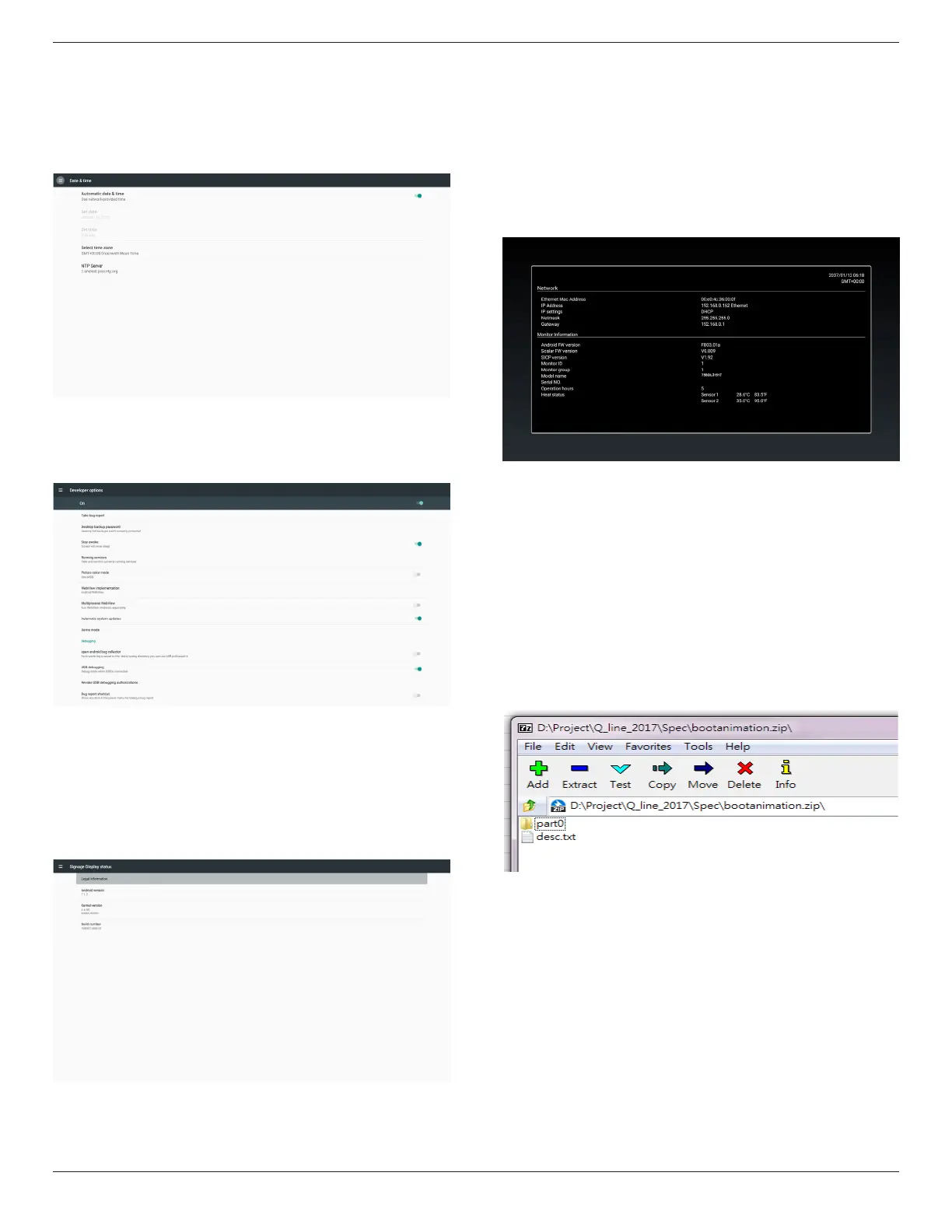
5.8. Date & time
ViaScalarOSDmenutocontrolAutoTimeOn/Off.
Note:
AddnewNTPservertodisplaycurrentserverIP
.
Themaxvalueofdateis2037/12/31inAndroid7.1.
5.9. Developer options
Androiddeveloperoptions.Formoreinformationpleasevisit
https://developer.android.com/index.html
5.10. About
MaininfoinAbout:
(1)LegalInformation:showtheopensourcelicenses.
(2)Androidversion
(3)Kernelversion
(4)Buildnumber
5.11. Supplementary
5.11.1. Quick Info
Youcanpress“Info+77”tostartupquickinfo.
Quickinfowillshow“Network”and“MonitorInformation”,asbelow:
Note:
Operationhours:Itisupdatedeveryminute.
Heatstatus:Itisupdatedevery5seconds.
5.11.2. How to custom an Android boot
animation?
1. Overview
TheAndroidbootanimationisusedscripttoloadPNGleswhen
thedeviceboots.Itiscontainedwithinanuncompressedziplecalled
bootanimation.zip.
2. Insidethebootanimation.ziple
Thebootanimation.zipasfollow:
• Theimagefolder(ContainsPNGimagesnamedinincremental
numbers)
• Thedesc.txtle
(1)Theimagefolder
ThesecontainPNGimagesnamedinnumbers,startingfrom
somethinglike0000.pngor0001.pngandproceedingwith
incrementsof1.Therehastobeatleastonefolderandthereisno
knownupperlimittothenumberoffolders.
(2)Thedesc.txtle
Thisledeneshowtheimagesinthefolder(s)aredisplayedduring
thebootanimation,inthefollowingformat:
- WidthHeightFrame-rate
- modeLoopdelay-timeFolder1
- modeLoopdelay-timeFolder2
Anexampleofadesc.txtleis:
- 1920108030








 To Next Page