75BDL3151T
28
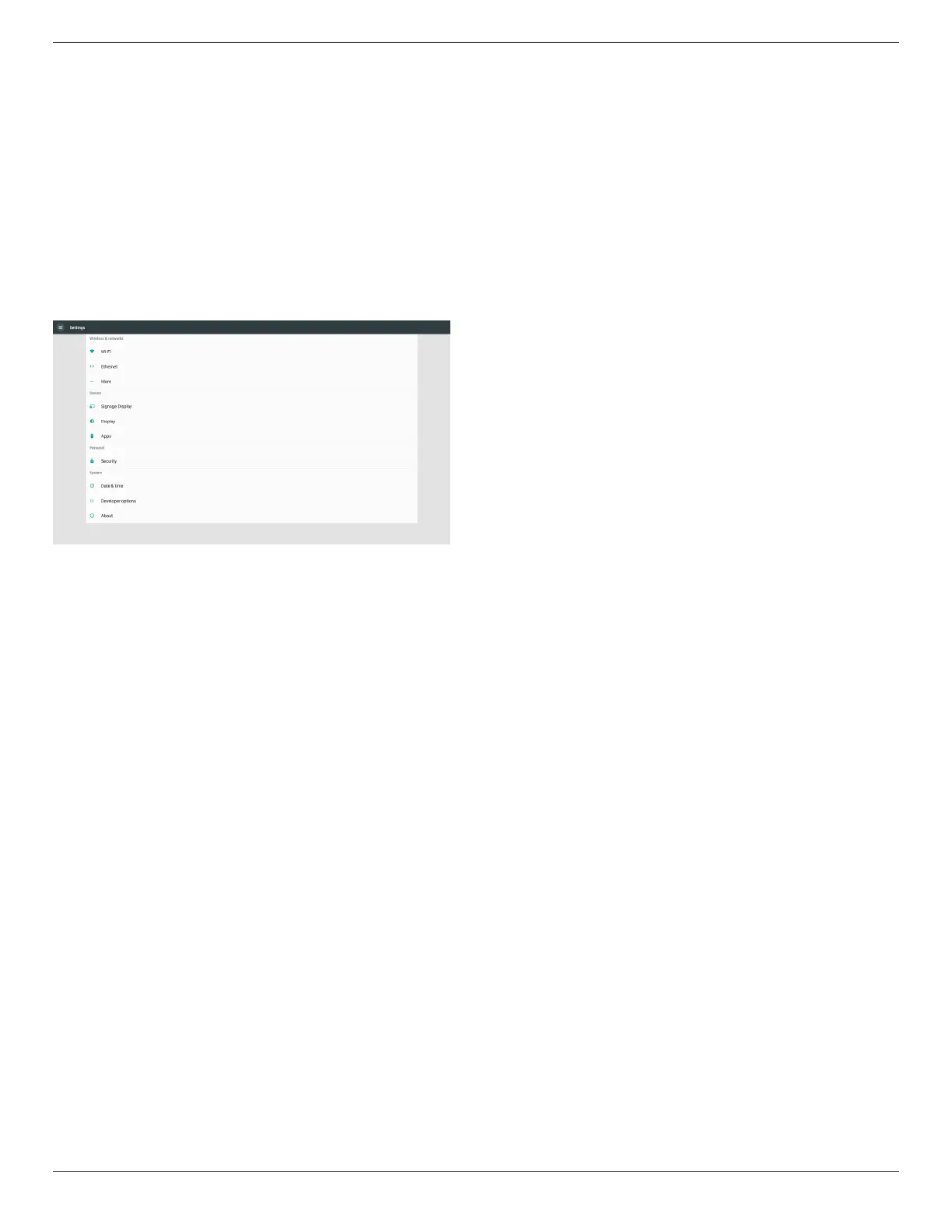
5. Setting
Mainitems:
(1)WI-Fi
(2)Ethernet
(3)More(Onlyshowupwhen4Gmoduleconnected)
(4)SignageDisplay
(5)Display
(6)Apps
(7)Security
(8)Date&time
(9)Developeroptions
(10)About
5.1. WI-Fi
ViaEnable/DisabletocontrolWi-FiOn/OFF.AfterEnable,thescreen
willlistallavailableWi-FiAP.
Note:
1. EthernetwillbedisableautomaticallyifWi-Fiturnonand
connecttonetwork.
2. AparticularmodelofWi-Fimoduleisrequired.Pleaseconsult
thedealerorservicetechnicianforhelp.
5.2. Ethernet
Enable/Disabletoturnon/offEthernet
AfterenableEthernet,thesettingswillshow:
(1)ConnectionType(Availableconnectiontype:DHCP/StaticIP)
A.DHCP
CannotmodifyIPAddress,Netmask,DNSAddressand
Gateway.
Ifconnectsuccessfully,itwilldisplaycurrentnetwork
conguration.
B.StaticIP
InStaticIPmode,usercaninputIPAddress,Netmask,DNS
addressandGateway
Note:
IPaddress,netmask,DNSaddressandgatewayaddress
inputlimitation
(1)Format:number0-9,decimalpoint“.”
(2)MacAddress
Note:
EthernetwillbedisableautomaticallyifWi-Fiturnonandconnectto
network.
5.3. More (Only show up when 4G module
connected)
ViaEnable/DisabletocontrolCellularnetworksOn/OFF.
Note:
1. Onlyshowupwhen4Gmoduleconnected.
2. Onlyshowup“Tethering&portablehotspot”whendetect
Wi-Fimodule.
3. Networkinfowillbedifferentduetodifferentcarrier.
5.4. Signage Display
(1)GeneralSettings
A. Signagedisplayname
B. BootLogo(notsupport)
C. Screenshot
(2)ServerSettings
A. Emailnotication
B. FTP
C. Remotecontrol
(3)SourceSettings
A. Mediaplayer
B. Browser
C. CMND&Play
D. PDFplayer
E. Customapp
(4)Networkapplication
A. Proxy
B. PlatformWebAPI
C. SICPnetworkport
(5)Systemtools
A. ClearStorage
B. Reset
C. Import&Export
D. Clone
E. Security
(6)Misc.
A. TilingTool(notsupport)
B. TeamViewerSupport
(7)Systemupdates
A. Localupdate









 To Next Page