75BDL3151T
27
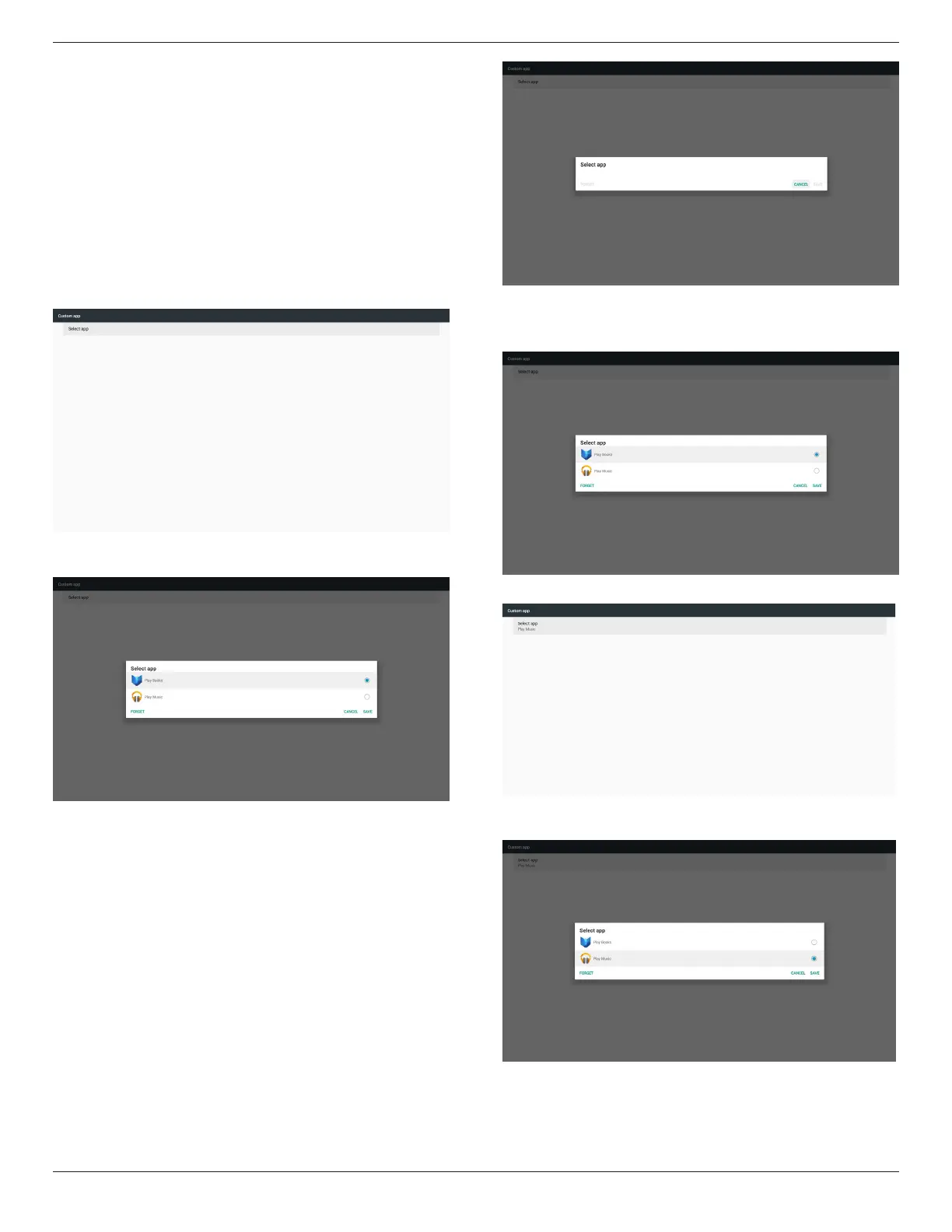
4.8. Custom App
UsercansetuptheapplicationforCustomerSource.
Note:
(1)OnlydisplayUserInstalledapp.
(2)Willnotshowupsystempre-installapp.
4.8.1. OSD Menu operation:
RCU:Source->Custom
IfsetupcustomerAPK,PDwillopencustomerappwhenswitchsource
toCustomermode.
IfnosetupcustomerAPK,PDwillshowBlackscreenwhenswitch
sourcetoCustomermode.
4.8.2. Function Introduction
Save
SelecttheApp,clicktheSavewillperformthefunctionofstorage.
Forget
AfterpresstheForget,canremovepreviouslystoredinformation.
Cancel
Don’tdoanychange,directlyclosedWindows.
Ifnocustomerinstalledapk,thelistwillbeblank.
Nooptionforchoose.“Save””Forget”keywillbegrayandunavailable.
Ifcustomerinstalledapk,usercanselectcustomerinstalledapkinlist
• Case1:NotsetupCustomAppcase.
Customerappwillshowupandfocusonrstitemautomatically.
Aftersetup,thesettingscreendisplaytheappname.
• Case2:SetupCustomAppcase(thereisentitycircletotherightof
icon)










 To Next Page