75BDL3151T
33
Note:
IfnoPhilipsfolderexistsinUSBorSDcard,itwillbecreated
automatically.
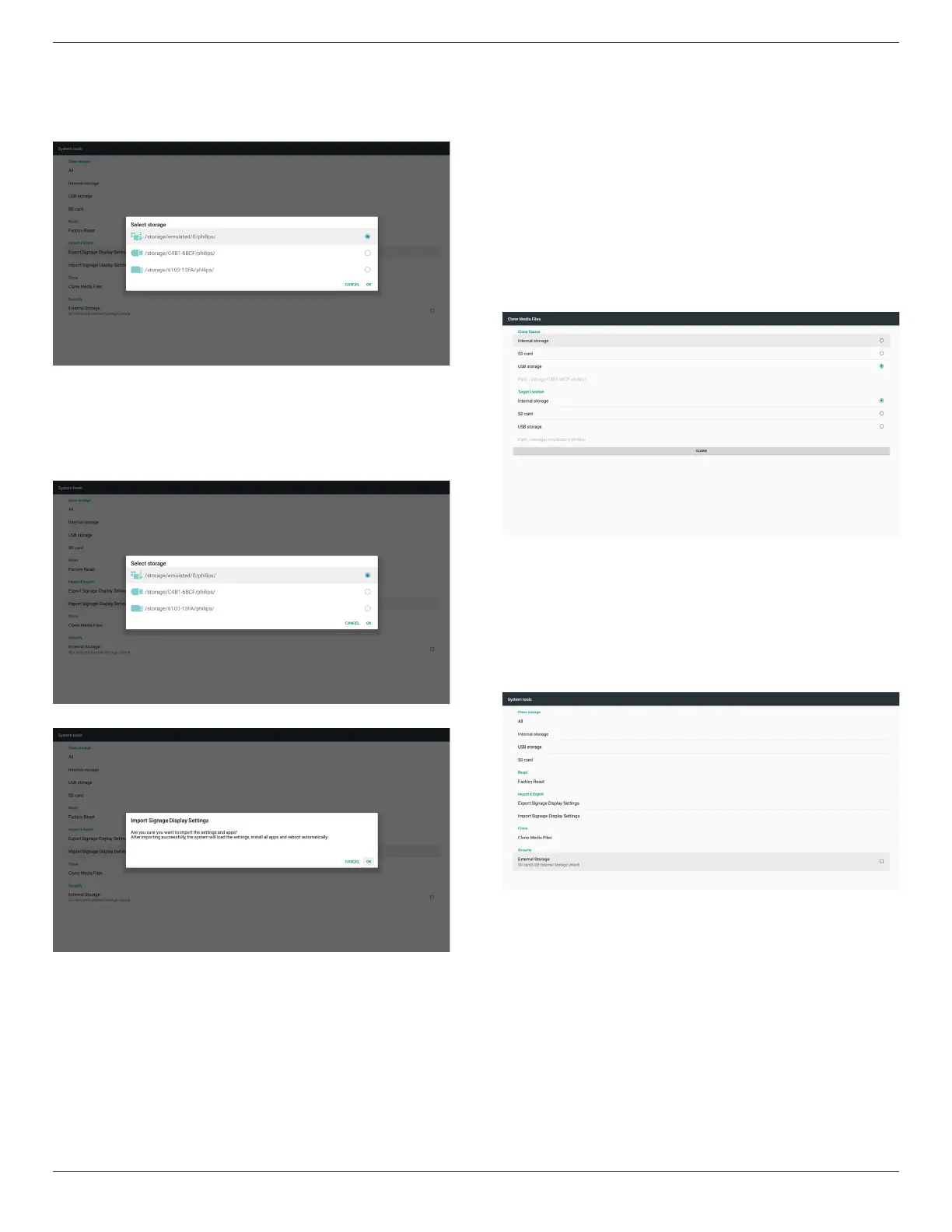
Listallavailablestorage(internal/SD/USB)
Import Signage Display Settings
ImportdatafromPhilipsfolderunderUSBorSDcard.
(1)Importdatabase
(2)Autoinstall3
rd
partyapkfromPhilips/app/
Listallavailablestorage(Internal/SD/USB)
Shownoticationdialogbeforedatabaseimport
5.4.5.4 Clone Media File
ClonemedialefromInternal,SDorUSBPhilipsfolder.
1.TheclonedfoldernameunderPhilipsfolder
(1)philips/photo
(2)philips/music
(3)philips/video
(4)philips/cms
(5)philips/pdf
(6)philips/browser
2.Theclonedleextensionnameis“.cms”)
CloneSource
(1)Internalstorage
(a)checkFTP
(b)check/Philips/
(2)SD/USB
Filesunderroot
TargetLocation
(1)Internalstorage
Saveto/Philips/
(2)SD/USB
Savetoroot
5.4.5.5 External Storage
1. ExternalStorage
Enable:SDcard/USBExternalStorageLock.
Disable:SDcard/USBExternalStorageUnlock.
Note:
Mustre-plugSDcard/USBExternalStorageafterunlockthe
externalstorage.






 To Next Page