75BDL3151T
30
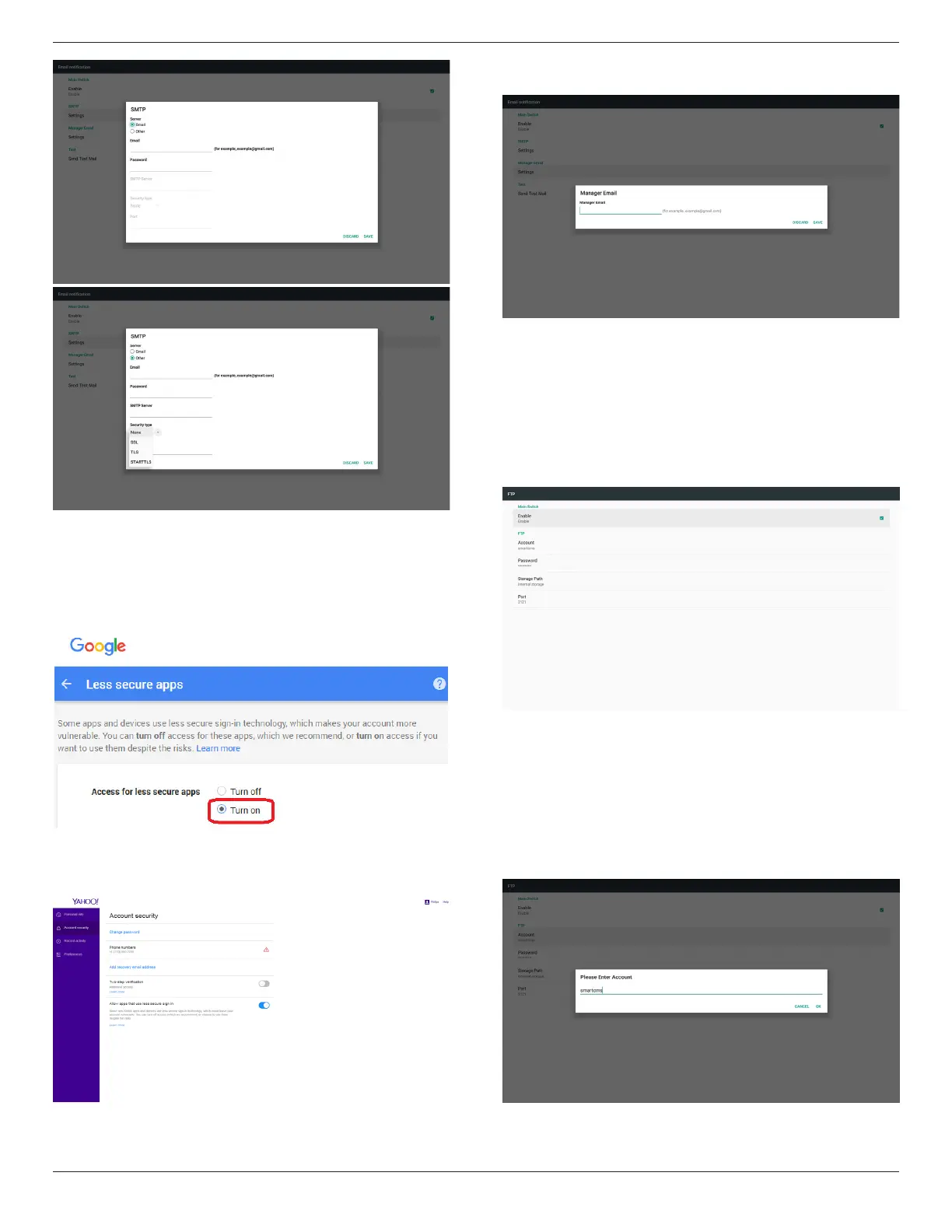
Gmailsafetysetting
IfGmailisnotworkingwhenthesettingsarecompleted,pleasetest
theGmailaccountviaaPCandthebelowlink
https://www.google.com/settings/security/lesssecureapps
Andconrmon“Accessforlesssecureapps”the“Turnon”itemis
selected.
YahooEmailSecuritySetting
IfYahooEmailisnotworkingwhensettingcomplete,pleaseconrm
“Allowappsthatuselesssecuresignin”itemisenabled.
2)ManagerEmail
SetupReceivermailaccount
3)Test
SendTestMail
TotestGmailaccountreceive/sendfunction.
Note
WhenEmailisDisable,“SendTestMailButton”buttonwillgrayout.
2. FTP
ViaEnable/DisabletocontrolFTPOn/Off.Aftersetup,PDcanshare
FTPles.
1)Account
SetupFTPaccount
Note:
Inputlimitation
(1)Length:4-20characters
(2)Format:
I. Englisha-zandA-Z
II. Number0-9











 To Next Page