75BDL3151T
40
Audio reset
ResetallsettingsintheAudiomenutofactorypresetvalues.
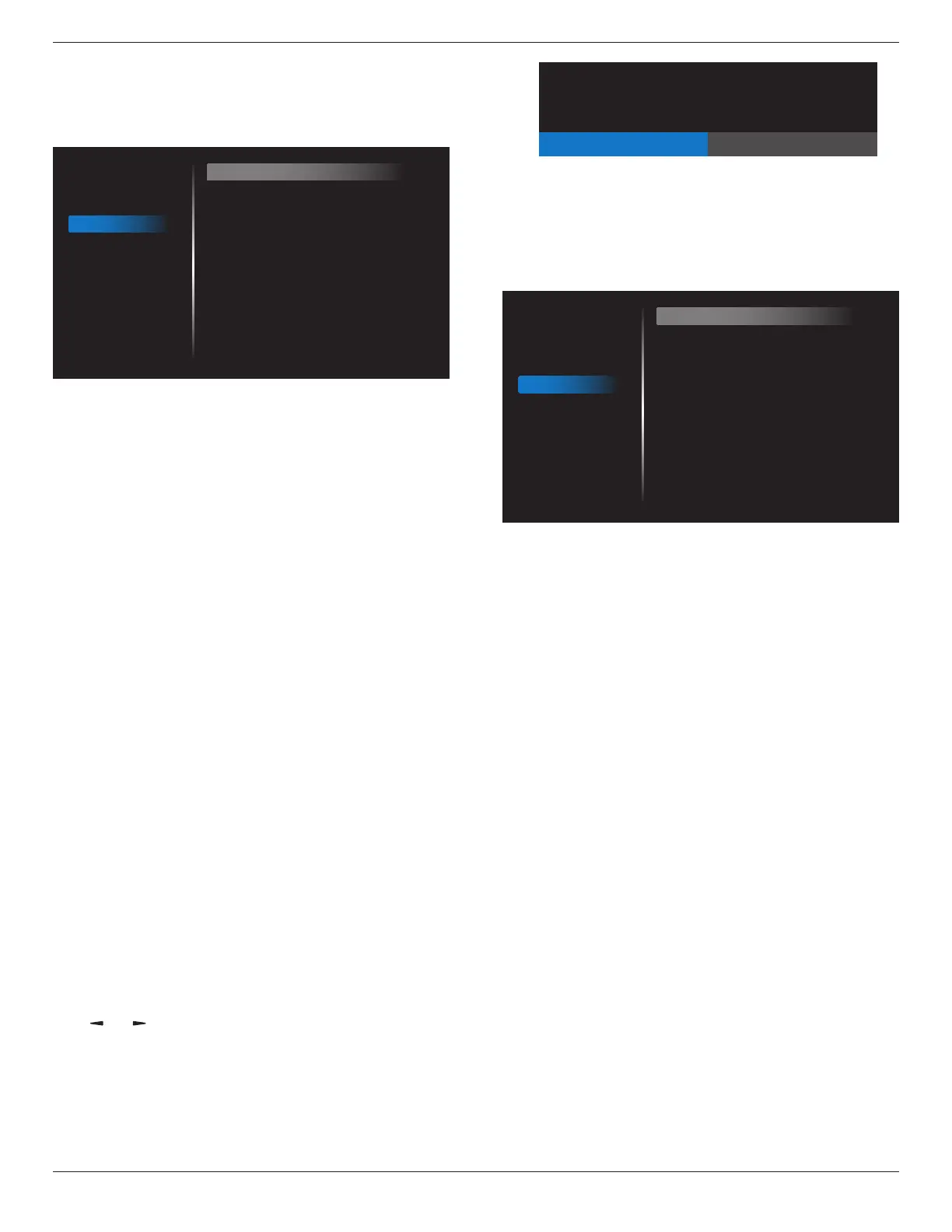
6.2.4. Configuration1 menu
Picture
Screen
Audio
Configuration 1
Configuration 2
Advanced option
Switch on state
Panel saving
RS232 routing
Configuration1 reset
Factory reset
Light Sensor
Force on
Action
RS232
Action
Action
Off
Switch on state
Selectthedisplaystatususedforthenexttimeyouconnectthepower
cord.
• {Power off}-Thedisplaywillremainoffwhenthepowercordis
connectedtoawalloutlet.
• {Forced on}-Thedisplaywillturnonwhenthepowercordis
connectedtoawalloutlet.
• {Last status}-Thedisplaywillreturntothepreviouspowerstatus
(on/off/standby)whenremovingandreplacingthepowercord.
Panel saving
Choosetoenablethepanelsavingfunctionsandthusreducetheriskof
“imagepersistence”or“ghost-imaging”.
• {Brightness}-Select{On}andtheimagebrightnesswillbereduced
toanappropriatelevel.TheBrightnesssettinginthePicturemenu
willbeunavailablewhenselected.
• {Pixel shift}-Selectthetimeinterval({Auto} / {10 ~ 900}Seconds/
{Off})forthedisplaytoslightlyexpandtheimagesizeandshift
thepositionofpixelsinfourdirections(up,down,left,orright).
ActivatingPixelShiftwilldisableHPosition,VPositionandZoom
ModeintheScreenMenu.
Note:Onlysupportexternalinputsource(HDMI,VGA).
RS232-Routing
Selectthenetworkcontrolport.
Choosefrom:{RS232} / {LAN}.
Conguration1 reset
ResetallsettingsinConguration1menutothefactorypresetvalues.
Factory reset
ResetallsettingsintheOSDmenusof{Picture},{Screen},{Audio},
{Conguration1},{Conguration2},and{Advanced option}tothe
factorypresetvalues.
Androidsettingswillalsoresetwhenfactoryreset.
Press[ ]
or[ ]buttontoselect{Reset},andpress[OK]buttonto
dothereset.
Factory reset
CANCEL Reset
Light Sensor
Choosetoturnonoroffbacklightadjustmentaccordingtoenvironment
brightness.
6.2.5. Configuration2 menu
Picture
Screen
Audio
Configuration 1
Configuration 2
Advanced option
OSD turn off
OSD H position
OSD V position
Information OSD
Logo
Heat status
Monitor information
HDMI Version
Configuration2 reset
45
50
50
10
On
24.21°C 75.57°F
Action
Action
OSD turn off
SettheperiodoftimetheOSD(on-screendisplay)menustaysonthe
screen.
Theoptionsare:{Off, 5 ~ 120}seconds.
*{0ff}doesnotdisappearautomatically.
OSD H-position
AdjustthehorizontalpositionoftheOSDmenu.
OSD V-position
AdjusttheverticalpositionoftheOSDmenu.
Information OSD
SettheperiodoftimetheinformationOSDisdisplayedontheupper
rightcornerofthescreen.TheinformationOSDwilldisplaywheninput
signalischanged.
TheinformationOSDwillremainonthescreenwith{Off}selection.
Theoptionsare:{1 ~ 60}seconds.
Logo
ChoosetoenableordisablethepictureofLogowhenturnonyour
display.
Theoptionsare:
• {Off}
• {On}(Default)
• {User}
1. IfLogosettoON,bothscalarPhilipslogoandandroidanimation
Philipslogowillshow.
2. IfLogosettoOFF,neitherscalarPhilipslogonorandroidanimation
logowillnotshow.
3. IfLogosettoUSER,customlogooptioninandroidisnotset,then
therewillbenobootlogowhenpoweron.
4. IfLogosettoUSER,customlogooptioninandroidisset,therewill
beonlycustomlogowhenpowerup.






 To Next Page