8 EN
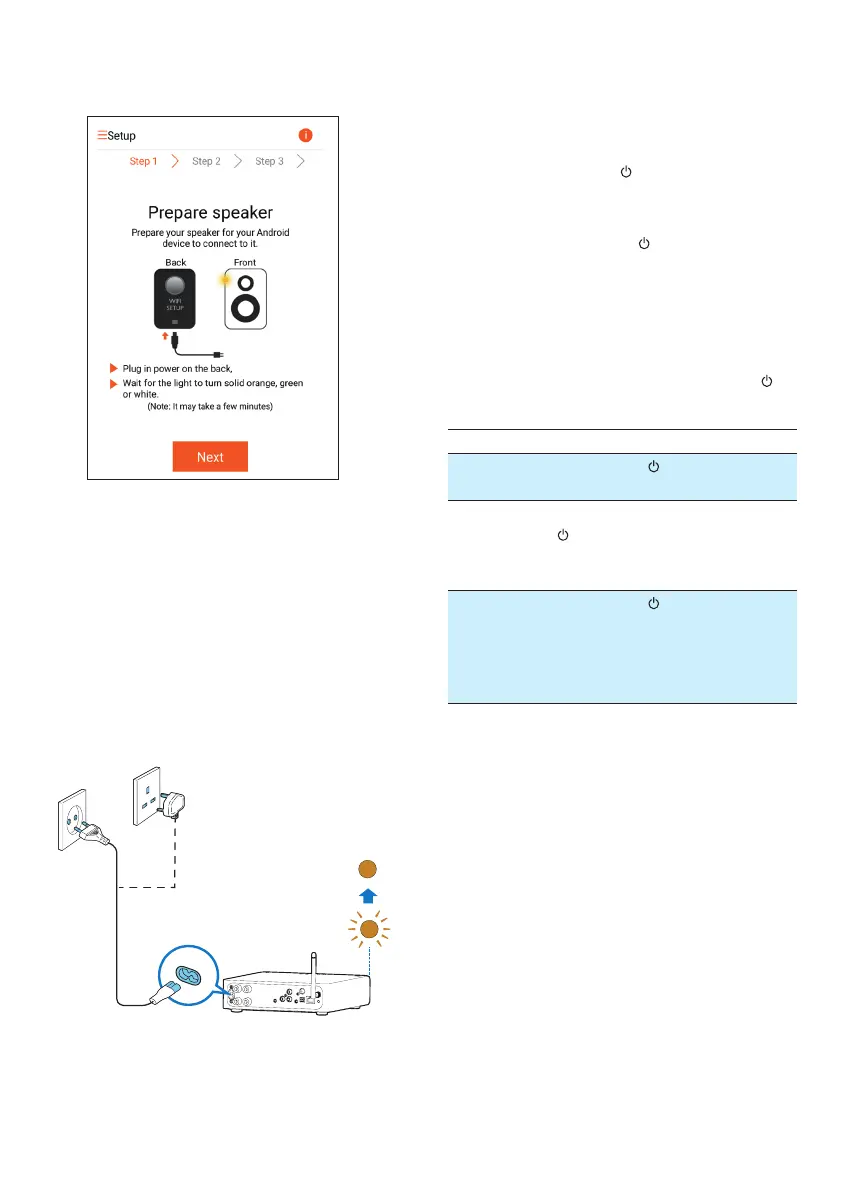
1 Read the power connection instructions
on the app.
2 Connect the AC power cord to
• the AC IN ~ socket on the back of the
device.
• the wall power socket.
» The device switches on automatically.
» The power/status indicator blinks
amber during boot-up.
» Afterawhile,forrst-timesetup,the
power/status indicator turns solid
amber.
AC IN ~
3 Tap Next on the app screen to continue.
Switch between normal and Eco power
standby mode
• To switch the device to normal standby
mode,brieypress
.
» The power/status indicator turns green.
• To switch the device to Eco power standby
mode,pressandhold
for less than 3
seconds and then release the button.
» The power/status indicator turns
amber for a short while and then turns
off.
• To switch the device on from normal or
Ecopowerstandbymode,brieypress
again.
Operation LED status
On -> Nor-
mal standby
Brieypress
. Amber/white
->Green
On/Normal
standby ->
Eco power
standby
Press and hold
for less than 3
seconds and then
release the button.
Amber/white
or green ->
Off
Normal
standby/
Eco power
standby ->
On
Brieypress
. Green/Off->
Amber/white



 To Next Page