15
English
EN
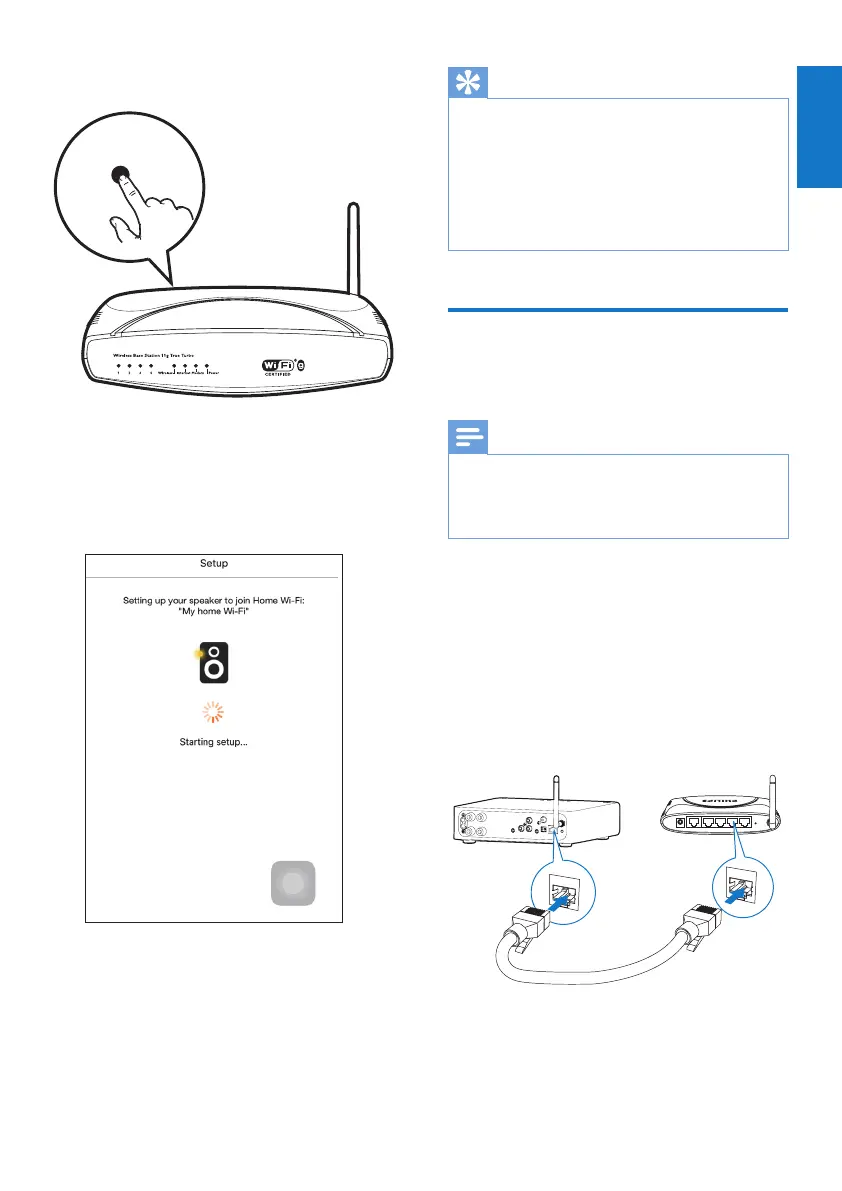
4 Press the WPS button on your home Wi-Fi
router.
5 Wait until the power/status indicator on
AW2000turnssolidwhite,thentapNext
on the app screen..
» The following app screen appears.
» AW2000 is connected to your home
Wi-Fi network successfully.
WPS
Tip
•
ForsomeWi-Firouters,youmayneedtoholdthe
WPS button for Wi-Fi connection or enable the WPS
PBCfunctionfromtheroutercongurationpages.See
theusermanualsofthespecicroutersfordetails.
• Aftersuccessfulnetworksetup,youcantapRock n'
Roll on the above app screen to get ready for music
playdirectly.Formoredetails,gotothe'Play'section
(see 'Play' on page 16).
Option 4: Set up wired
connection through an
Ethernet cable
Note
•
Ifyouusewiredconnection,youjustneedtoselect
Speaker already setup on the initial Setup page (see
'Download Philips AirStudio+ Lite to your smartphone
or tablets' on page 6).
1 Ifyouhavetriedwirelessconnection,
beforesetupofwiredconnection,you
need to reset the wireless Hi-Fi receiver
(see 'Troubleshooting' on page 26).
2 Connect an Ethernet cable (not supplied) to:
• the ETHERNET socket on the back of
the device
• one of the Ethernet ports on your
home Wi-Fi router
3 Wait until the power/status indicator turns
solid white.
» AW2000 is connected to your home
Wi-Fi network successfully.
LAN4To Modem12V=1A ResetLAN3 LAN2 LAN1
ETHERNET
ETHERNET



 To Next Page