5
English
EN
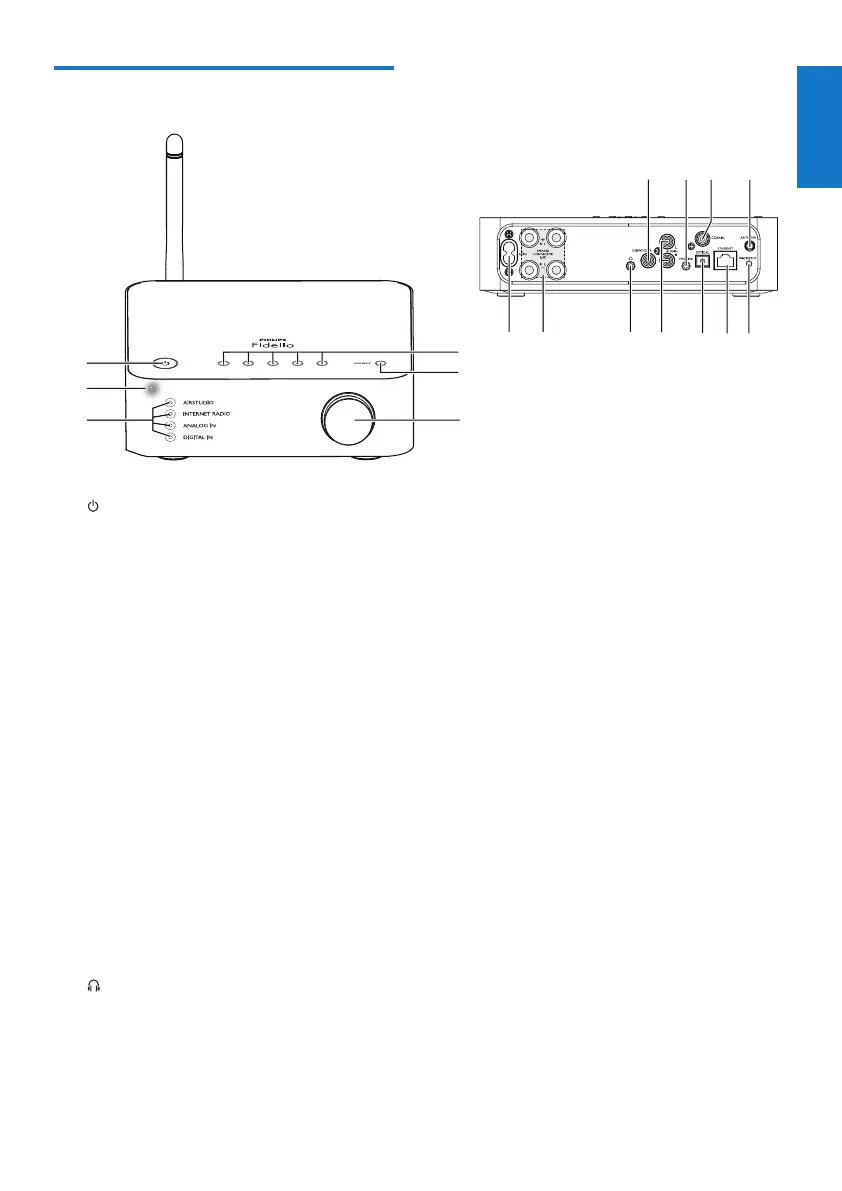
Overview of the main unit
a
• Switch the device on or to normal/Eco
standby mode.
b Power/status indicator
• Show the current status of the device.
c Source indicators
• Light up when the corresponding
source is selected.
d Volume knob
• Adjust volume.
e SOURCE button
• Press repeatedly to select an audio source.
f Numerickeys(1to5)
• Select an Internet radio station.
g AC IN ~ socket
• Connect the power cord.
h SPEAKERCONNECTORL/R(+/-)
sockets
• Connect AW2000 to an existing
speaker system.
i
• Headphone socket.
j AUX IN L/R sockets
• Connect an external audio device
through RCA audio cables (red/white;
not supplied).
f
qpon
gh i lmjk
e
d
a
c
b
k OPTICAL socket
• Connect an external audio device to
AW2000 through an optical cable (not
supplied).
l ETHERNET socket
• (Optional) Connect to a wireless
router through an Ethernet cable (not
supplied).
m WI-FI SETUP button
• Connect the device to a Wi-Fi
network.
n ANTENNA socket
• Connect the supplied Wi-Fi antenna.
o COAXIAL
• Connect an external audio device to
AW2000 through a coaxial cable (not
supplied).
p MP3-LINK
• Connect an external audio device to
AW2000 through a 3.5mm audio cable
(not supplied).
q SUBWOOFER socket
• Connect a subwoofer for better sound
effect.



 To Next Page