EN 22
C Description for Icons
[ ] : group (folder) icon
[
] : music file icon
[
] : photo file icon
- ˝Folders” refers to the group of files.
- ˝Track” refers to the contents recorded on the audio CD.
- ˝Files” refers to the contents on a disc which are recorded in AVCHD or JPEG / PNG / MP3 / FLAC / AAC / WAV file
format.
NoteD
• Unrecognizable characters will not be displayed.
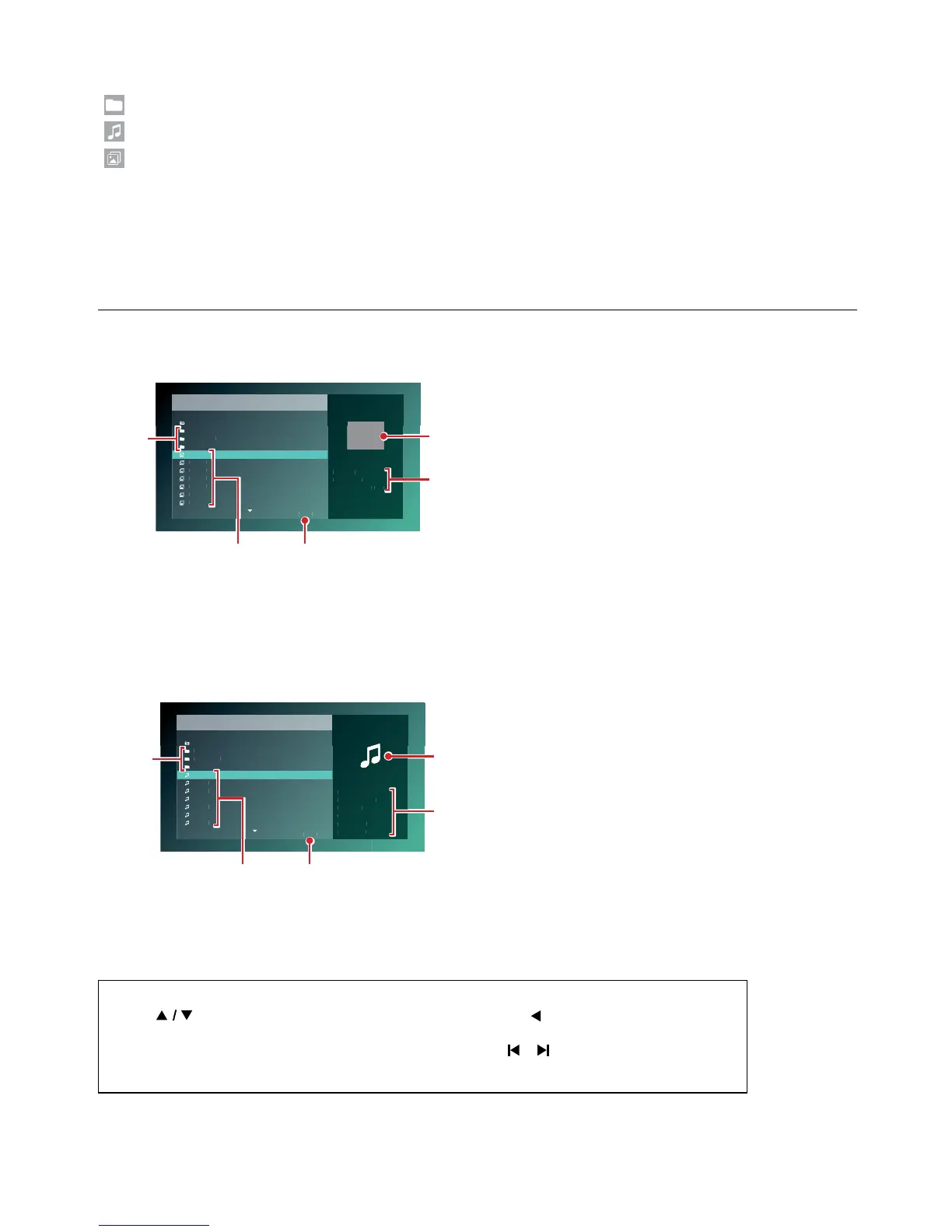
6.2. Guide to File List
C Photo File List
/
..
mixture location
multi media
size
Photo 1
Photo 2
Photo 3
Photo 4
Photo 5
Photo 6
Photo 7
4 / 20
Type:JPG
Size:0.069M
HDMI Video:800
x
600
32
4
5
1
1. Folder List
2. File List
3. Number of Folders or Files in this directory / Total
number of Folders or Files in this directory
4. Track information
5. Cover Art (when available)
C How to Navigate through the File List
• Use [ ] to move the Highlighted text up and down. Press [ ] to go back to the previous
hierarchy.
• If the List has multiple pages, you can switch pages using [
/ (SKIP)].
• To access Files in a Folder, select the desired folder, then press [OK].
• Press [Q (HOME)] to Exit.



 To Next Page