EN 53
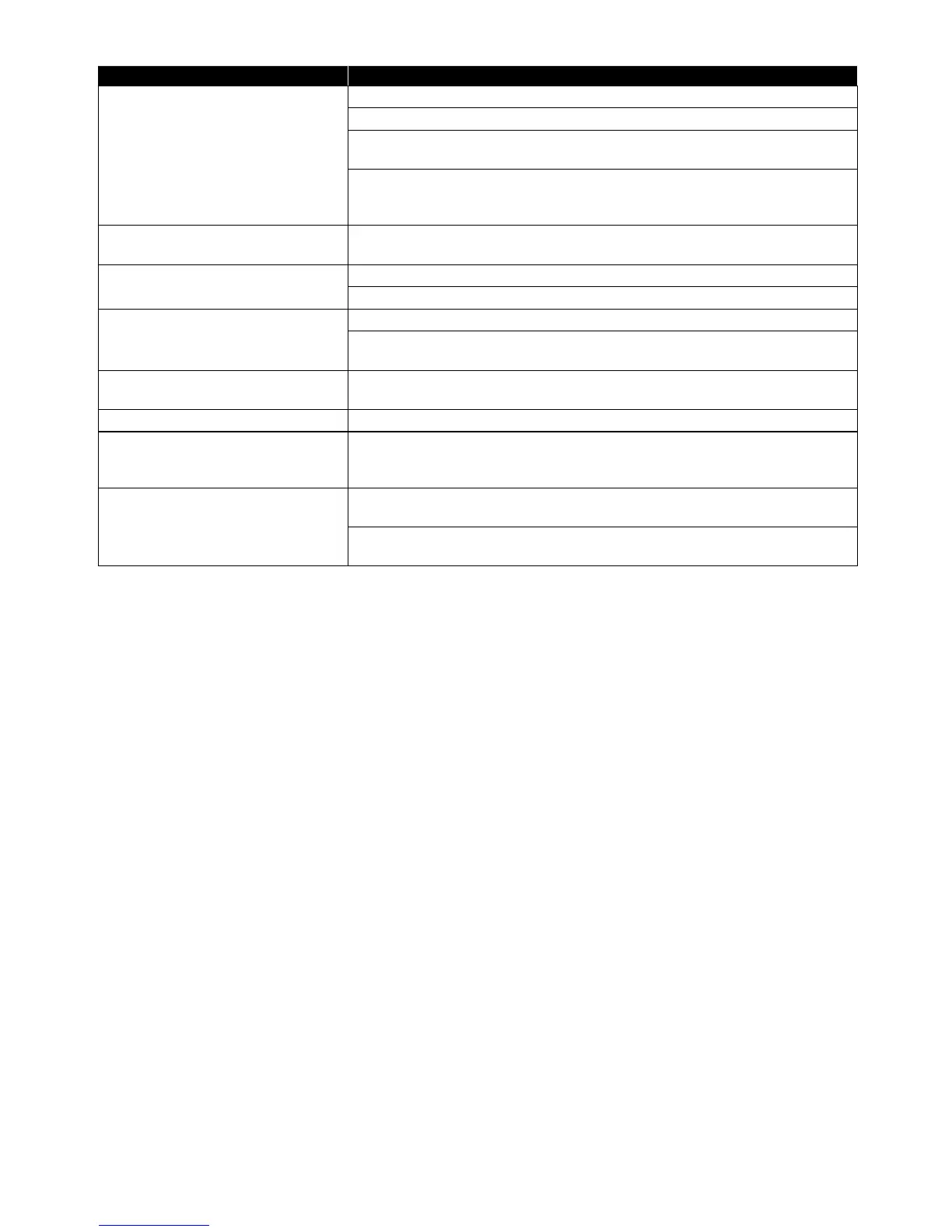
Problem Tip
Cannot use the BD-Live™ function
or I
nternet data does not download
properly.
Confirm that this unit is successfully Connected to the Internet.
Confirm the BD-Live Connection setting in the Setup.
Connect a USB Memory Stick before inserting a Disc. The USB Memory Stick
must have 1GB or more free space.
Confirm that the USB Memory Stick is properly Connected to this unit.
Make sure that the USB memory stick Connected to this unit is not write-
protected.
Cannot add Network Services. On this unit, only the Network Services of Netflix and YouTube™ can be
used.
Cannot use Netflix Service. Check to see if the Network Connection is properly made.
Visit www.netflix.com on your PC and become a Netflix member.
The picture quality of Netflix
streaming movie is poor.
Check your Internet connection speed.
Contact your Internet Service Provider. (You may need to improve the
broadband speed.)
Netflix streaming movie often stops
or starts buffering during playback.
Contact your Internet Service Provider. (You may need to improve the
broadband speed.)
Can not use the YouTube™ service. Check to see if the Network Connection is properly made.
No sound with YouTube™. If this unit is Connected to an AAC-compliant device, the sound may not be
output. In such cases, configure as follows:
“Setup” A “Audio” A “HDMI Audio” A “LPCM”.
The picture quality of the YouTube™
video is poor.
You may experience frequent buffering, distorted pictures or no picture at
all depending on your Network environment and Internet traffic.
The Picture and Sound quality differ depending on the Internet Service
Provider.
NoteD
• Do not attempt to repair the Blu-ray Disc™ Player yourself. This may cause severe injury, irreparable damage to
your Blu-ray Disc™ Player and void your warranty.
• Please have your Blu-ray Disc™ Player model and serial number available before contacting us. These numbers
are available on the cabinet, as well as on the packaging.



 To Next Page