Service Modes, Error Codes, and Fault Finding
EN 19BJ3.1E LA 5.
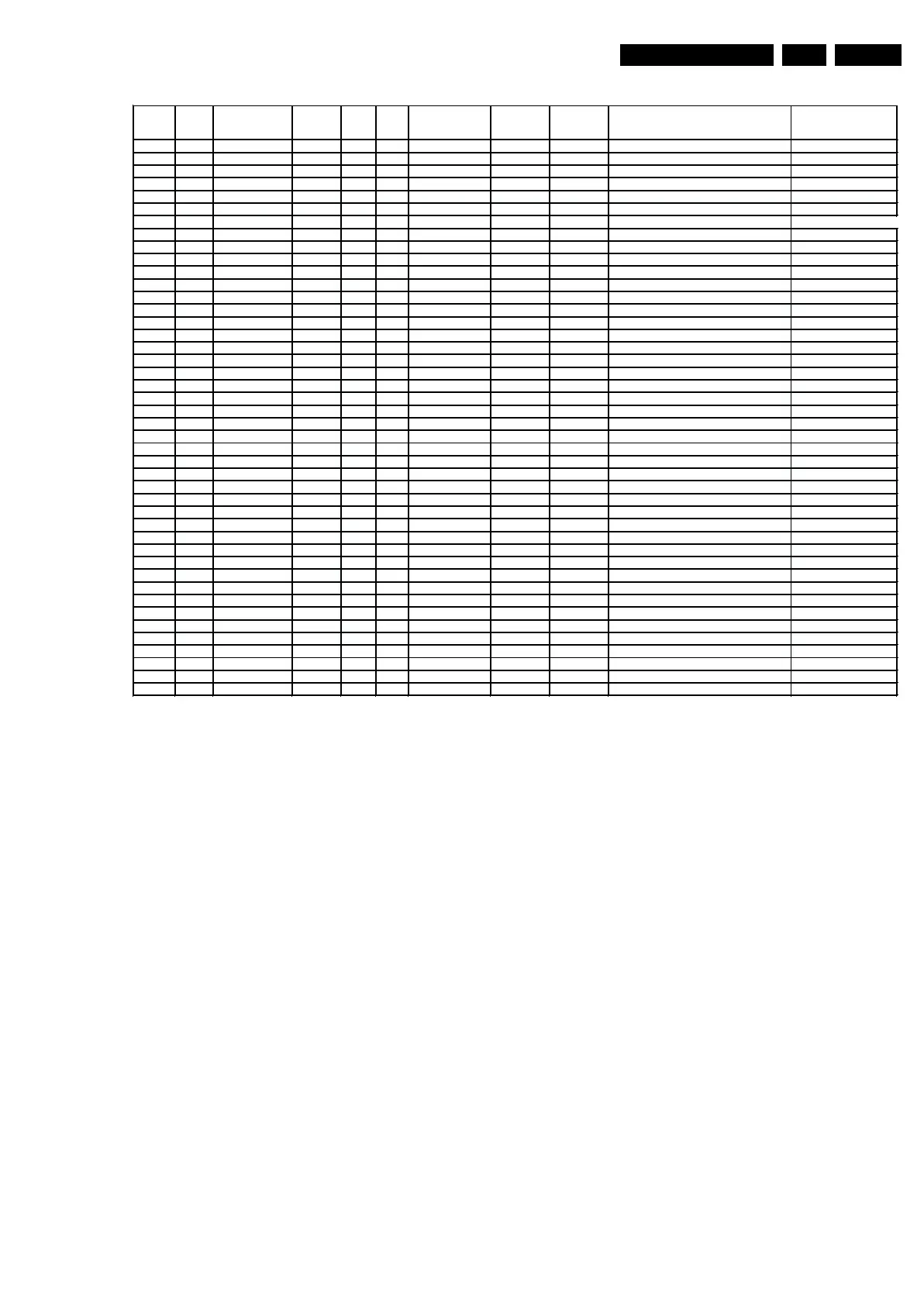
Figure 5-4 Display option code overview [2/2]
• Store. All options and alignments are stored when
pressing “cursor right” and then the “OK”-button
• SW Maintenance.
– SW Events. Not useful for Service purposes. In case
of specific software problems, the development
department can ask for this info.
– HW Events. Not useful for Service purposes. In case
of specific software problems, the development
department can ask for this info.
• Operation hours PDP. Here you are able to reset the
operations hours of the plasma display. This has to be
done in case of replacement of the display. This option is
not applicable for LCD sets.
• Upload to USB. Here you are able to upload several
settings from the TV to a USB stick which is connected to
the Side IO. The four items are “Channel list”, “Personal
settings”, “Option codes” and “Display-related alignments”.
First you have to create a directory “repair\” in the root of
the USB stick.To upload the settings you have to select
each item separately, press “cursor right”, confirm with
“OK” and wait until “Done” appears. Now the settings are
stored onto your USB stick and can be used to download
onto another TV or other SSB. Uploading is of course only
possible if the software is running and if you have picture.
This method is created to be able to save the customer’s
TV settings and to store them into another SSB.
• Download from USB. Here you are able to download
several settings from the USB stick to the TV. Same way of
working as with uploading. To make sure that the download
of the channel list from USB to the TV is executed properly,
it is necessary to restart the TV and tune to a valid preset if
necessary.
How to Navigate
• In SAM, you can select the menu items with the “CURSOR
UP/DOWN” key on the RC-transmitter. The selected item
will be highlighted. When not all menu items fit on the
screen, move the “CURSOR UP/DOWN” key to display the
next/previous menu items.
• With the “CURSOR LEFT/RIGHT” keys, it is possible to:
– (De) activate the selected menu item.
– (De) activate the selected sub menu.
• With the “OK” key, it is possible to activate the selected
action.
How to Exit SAM
Use one of the following methods:
• Press the “MENU” button on the RC-transmitter.
• Switch the set to STAND-BY via the RC-transmitter.
Display
option
HEX Display type Brand SIZE Full
HD
Clear LCD Resolution
vertical
Resolution
horizontal
Type number 12 NC
064 40
reserved
065 41
reserved
066 42 PDP SDI 63 x 1080p 1920
S63HW-YD02 (W2)
under development
067 43 LCD AUO 26 768p 1366
T260XW03V1
under development
068 44 LCD CMO 26 768p 1366
V260B1-L03 9322 249 37682
069 45 LCD CMO 32 768p 1366
V315B1 L05 9322 248 65682
070 46 LCD CPT 32 768p 1366
CLLAA320WB02P
9322 245 31682
071 47 LCD LPL 37 768p 1366
LC370WX1-SLB1 9322 246 96682
072 48 LCD AUO 37 768p 1366
T370XW02V5 9322 249 77682
073 49 LCD LPL 42 768p 1366
LC420WX3-SLA1 9322 246 97682
074 4A LCD LPL 42 DFI 768p 1366
LC420WX4-SLA1
under development
075 4B LCD Sharp 52 X DFI 1080p 1920
LK520D3LZ1X under development
076 4C LCD AUO 42 768p 1366
T420XW01V8 9322 249 10682
077 4D LCD AUO 42 BDI 768p 1366
T420XW
under development
078 4E LCD AUO 42 X 1080P 1920
T420HW01 V0
under development
079 4F LCD CMO 42 BDI 768p 1366
V420B1
under development
080 50 LCD CMO 42 X 1080P 1920
V420H1
under development
081 51 LCD LPL 47 X 1080P 1920
LC470WU4-SLA2
under development
082 52 LCD AUO 47 X 1080P 1920
T470HW01 V0
under development
083 53 PDP SDI 42 768p 1024
S42AX-YD04(PS-426-PH) 9322 246 76682
084 54 PDP LGE 42 768p 1024
HD X4
under development
085 55 PDP SDI 50 768p 1366
S50HW-YD05(PS-506-PH) 9322 246 81682
086 56 PDP LGE 50 768p 1366
HD X4
under development
087 57 LCD Sharp 37 X BDI 1080p 1920
LK370D3LZ43 (ASV3.0) 9322 248 28682
088 58 LCD Sharp 37 BDI 768P 1366
(ASV2,3 VE1)
under development
089 59 LCD AUO 42 768p 1366
T420XW01V5
under development
090 5A LCD AUO 26 768p 1366
T260XW03V1
under development
091 5B LCD AUO 32 768P 1366
T315XW02VD 9322 249 06682
092 5C LCD LPL 42 768p 1366 LC420WX2-SLA1 9322 240 80682
093 5D LCD LPL 42 X 1080p 1920
LC420WU2-SLA1 9322 246 84682
094 5E PDP SDI 63 x 1080p 1920
S63HW-YD02 (W2) used with JIP panel
under development
095 5F LCD Sharp 37 X 1080p 1920
LK370D3LZ23 9322 249 96682
096 60 LCD LPL 42 X SC BL DFI 1080p 1920
TBD
under development
097 61 LCD LPL 47 X SC BL 1080p 1920
LC470WU6 - SLA1 under development
098 62 LCD Sharp 52 X 1080p 1920
LK520D3LZ1X
under development
099 63
reserved
100 64 LCD 42 X 1080p 1920
3D
under development
101 65
reserved
102 66 LCD Sharp 32 DFI 768p 1366
LK315T3LZ53 under development
103 67 LCD LPL 20 480p 640
LC201V02-SDB1
9322 242 65682
104 68 LCD AUO 20 600p 800
A201SN02 V5
not in ECM2
105 69 LCD CMO 19 900p 1440
TPM190A1-L02 9965 000 43654
106 6A LCD AUO 23 768p 1366
T230XW01V3
9322 249 79682
107 6B LCD LPL 42 768P 1366
LC420WX5-SLD1
9322 249 09682
E_06532_030b.eps
080207






 To Next Page