Service Modes, Error Codes, and Fault Finding
EN 26 BJ3.1E LA5.
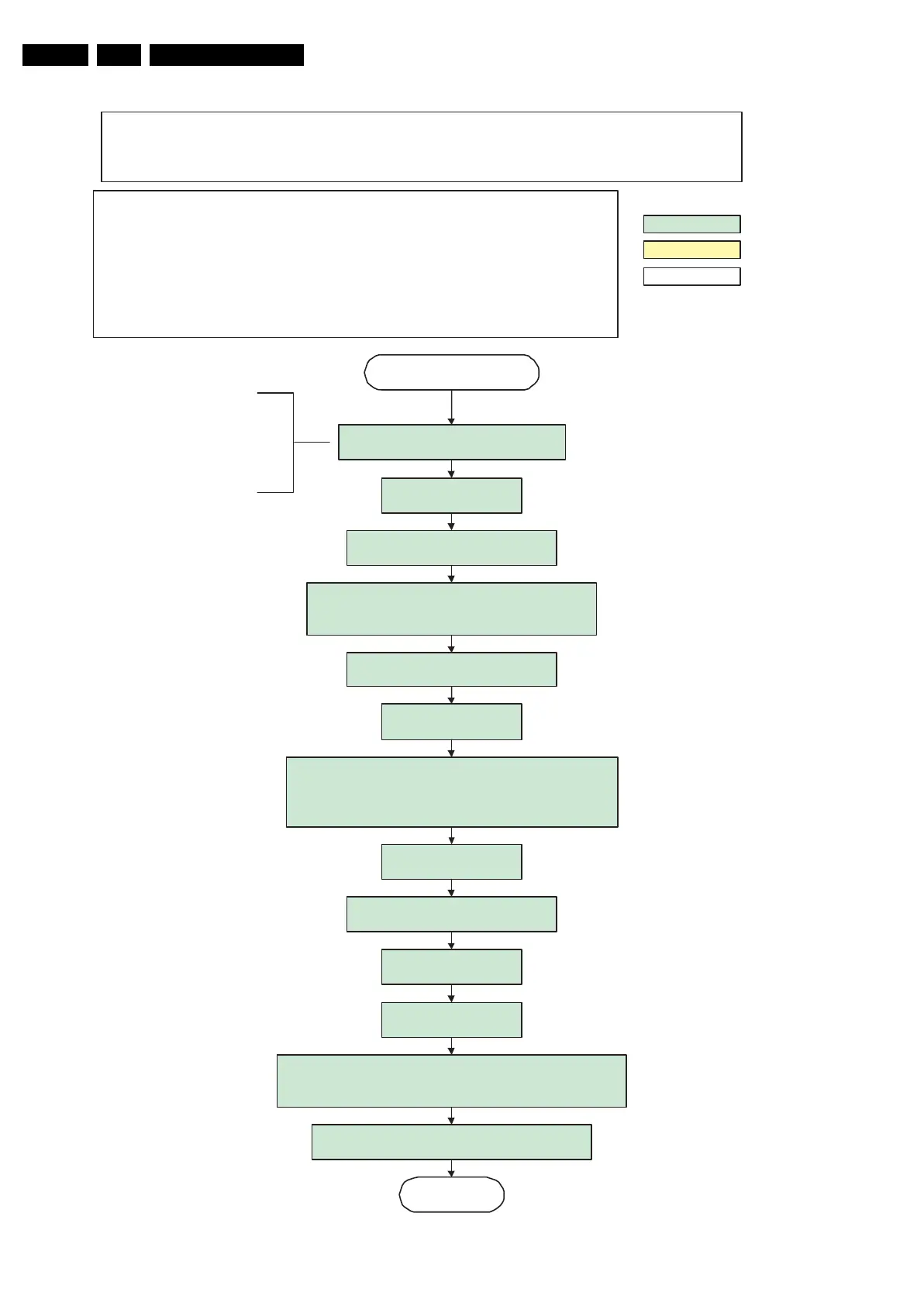
Figure 5-9 “Semi Stand-by” to “Active” flowchart
Switch on LCD
supply
(Viper: LCD-Power-on)
S
ta
rt to apply va
lid interf
ace
s
igna
ls
to the mod
ule (LVD
S
) within a time
frame of min. 22.5ms to max. 67.5ms
after
supply switch on.
In implement
ation,
us
e 25m
s, thi
s
m
a
kes it compatib
le with 3
7"HD
S
ha
rp
(t=17.5ms
i
s
the
su
pply switch-on dela
y ta
ken into account)
wait 250ms (min. = 200m
s
)
Active
Semi Standby
action holder: MIP
S
au
tonomo
us a
ction
action holder: St-by
Initi
alize audio a
nd video processing IC's
and
functions according needed use case.
A
ssert RGB video
blanking
a
nd au
dio m
ute
Wait u
ntil previo
us
on-s
tate i
s
left more than 2
s
econds ago. (to prevent LCD di
s
play pro
blem
s
)
The ass
umption here i
s that a fast toggle
(<2s) can only happen during ON->SEMI -
>ON. In the
s
es
tate
s, the Viper i
s
still active
and can provide the 2
s delay. If the
transition ON->S
EMI->
S
TBY->
S
EMI->ON
can be made in less than 2s, we have to
delay the semi -> stby transition until the
requirement is met.
LCD LPL 26" WX2- SLB2 / 32 "W01- SL06 /
37"WX1- SL04 /
42"WU02-SLB1 / 42" WX3-SLA1 / 42” WX2-SLA1 / 47” WU1-SLC2
Switch A
udio-Reset and
so
und enable low and demute
W
a
it until QVCP generates
a
valid output
clock.
S
witch on LCD ba
cklight
Regi
s
ter PanelTimin
g of the Pacific3
:
Timing
i
s not important since the
LCD power signal is controlled by the
Viper, default value
s can be used.
Constraints
t
aken into
acco
u
nt:
- Displa
y m
ay only b
es
t
a
rted when v
alid QVCP outpu
t clock ca
nb
e delivered
by the Viper.
- Between 5 and 50 m
s
after power is supplied, displa
ys
hould receive valid lvds clock.
- minimum w
a
it time to s
witch on the la
mp
a
fter power up is
200ms
.
- To have a reliab
le oper
ation of the backlight, the backlight sho
u
ld be driven with a PWM
d
u
ty cycle of 100
%
d
uring the first s
econd. Only
a
fter thi
s fir
s
t
second, the PWM ma
yb
e
set
to the re
qu
ired o
utput level (Note tha
t the PWM o
u
tput shou
ld
be pre
s
ent b
efore the
ba
cklight i
ss
witched on). To minimize the a
rtefact
s, the picture should only be unbla
nked
after thi
s
first s
econd.
Switch off the dimming ba
cklight fe
atu
re
and
m
a
ke
su
re PWM outpu
t i
s set to 100%
Re
store dimming
ba
cklight feat
ure
a
nd PWM o
u
tp
u
tand s
witch off RGB
b
l
anking when valid, stable video, corresponding to the requested outp
ut i
s
delivered by the Viper AND the 1second delay has
el
apsed.
Le
ave ba
cklight on with PWM
at 100%
for 1 s
econd
Rewrite P
acific regi
s
ter 0x0
3 (output format) with TcuUpdate: thi
s
command is
s
ometimes not processed properly by the Pacific at
initialisation time, resending it here solve
s
the i
ssu
e.
G_16470_002.eps
301106








 To Next Page