EasyManua.ls Logo

Philips CD-I - Page 71

Philips CD-I
102 pages
Print Icon
To Next Page IconTo Next Page
To Previous Page IconTo Previous Page
Loading...
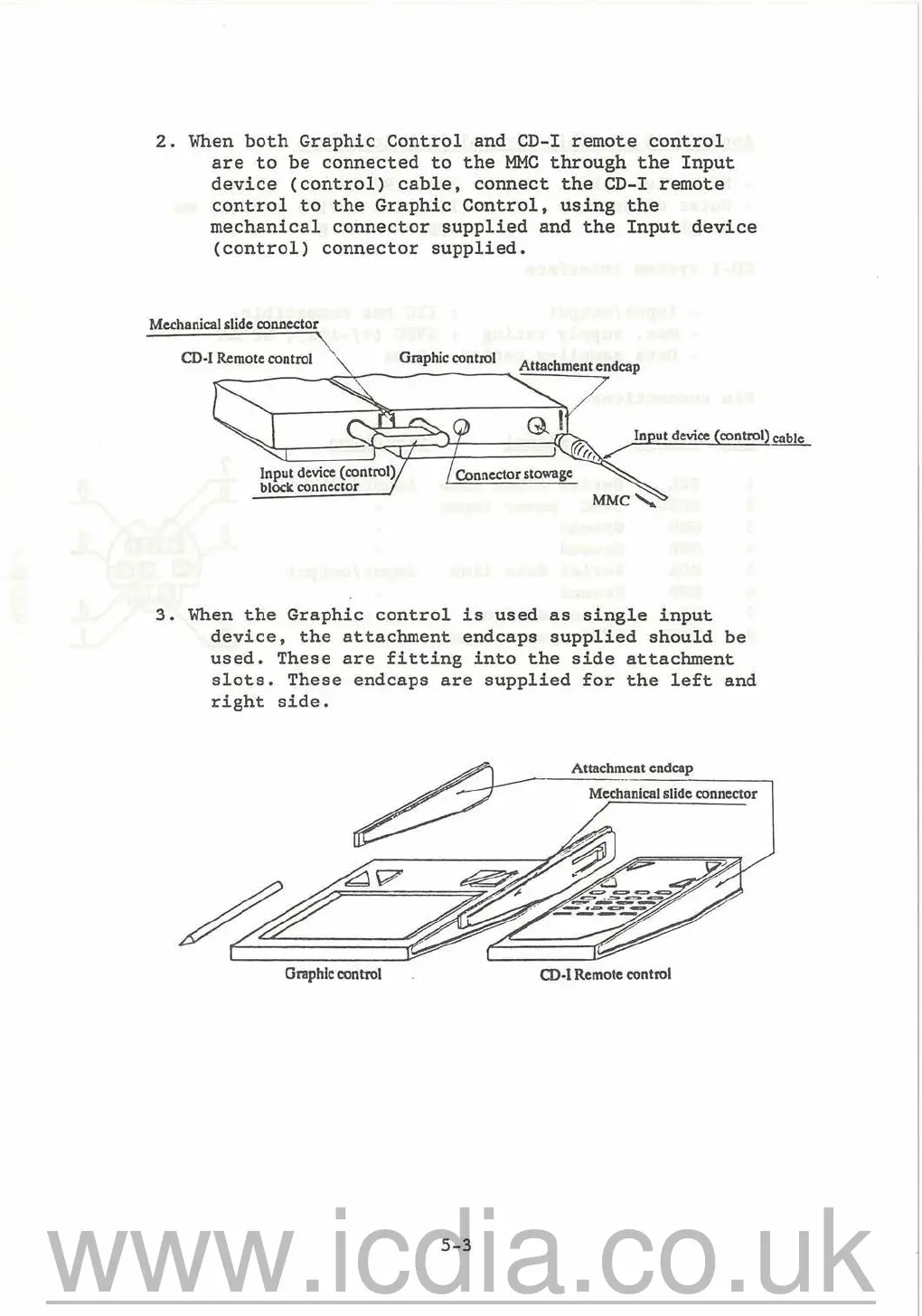
2.
When
both
Graphic
Control
and CD-I
remote
control
are
to
be
connected
to
the
MMC
through
the
Input
device
(control)
cable,
connect
the
CD-I
remote
control
to
the
Graphic
Control,
using
the
mechanical
connector
supplied
and
the
Input
device
(control)
connector
supplied.
Mechanical slide
co11J1ector
CD-I Remote control \ Graphic control
/
Connector stowage
Input
device
(control) cable
0,,/
--
3.
When
the
Graphic
control
is
used
as
single
input
device,
the
attachment
endcaps
supplied
should
be
used.
These
are
fitting
into
the
side
attachment
slots.
These
endcaps
are
supplied
for
the
left
and
right
side.
Attachment
endcap
Mechanical slide connector
Graphic control
CD-I
Remote control
5-3
www.icdia.co.uk

Related product manuals