9
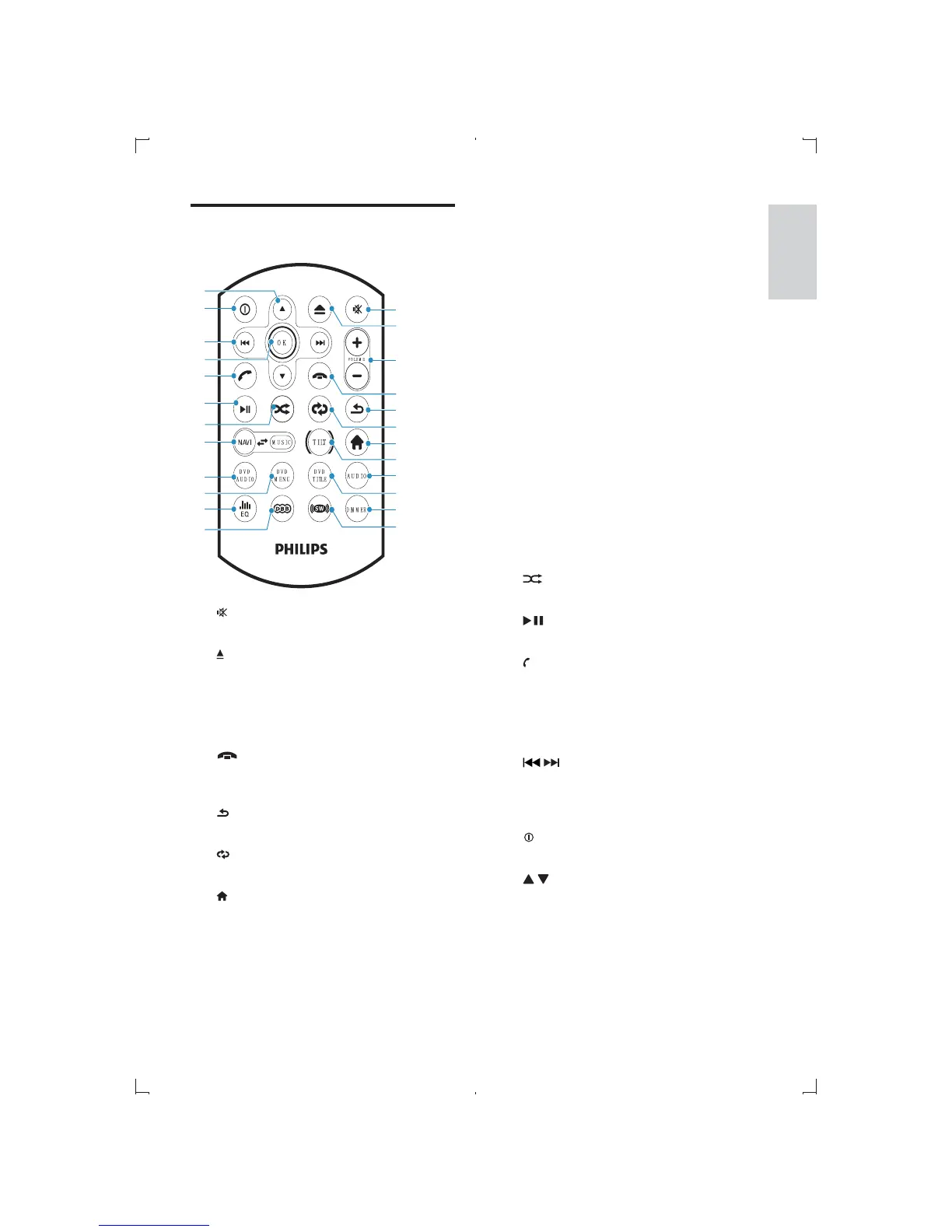
j DVD TITLE
Select DVD or DivX subtitle language.
k DIMMER
Access illuminate dimmer settings.
l SW
Turn on/off subwoofer.
m DBB
Turn on or off Dynamic Bass Boost
(DBB) sound.
n EQ
Access equalizer setting menu.
o DVD MENU
Access DVD main menu.
p DVD AUDIO
Select audio language or audio
channel.
q NAVI
Enter/exit the navigation system.
r
s
Start or pause play.
t
/RECEIVE
Answer phone.
Dial number.
u OK
v
/
Skip to previous/next track/chapter.
Play fast backward/forward.
Tune for radio station.
w
Turn the unit on or off.
x
/
Skip to the previous/next preset
station.
Skip to the previous/next folder.
Search backward/forward for DVD
video.
Move cursor up/down.
Overview of the remote
control
a
Mute or unmute audio.
b
Open the front panel to insert/eject
disc/card.
c VOLUME +/-
Adjust volume.
d
/REJECT
Terminate call.
Reject incoming call.
e
Return to previous menu or exit.
f
Adjust repeat mode.
g
Access home menu.
h TILT
Adjust the position of the front panel.
i AUDIO
Access speaker fader/banlance menu.
w
x
v
s
r
p
n
q
u
m
o
c
e
g
i
k
a
f
h
j
l
d
b
w
x
v
s
r
p
n
q
u
m
o
c
e
g
i
k
a
f
h
j
l
d
b
English
EN



 To Next Page