EasyManua.ls Logo

Philips CED232 - Page 11

Philips CED232
28 pages
Print Icon
To Next Page IconTo Next Page
To Previous Page IconTo Previous Page
Loading...
9EN
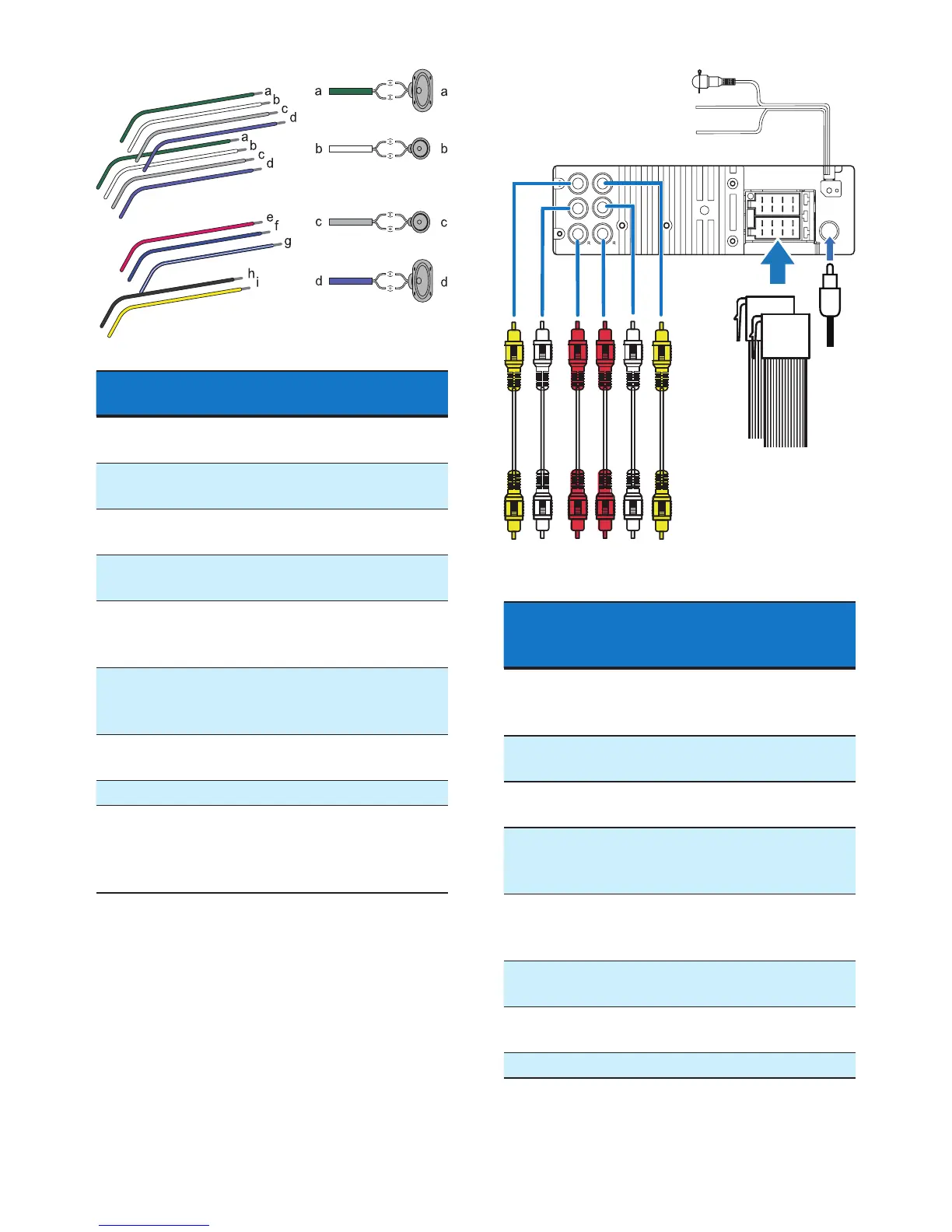
ISO male
connectors
Connect to
a Green strip, black-
edged green strip
Rear left speaker
b White strip, black-
edged white strip
Front left speaker
c Gray strip, black-
edged gray strip
Front right speaker
d Purple strip, black-
edged purple strip
Rear right speaker
e Red strip Ignition key +12V
DC when ON/
ACC
f Blue strip Motor/electric
antenna relay
control lead
g White-edged blue
strip
Amplierrelay
control lead
h Black strip Ground
i Yellow strip To the +12V car
battery which is
energized at all
times
2 Connect the ISO male connectors and
other wires to the rear panel of the main
unit if necessary.
Sockets or
connectors on
rear panel
External sockets or
connectors
1 VIDEO OUT
(Yellow socket)
Video input socket
for an external display
device
2 REAR L (White
socket)
Rear left speaker
3 REAR R (Red
socket)
Rear right speaker
4 AUDIO IN R(Red
socket)
Right audio channel
output socket of an
external video player
5 AUDIO IN L
(White socket)
Left audio channel
output socket of an
external video player
6 CAMERA IN
(Yellow socket)
Video output socket
of an external camera
7 Sockets for ISO
male connectors
As indicated in step
1 above
8 Antenna socket Radio antenna
LL
ab cd ef
g
i
h
j
Video OutCamera In
Audio InRear
k

Related product manuals