12 EN
4 Get started
Prepare the remote control
For the rst time use
Pull the protective sheet out.
» The remote control is ready for use.
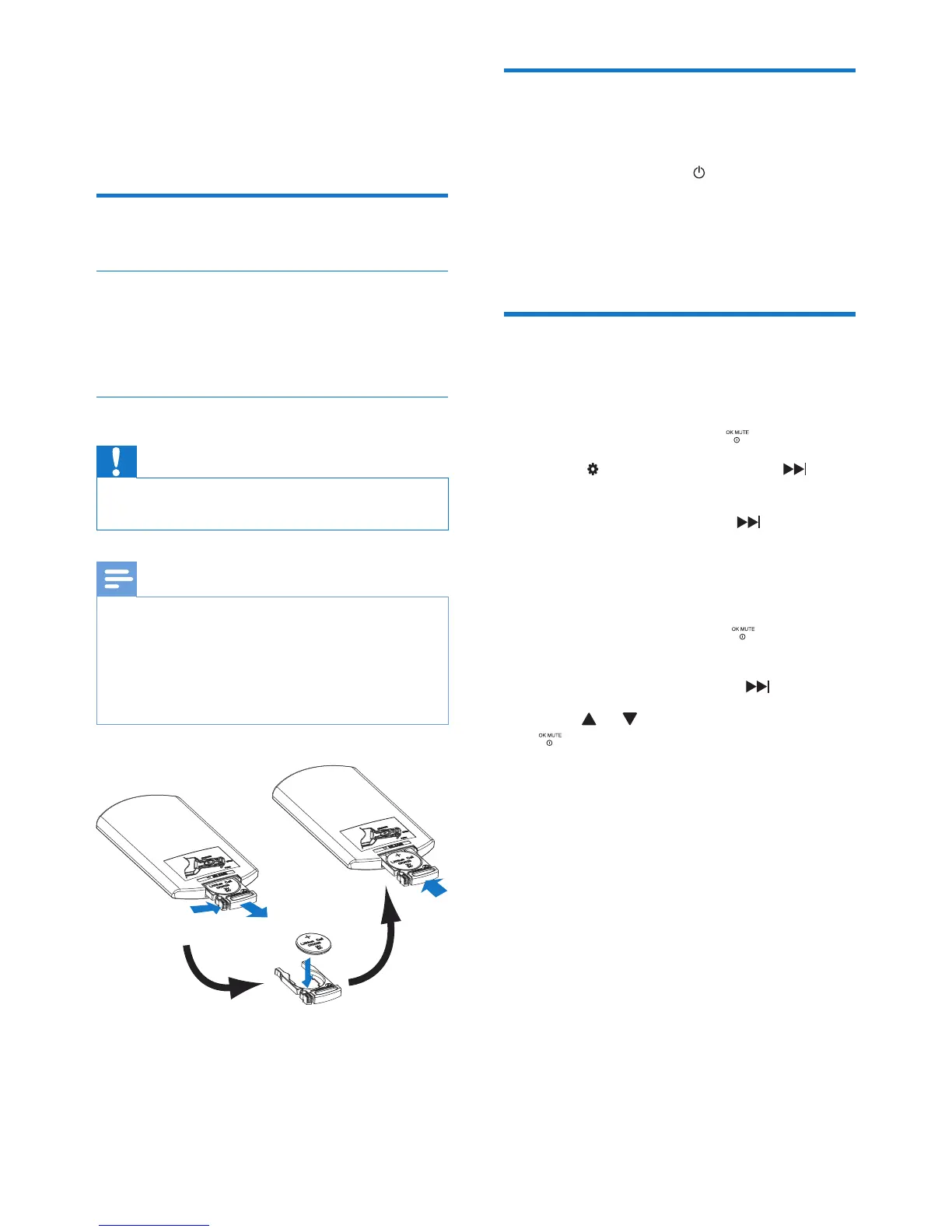
Replace the battery
Caution
• Risk of explosion! Keep batteries away from heat,
sunshineorre.Neverdiscardbatteriesinre.
Note
• Remove the battery if it is exhausted or if the remote
control is not to be used for a long time.
• Batteries contain chemical substances, they should be
disposed of properly.
• Perchlorate Material - special handling may apply. See
www.dtsc.ca.gov/hazardouswaste/perchlorate.
1 Pull out the battery tray.
2 Insert one CR2025 battery with correct
polarity (+/-) as indicated.
3 Insert the battery tray.
Turn on and turn off
Turn On
Press the power button ( ).
Turn Off
Press and hold the same power button for 3
seconds.
Set clock
1 Press MENU.
2 Press the navigation buttons to select
[SETTINGS], then press .
3 Select [GENERAL], then press .
4 Press the navigation buttons to select
[TIME MODE], then press .
» The time mode options are displayed:
• [12 HOUR]
• [24 HOUR]
5 Select a mode, then press .
6 Press the navigation buttons to select
[TIME ADJUST], then press .
7 Press or to enter clock, then press
.



 To Next Page