10 EN
Sockets or
connectors on
rear panel
External sockets or
connectors
9 VIDEO IN (Black
strip)
Video output socket
of an external video
player
10 REVERSE
CAMERA (Orange
strip)
Reverse camera (B+)
11 PARKING
BRAKE (Pink
strip)
Parking brake (-)
Tip
• The pin arrangement for the ISO connectors depends
on the type of your vehicle. To avoid damage to the
unit, connect properly.
Mount into the dashboard
• If the car does not have an on-board drive
or navigation computer, disconnect the
negative terminal of the car battery.
• If the car battery is not disconnected, to
avoid short-circuit, make sure that the bare
wires do not touch each other.
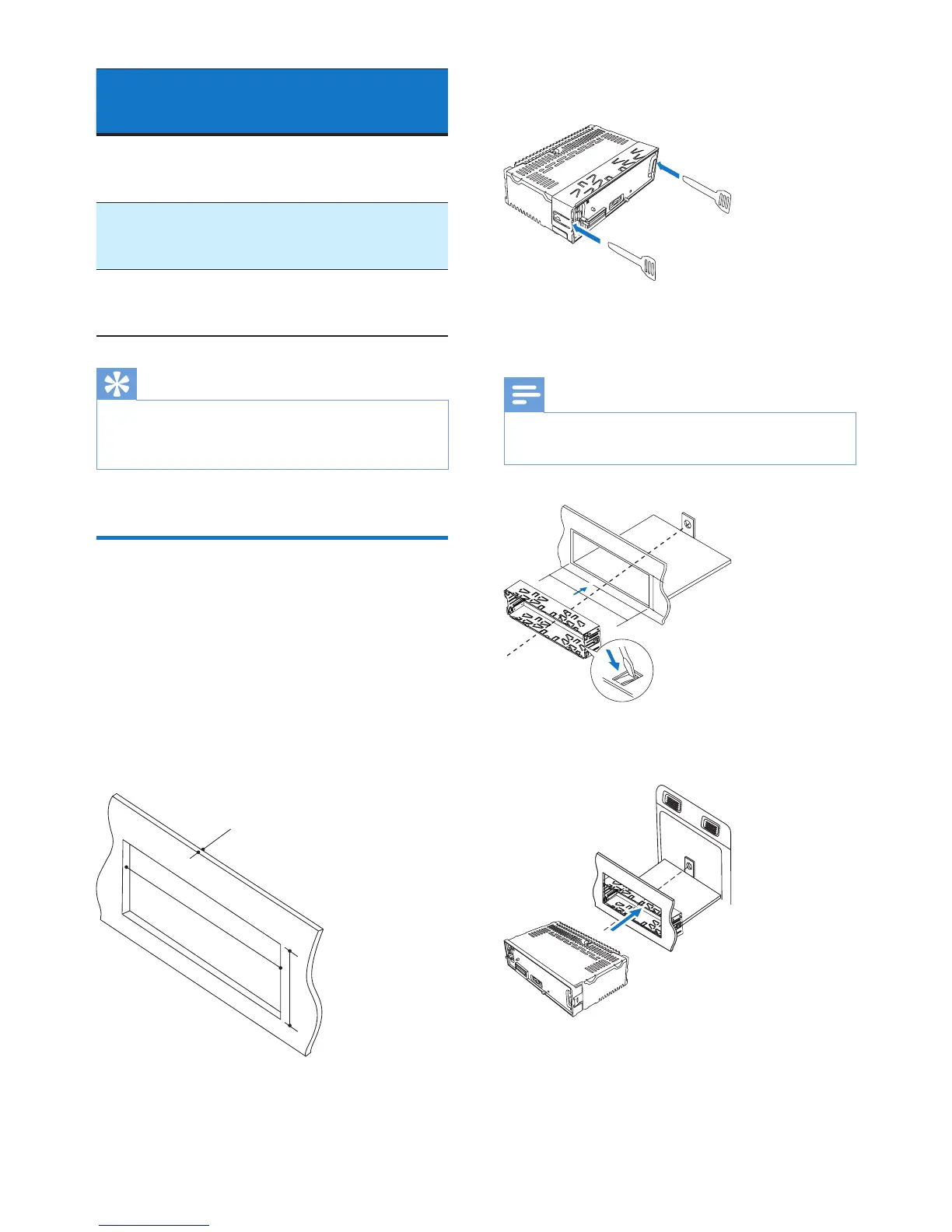
1 Make sure that the car dashboard opening
is within these measurements.
178mm
50 mm
5mm
2 Remove the mounting sleeve with the
supplied disassembly tools.
3 Install the sleeve into the dashboard and
bendthetabsoutwardtoxthesleeve.
Note
• Iftheunitisnotxedbysleevebutbythesupplied
screw, skip this step.
4 Slide the unit into the dashboard until you
hear a "click".
183 mm
53.5 mm



 To Next Page