EasyManua.ls Logo

Philips DC932 - Mounting Instructions

Philips DC932
32 pages
Print Icon
To Next Page IconTo Next Page
To Previous Page IconTo Previous Page
Loading...
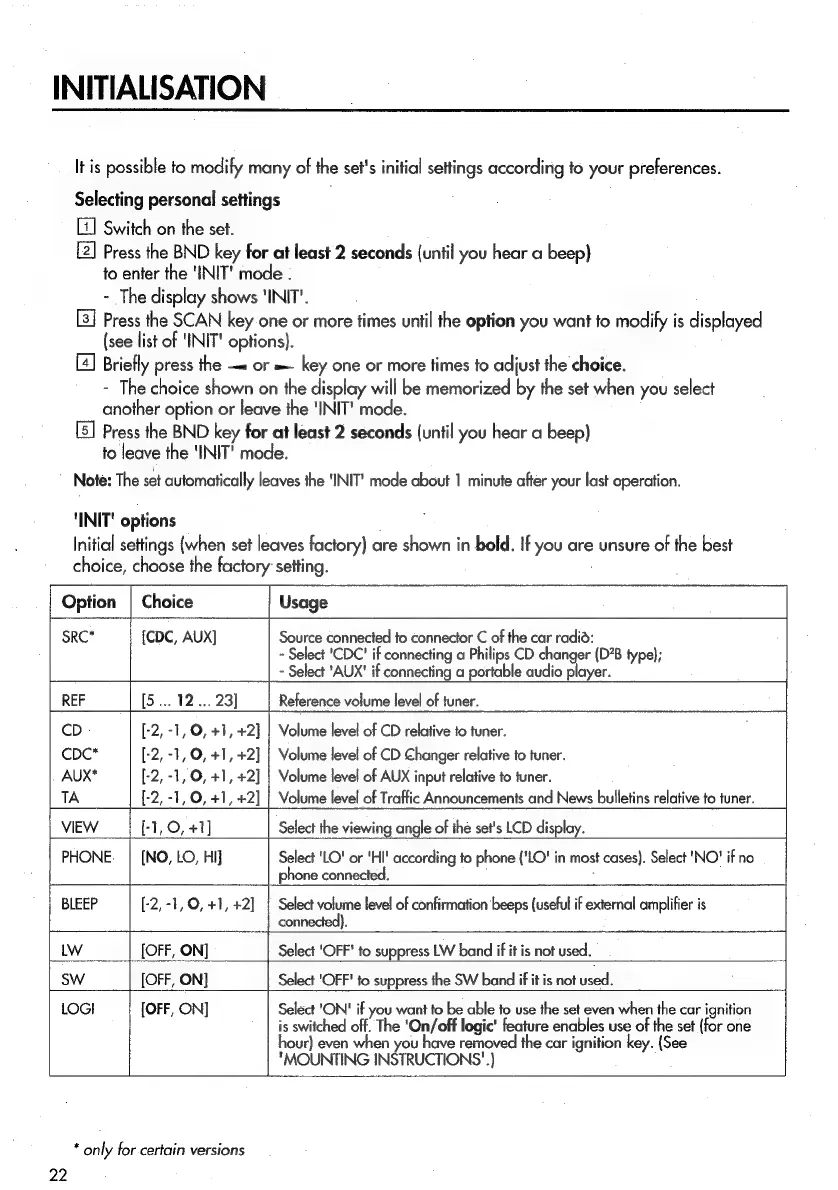
INITIALISATION
It
is
possible
to
modify
many
of
the
set's
initial
settings
according
to
your
preferences.
Selecting
personal
settings
Switch
on
the
set.
Press
the
BND
key
for
at
least
2
seconds
(until
you
hear
a
beep)
to
enter
the
'INIT'
mode
.
-
The
display
shows
‘INIT’.
Press
the
SCAN
key
one
or
more
times
until
the
option
you
want
to
modify
is
displayed
(see
list
of
INIT!
options).
[4]
Briefly
press
the
or
=
key
one
or
more
times
to
adjust
the
choice.
-
The
choice
shown
on
the
display
will
be
memorized
by
the
set
when
you
select
another
option
or
leave
the
'INIT'
mode.
Press
the
BND
key
for
at
least
2
seconds
(until
you
hear
a
beep)
to
leave
the
'INIT'
mode.
Note:
The
set
automatically
leaves
the
‘INIT!
mode
about
1
minute
after
your
last
operation.
‘INIT'
options
Initial
settings
(when
set
leaves
factory)
are
shown
in
bold.
If
you
are
unsure
of
the
best
choice,
choose
the
factory’
setting.
Option
|
Choice
Usage
SRC*
{CDC,
AUX]
Source
connected
to
connector
C
of
the
car
radia:
~
Select
'CDC'
if
connecting
a
Philips
CD
changer
(D’B
type);
-
Select
‘AUX'
if
connecting
a
portable
audio
player.
REF
[5...
12...
23]
Reference
volume
level
of
tuner.
CD
-
[-2,
-1,
O,
+1,
+2]
|
Volume
level
of
CD
relative
to
tuner.
CcDC*
[-2,
-1,
O,
+1,
+2]
|
Volume
level
of
CD
Changer
relative
to
tuner.
AUX*
[-2,-1,
O,
+1,
+2]
|
Volume
level
of
AUX
input
relative
to
tuner.
TA
[-2,
-1,
O,
+1,
+2]
|
Volume
level
of
Traffic
Announcements
and
News
bulletins
relative
to
tuner.
VIEW
[-1,
0,
+1]
Select
the
viewing
angle
of
the
set's
LCD
display.
PHONE.
|
[NO,
LO,
HI}
Select
'LO'
or
'HI'
according
to
phone
{'LO'
in
most
cases).
Select
'NO'
if
no
phone
connected.
:
BLEEP
[-2,-1,O,
+1,
+2]
|
Select
volume
level
of
confirmation
beeps
(useful
if
external
amplifier
is
na
connected).
LW
[OFF,
ON]
Select
'OFF'
to
suppress
LW
band
if
if
is
not
used.
SW
[OFF,
ON]
Select
'OFF'
to
suppress
the
SW
band
if
it
is
not
used.
LOGI
[OFF,
ON]
Select
'ON'
if
you
want
to
be
able
to
use
the
set
even
when
the
car
ignition
is
switched
off.
The
'On/off
logic'
feature
enables
use
of
the
set
{for
one
jour)
even
when
you
have
removed
the
car
ignition
key.
(See
"MOUNTING
INSTRUCTIONS'.}
*
only
for-certain
versions
22

Related product manuals