EasyManua.ls Logo

Philips DC932 - Audio Reset

Philips DC932
32 pages
Print Icon
To Next Page IconTo Next Page
To Previous Page IconTo Previous Page
Loading...
...
AND
SOUND
ADJUSTMENTS
TREBLE
/
BASS
/
FADER
/
BALANCE
The
v
arid
A
keys
normally
function
as
volume
control.
These
keys
become
the
controls
for
de
Treble,
Bass,
Facer
or
Balance
when
you
select
the
relevant
audio
mode.
After
use,
the
function
of
the
keys
returns
fo
volume
control
(after
about
10
seconds).
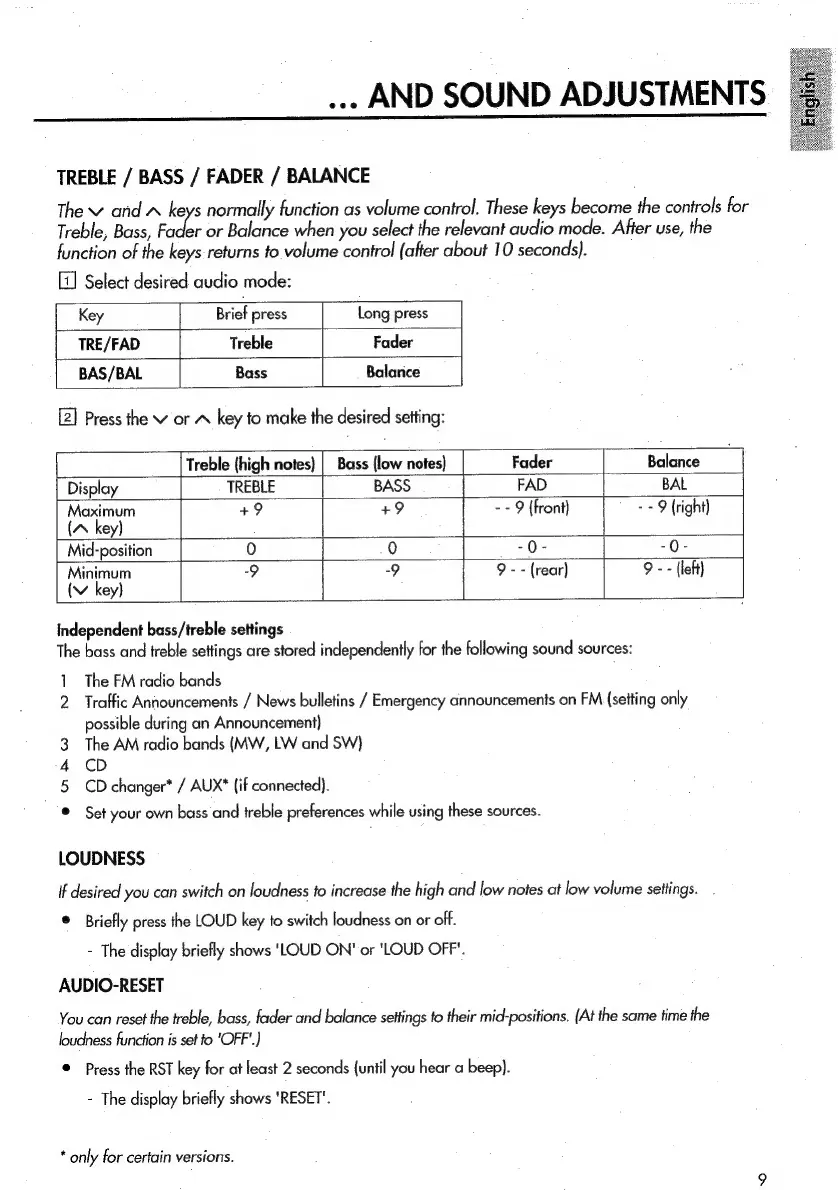
Select
desired
audio
mode:
Key
Brief
press
Long
press
TRE/FAD
Treble
Fader
BAS/BAL
Bass
Balarice
Press
the
Vv
or
A
key
to
make
the
desired
setting:
Independent
bass/treble
settings
The
bass
and
treble
settings
are
stored
independently
for
the
following
sound
sources:
1
The
FM
radio
bands
2
Traffic
Announcements
/
News
bulletins
/
Emergency
announcements
on
FM
(setting
only
possible
during
an
Announcement}
The
AM
radio
bands
(MW,
LW
and
SW}
CD
enh
LOUDNESS
CD
changer*
/
AUX*
{if
connected).
Set
your
own
bass
and
treble
preferences
while
using
these
sources.
Treble
(high
notes}
|
Bass
{low
notes)
Fader
Balance
Display
TREBLE
BASS
FAD
BAL
Maximum
+9
+9
--
9
(front)
-
-
9
(right)
(A
key)
Mid-position
Minimum
(v
key}
if
desired
you
can
switch
on
loudness
fo
increase
the
high
and
low
notes
at
low
volume
settings.
®
Briefly
press
the
LOUD
key
to
switch
loudness
on
or
off.
-
The
display
briefly
shows
'LOUD
ON'
or
'LOUD
OFF".
AUDIO-RESET
You
can
reset
the
treble,
bass,
fader
and
balance
settings
fo
their
mid-positions.
(At
the
same
time
the
loudness
function
is
set
to
'OFF'.)
©
Press
the
RST
key
for
at
least
2
seconds
{until
you
hear
a
beep).
-
The
display
briefly
shows
'RESET'.
*
only
for
certain
versions.
.
i

Related product manuals