EasyManua.ls Logo

Philips DC932 - Installing Remote Control

Philips DC932
32 pages
Print Icon
To Next Page IconTo Next Page
To Previous Page IconTo Previous Page
Loading...
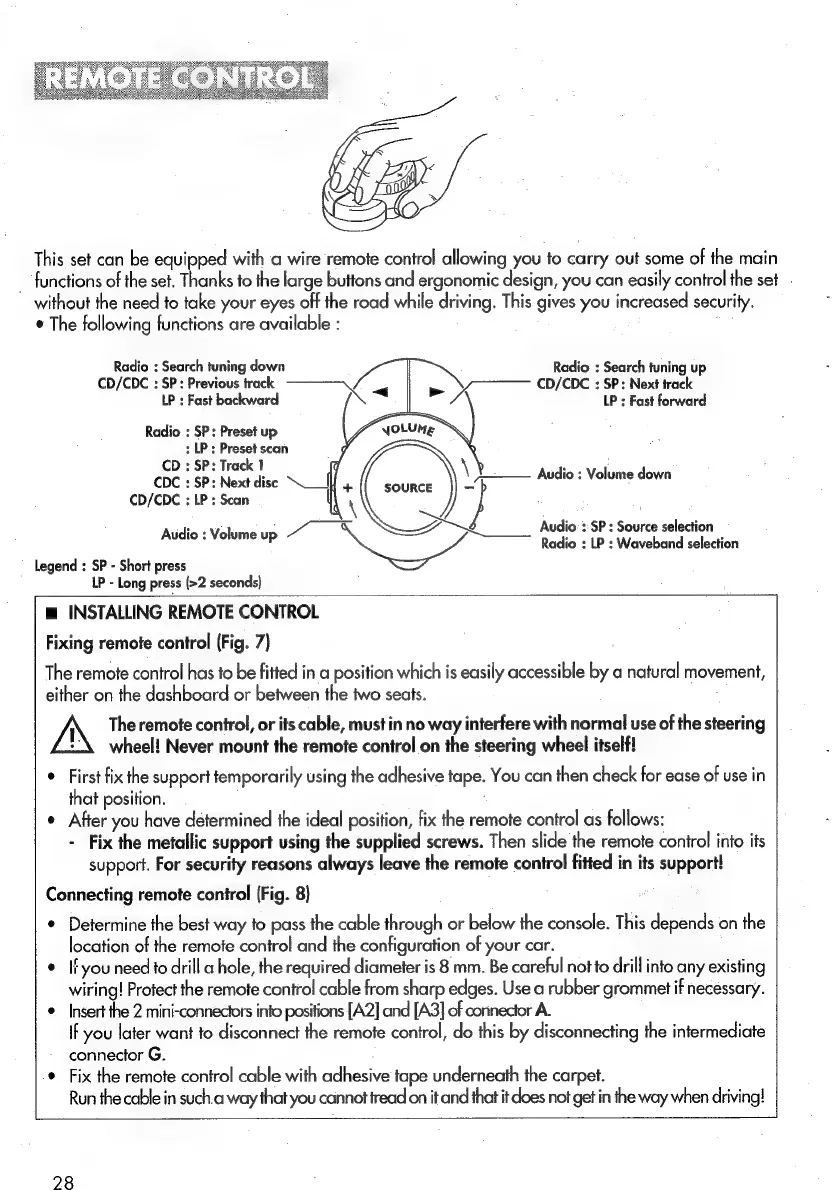
This
set
can
be
equipped
with
a
wire
remote
control
allowing
you
to
carry
out
some
of
the
main
_
functions
of
the
set.
Thanks
to
the
large
buttons
and
ergonomic
design,
you
can
easily
control
the
set
-
without
the
need
to
take
your
eyes
off
the
road
while
driving.
This
gives
you
increased
security.
¢
The
following
functions
are
available
:
Radio
:
Search
tuning
down
Radio
:
Search
tuning
up
CD/CDC
:
SP:
Previous
track
CD/CDC
:
SP:
Next
track
LP
:
Fast
backward
as
a,
LP
:
Fast
forward
Radio
:
SP:
Preset
up
NOLUME
:
LP;
Preset
scan
CD
:
SP:
Track
1
CDC
:
SP:
Next
disc
“__|
CD/CDC
:
LP
:
Scan
\
Audio
:
Volume
down
———
+
SOURCE
=
\
}
Radio
:
LP
:
Waveband
selection
Audio
:
Volume
up
Sea
Audio
:
SP
:
Source
selection
Legend
:
SP
-
Short
press
LP
-
Long
press
(>2
seconds)
m
INSTALLING
REMOTE
CONTROL
Fixing
remote
control
(Fig.
7)
The
remote
control
has
to
be
fitted
in
a
position
which
is
easily
accessible
by
a
natural
movement,
either
on
the
dashboard
or
between
the
two
seats.
The
remote
control,
or
its
cable,
must
in
no
way
interfere
with
normal
use
of
the
steering
wheel!
Never
mount
the
remote
control
on
the
steering
wheel
itself!
°
First
fix
the
support
temporarily
using
the
adhesive
tape.
You
can
then
check
for
ease
of
use
in
that
position.
¢
After
you
have
determined
the
ideal
position,
fix
the
remote
control
as
follows:
-
Fix
the
metallic
support
using
the
supplied
screws.
Then
slide
the
remote
control
into
its
support.
For
security
reasons
always
leave
the
remote
control
fitted
in
its
support!
Connecting
remote
control
(Fig.
8)
*
Determine
the
best
way
to
pass
the
cable
through
or
below
the
console.
This
depends
on
the
location
of
the
remote
control
and
the
configuration
of
your
car.
*
Ifyou
need
to
drill
a
hole,
the
required
diameter
is
8
mm.
Be
careful
not
to
drill
into
any
existing
wiring!
Protect
the
remote
control
cable
from
sharp
edges.
Use
a
rubber
grommet
if
necessary.
¢
Insert
the
2
mini-connectors
into
positions
[A2]
and
[A3]
of
connector
A.
If
you
later
want
fo
disconnect
the
remote
control,
do
this
by
disconnecting
the
intermediate
connector
G.
.
Fix
the
remote
control
cable
with
adhesive
tape
underneath
the
carpet.
Run
the
cable
in
such.a
way
that
you
cannot
tread
on
it
and
that
it
does
not
get
in
the
way
when
driving!
28

Related product manuals