EasyManua.ls Logo

Philips DC932 - Page 7

Philips DC932
32 pages
Print Icon
To Next Page IconTo Next Page
To Previous Page IconTo Previous Page
Loading...
DISPLAY
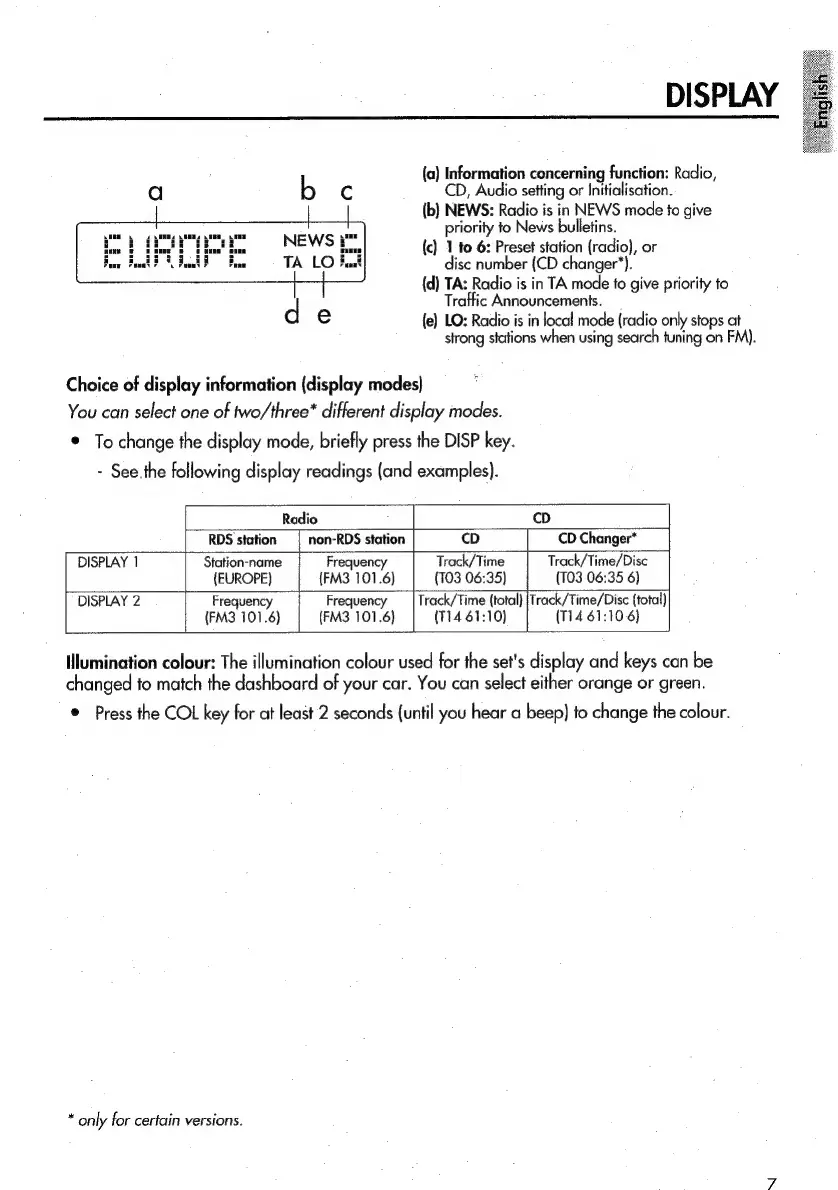
{a)
Information
concerning
function:
Radio,
CD,
Audio
setting
or
Initialisation.
(b})
NEWS:
Radio
is
in
NEWS
mode
to
give
priority
to
News
bulletins.
foie
iia
i
{c}
1
to
6:
Preset
station
(radio),
or
Boar
Fut
FE
Fad
F
Fatt
disc
number
(CD
changer’).
(d)
TA:
Radio
is
in
TA
mode
fo
give
priority
to
Traffic
Announcements.
{e)
LO:
Radio
is
in
local
mode
(radio
only
stops
at
strong
stations
when
using
search
tuning
on
FM).
Choice
of
display
information
(display
modes)
You
can
select
one
of
two/three*
different
display
modes.
©
To
change
the
display
mode,
briefly
press
the
DISP
key.
-
See.the
following
display
readings
(and
examples).
Radio
cD
non-RDS
station
CD
Changer*
Station-name
Frequency
Track/Time
Track/Time/Disc
(EUROPE)
(FM3
101.6)
(T03
06:35)
(TO3
06:35
6)
DISPLAY
2
Frequency
Frequency
—_|
Track/Time
(total)
|Track/Time/Disc
(total)
(FM3
101.6)
(FM3
101.6)
(114
61:10)
(114
61:10
6}
Illumination
colour:
The
illumination
colour
used
for
the
set's
display
and
keys
can
be
changed
to
match
the
dashboard
of
your
car.
You
can
select
either
orange
or
green.
©
Press
the
COL
key
for
at
least
2
seconds
(until
you
hear
a
beep)
to
change
the
colour.
RDS
station
DISPLAY
1
*
only
for
certain
versions.

Related product manuals