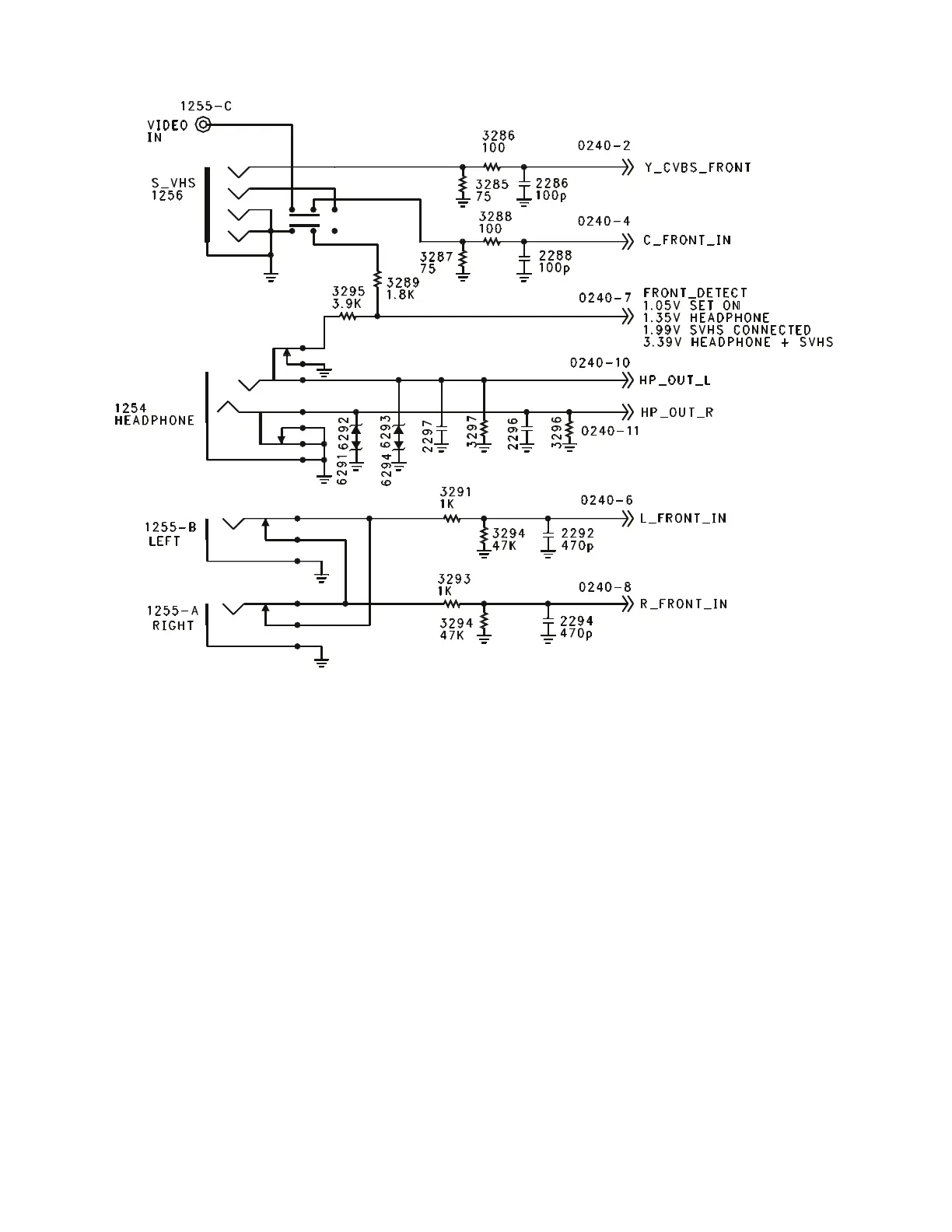
Side Jack Panel (Figure 22)
The Side Jack panel is the AV3 input in the
Customer Menu. It has a Composite Video
Input, SVHS Input, and a Stereo Audio input.
It also has a headphone output. If an SVHS
connector is plugged into the Side Jack panel,
the Composite Video input is muted. The
Audio inputs are designed so that if audio is
plugged into only one input, the signal will be
fed to both the Left and Right Channel lines.
The Front Detect line tells the Microprocessor
if an SVHS or Headphone is connected to the
Side Jack panel. In normal operation, the
FRONT-DETECT line is approximately 1.05
volt. When a Headphone is plugged in,
resistor 3295 is taken out of the circuit
causing the voltage to increase to 1.35
volts. The Microprocessor will activate the
Mute line. With only the SVHS connected,
resistor 3289 is out of the circuit, causing
the FRONT-DETECT line to increase to
1.99 volts. An indicator will appear in the
Menu to indicate that SVHS is present on
AV3. With both a SVHS and Headphone
connected to the Side Jack panel, both
resistors are out of the circuit and the
voltage will increase to 3.39 volts. This will
give the SVHS indication in the Menu and
Mute the Audio. If the Side Jack panel is
disconnected while troubleshooting the set,
the Audio will be muted.
Figure 22 - Side Jack Panel
Page 28



 To Next Page