10
ENGLISH
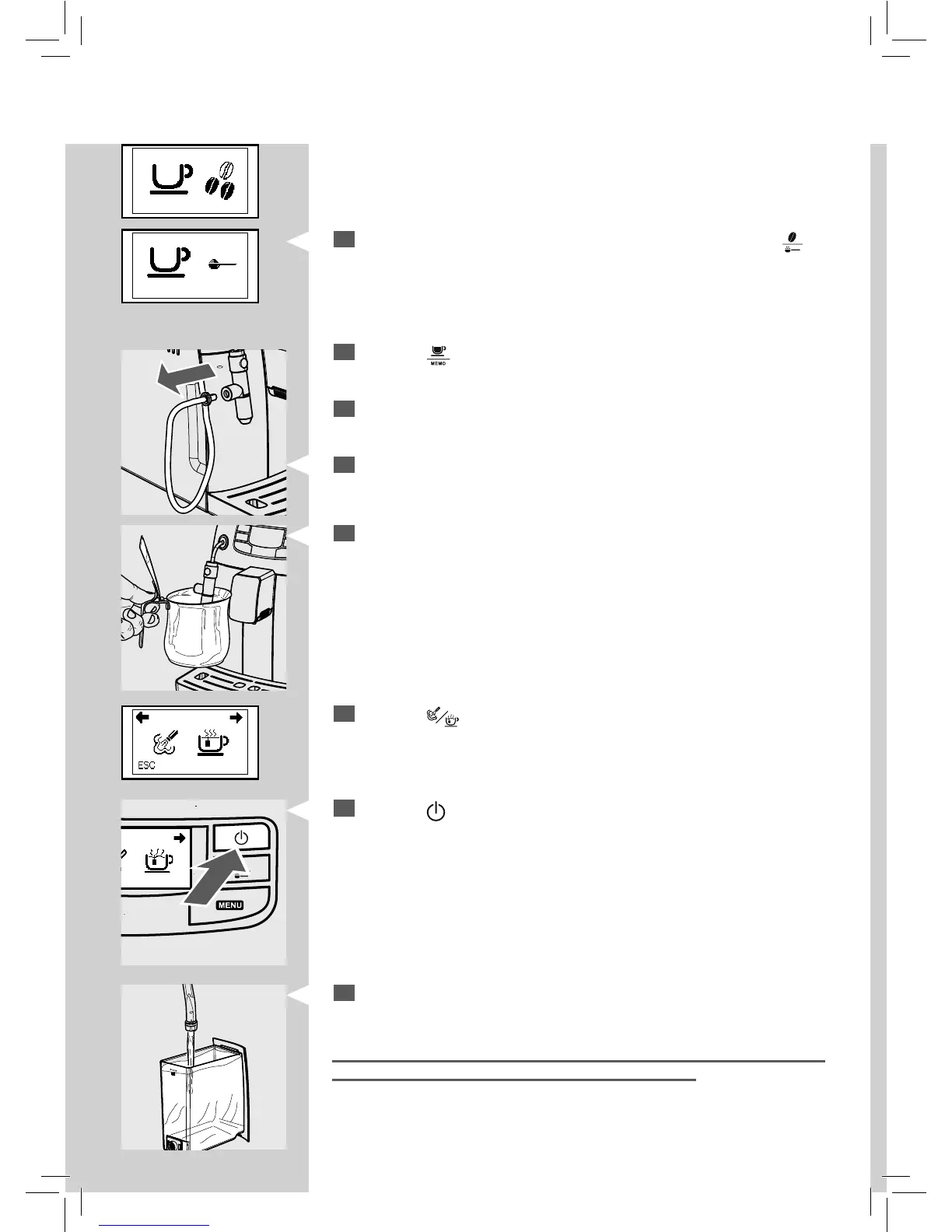
Before starting the procedure, check that the following icon is dis-
played.
Green
GreenGreen
7
Press the " " button. The following icon is displayed.
8
Press the " " button to start dispensing hot water. Dispense water
until the no water signal appears.
9
At the end, ll the water tank again. Then the products can be brewed
as described in the following sections.
Warning: At the end, reposition the pin with the tube that was removed at
step 5, in order to be able to correctly use the machine.
2
Select the pre-ground co ee brewing function by pressing the " "
button one or more times, until the following icon is displayed.
Note: Do not add pre-ground co ee into the compartment.
3
Press the " " button. Wait until the dispensing procedure is complete
and empty the water tank.
4
Repeat the operations from step 1 to step 3 for 3 times, then continue
with step 5.
5
Remove the pin with the suction tube from the Cappuccinatore.
6
Place a container under the Cappuccinatore.







 To Next Page