ENGLISH
15
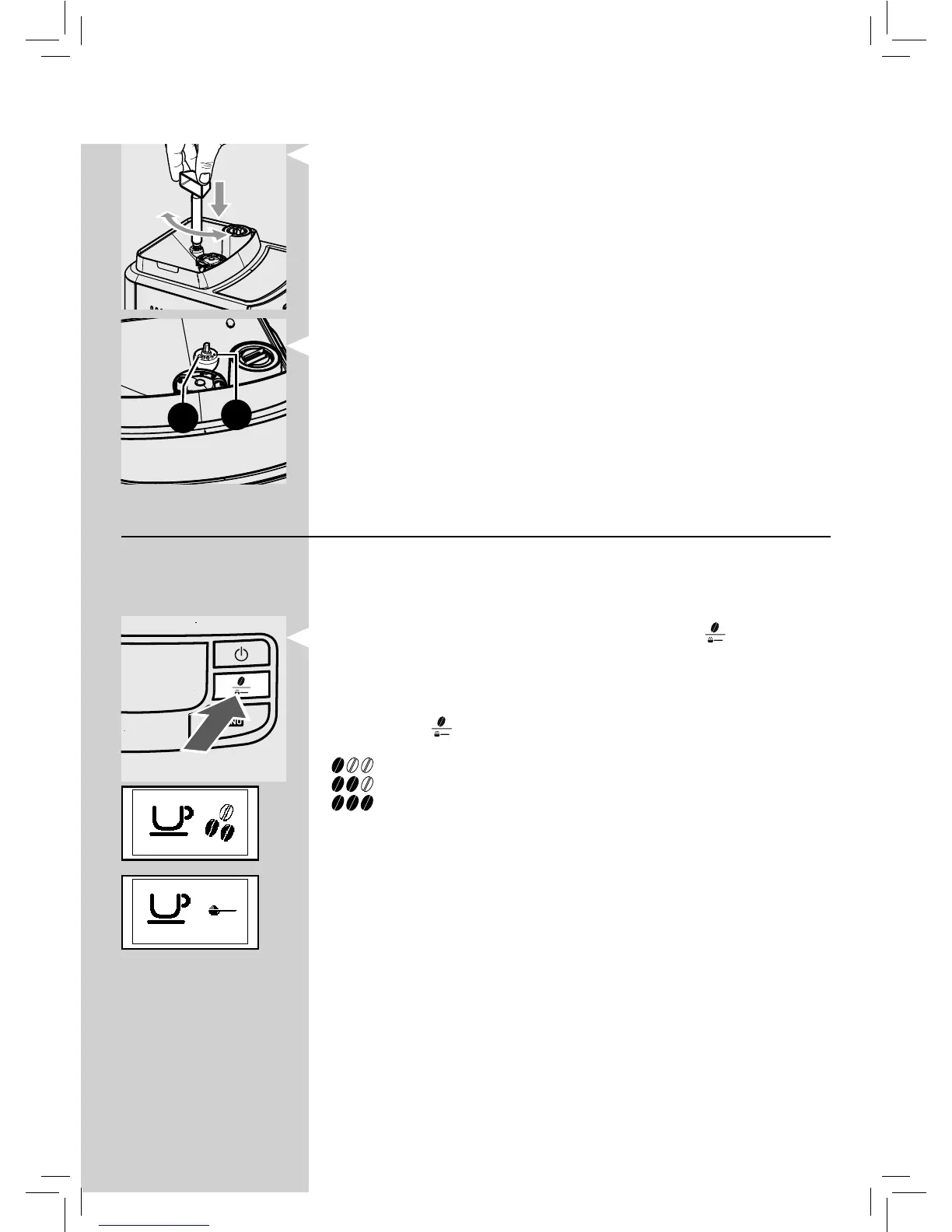
Press and turn the pin one notch at a time and brew 2-3 cups of co ee; this
is the only way to notice di erences in grind.
1
2
The reference marks inside the co ee bean hopper indicate the grind set-
ting. There are 5 di erent grind settings to choose from with the following
references:
1 - Coarse Grind: Lighter taste, for dark roasted co ee blends;
2 - Fine Grind: Bolder Taste, for light roasted co ee blends.
"Aroma" Adjustment: Select Your Favourite Amount
Choose your favourite co ee blend and adjust the amount of co ee to be
ground until they meet your personal taste. The machine is set-up to adjust
the amount according to the co ee to be ground.
Four choices are possible by pressing and releasing the "
" button: Mild,
medium or strong aroma, and pre-ground co ee.
Selection can be made when the beans appear on the display.
Each time the "
" button is pressed and released, the aroma changes by
one degree, according to the selected amount:
= Mild aroma
= Medium aroma
= Strong aroma
Note: Selection must be made prior to select co ee. The system sets the aroma
according to the personal taste of the user.
After selecting "Strong aroma", the function for brewing co ee with pre-
ground co ee is displayed.
This selection is displayed by the icon on the side.
Refer to the relevant section to use this function.
GreenGreen







 To Next Page