64
EN
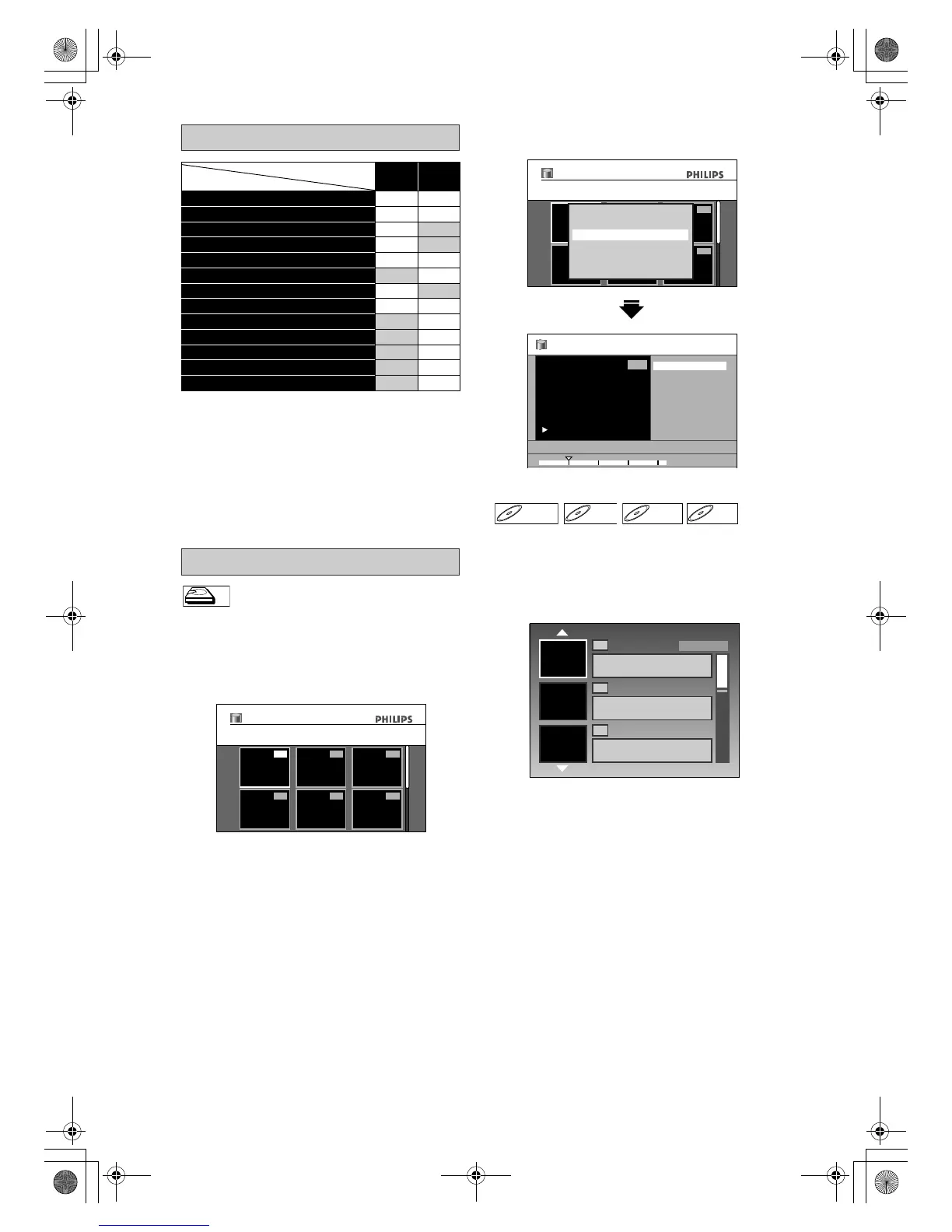
✔:Available Grey: Not available
*1:DVD-RW/+RW discs only
*2:DVD+R/-RW/-R discs only
*3:DVD+RW discs only
• Once you have finalised a DVD+R/ DVD-R, you
cannot edit or record anything on that disc.
• While recording a title to an HDD or a DVD, only
deleting HDD titles is available.
Press [HDD] first.
1 Press [TITLE].
2 Use [U \ D \ L \ P] to select a
desired title, then press [OK].
3 Use [U \ D] to select “Edit”, then
press [OK].
Press [DVD] first.
1 Press [TITLE].
2 Use [U \ D \ L \ P] to select a
desired title, then press [OK].
Edit Menu
Media
Available Futures
HDD DVD
Editing names on titles ✔✔
Deleting a title ✔✔
Deleting selected titles ✔
Deleting a scene of a title ✔
Adding / deleting chapter marks ✔✔
Hiding chapters ✔
Protecting a title ✔
Dividing a title ✔ ✔
*1
Setting an index picture ✔
Finalising a disc ✔
*2
Making edits compatible ✔
*3
Editing name on disc ✔
Setting or Releasing disc protect ✔
How to Access the Edit Menu
HDDHDD
1
456
23
01/01/08 1 SP
01/01/08 12:00 1SP
12:00 (1:00:00)
Title List
1
456
23
01/01/08 1 SP
01/01/08 12:00 1SP
12:00 (1:00:00)
Title List
Play From Start
Edit
Title Delete
Dubbing
Resume Playback
Delete Multiple Titles
01/01/08 12:00 1 SP
0:02:59
1
Edit
Scene Delete
Edit Title Name
Chapter Mark
Title Dividing
Protect
DVD+RWDVD+RW D
DVD-R
1
2
3
01/01/08 12:00 8 SP
01/01/08 1:55:00
0:05:00 SP(2Hr)
01/01/08 17:00 DVB 123 SP
10/01/08 0:10:00
EMPTY TITLE
SP(2Hr)
E2N41BN_EN.book Page 64 Wednesday, July 2, 2008 4:36 PM


 To Next Page