9
English
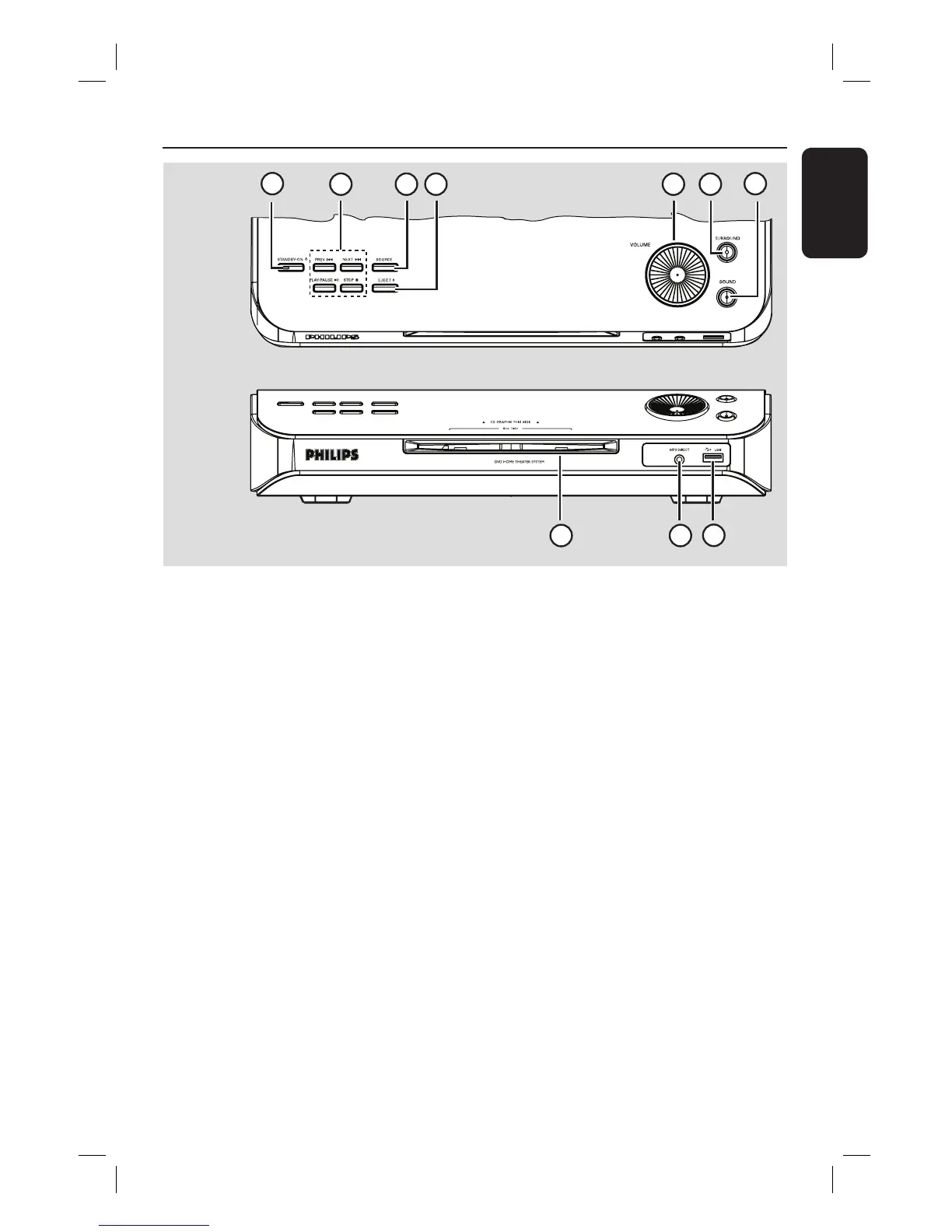
Main Unit
a STANDBY ON 2
– Turns on the system or turns off to Eco
Power standby mode.
b PLAY PAUSE u
– DISC: starts/pauses playback.
– TUNER: starts auto tuner installation for
rst time setup.
STOP Ç
– Exits an operation.
– DISC: stops playback.
– TUNER: press and hold this button to
erase the current preset radio station.
PREV . / NEXT >
– DISC: selects a track or press and hold
this button to search backward/forward.
– TUNER: selects a preset radio station.
c SOURCE
– Selects the relevant active source mode:
DISC, MP3 DIRECT, TUNER (FM/MW),
TV or AUX/DI.
d EJECT ç
– Ejects the disc from the disc slot.
e VOLUME
– Adjusts the volume level.
f SURROUND
– Turns on the Ambisound speakers to
multi-channel mode or turns off to
stereo mode. While in multi-channel
mode, the light will be on.
g SOUND
– Selects a prede ned sound effect.
h USB port
– Input for USB ash drive or USB memory
card reader.
i MP3 Direct
– Phono input for connecting to the
headphone out socket on your portable
audio or HDD player.
j Disc slot
1
3 42 5 6
7
8
9
10
Top view
Front view






 To Next Page