16 EN
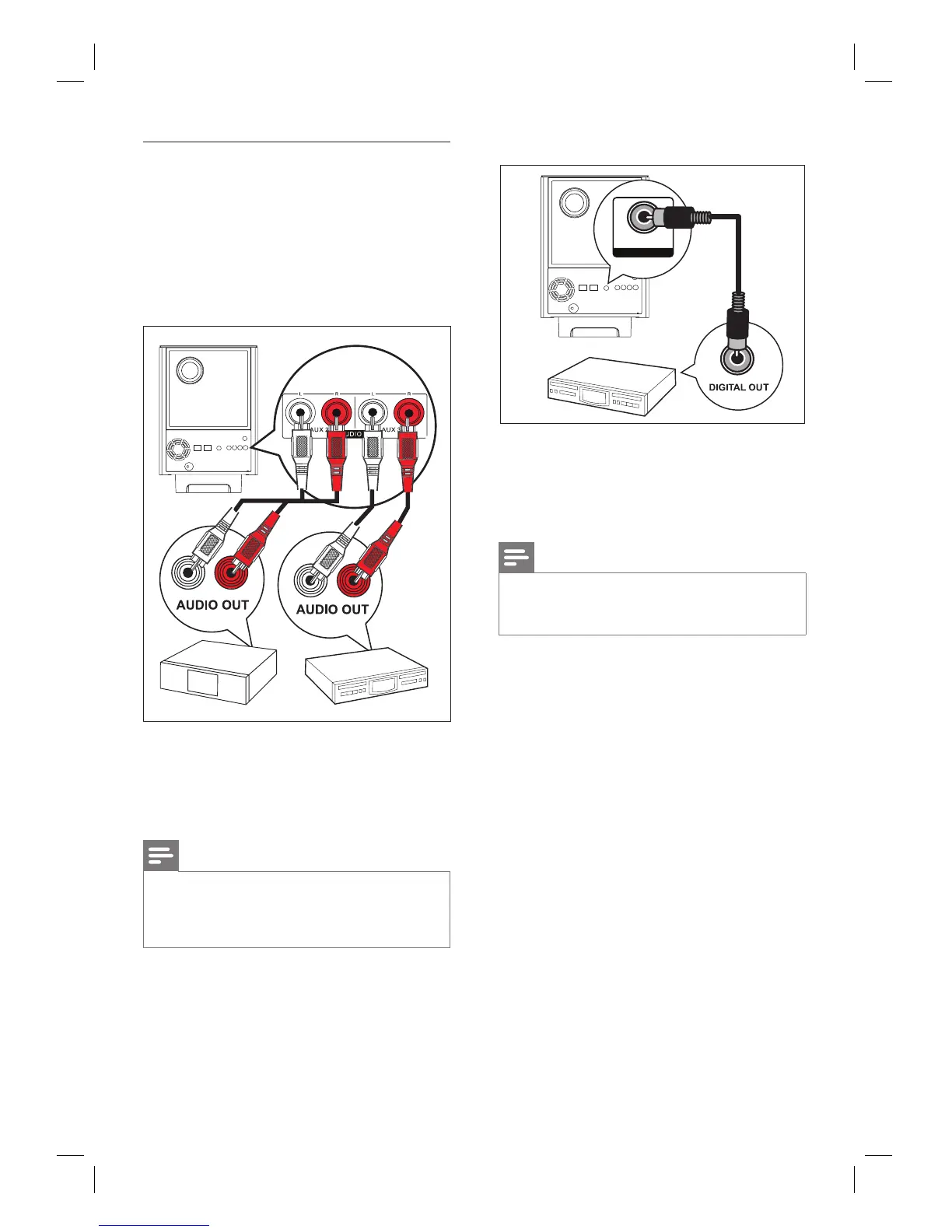
Connect audio from cable box/
recorder/game console
You can choose to connect to analogue or
digital socket depending on the device
capabilities.
Connect to analogue sockets
1 Connect an audio cable (not supplied)
from the AUDIO IN-AUX2 or AUX3
sockets on the subwoofer to the AUDIO
OUT sockets on the device.
Note
To listen to the audio output from this connection,
press AUX/DI /MP3 LINK repeatedly until ‘AUX2
INPUT’ or ‘AUX3 INPUT’ is displayed on the display
panel.
•
Connect to digital socket
COAXIAL
DIGITAL IN
1 Connect a coaxial cable (not supplied)
from the DIGITAL IN-COAXIAL socket
on the subwoofer to the COAXIAL/
DIGITAL OUT socket on the device.
Note
To listen to the audio output from this connection,
press AUX/DI /MP3 LINK repeatedly until ‘DIGITAL
INPUT’ is displayed on the display panel.
•













 To Next Page