English
EN 17
Connect
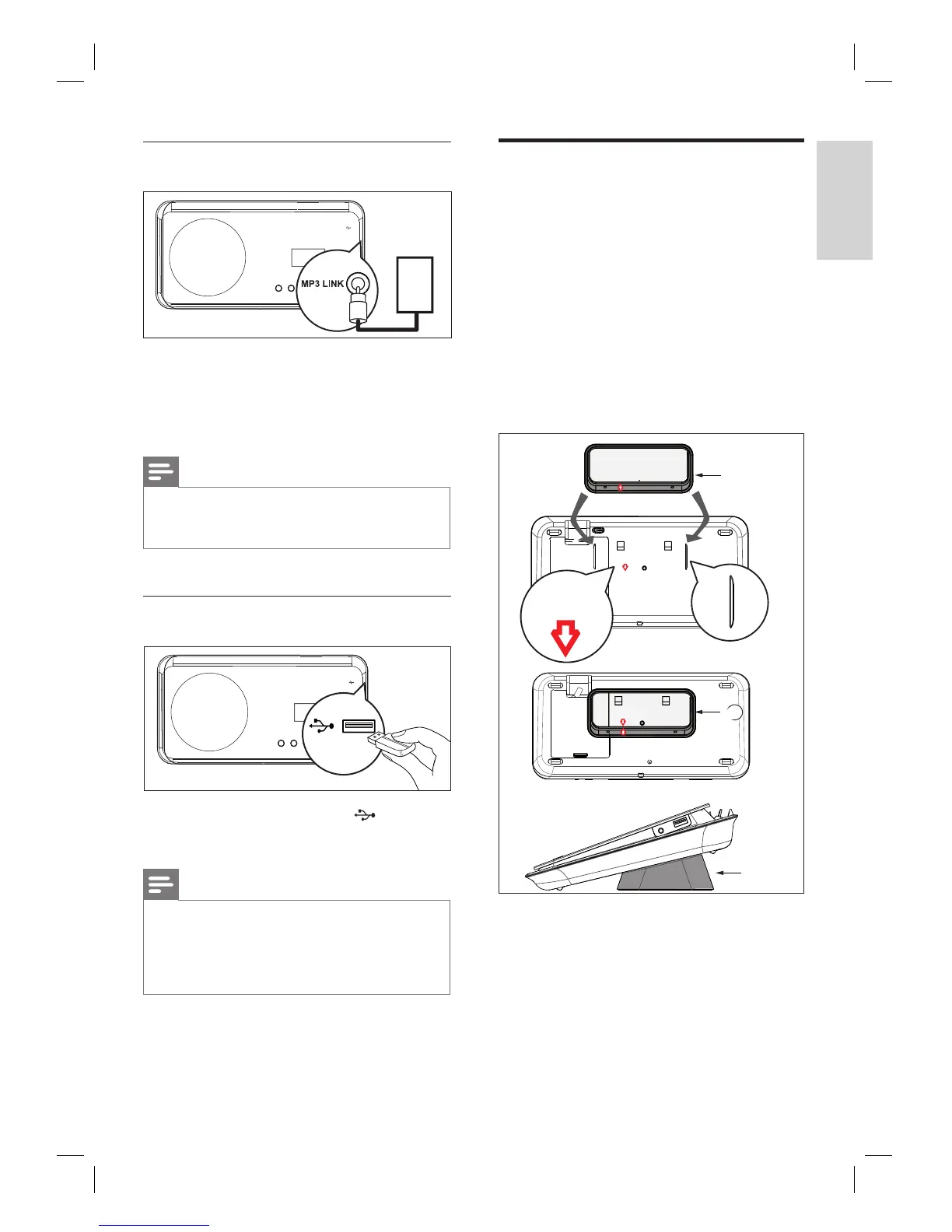
Connect portable media player
MP3 LINK
MP3
1 Connect a 3.5mm stereo audio cable (not
supplied) from the MP3 LINK socket on
this unit to the phone socket on your
portable media player (such as MP3 player).
Note
To listen to the audio output from this connection,
press AUX/DI /MP3 LINK repeatedly until ‘MP3
LINK’ is displayed on the display panel.
•
Connect USB device
1 Connect the USB device to (USB)
socket on this unit.
Note
This DVD Home Theatre unit can only play/view
MP3, WMA, DivX (Ultra) or JPEG fi les that are
stored on such devices.
To listen to the audio output from this connection,
press USB.
•
•
Attach table stand to DVD
Home Theatre unit
1
Ensure all the required cables are
connected to this unit and close the rear
cover.
2 Attach the table stand bracket to the rear
of this unit.
Align the arrow indicators for correct
positioning and placement.
Use the protrude panels to hold the
table stand bracket.
Align Arrow
With table Stand
Align Arrow
With table Stand
Align Arrow
With table Stand
A
A
A
A table stand bracket
•
•













 To Next Page