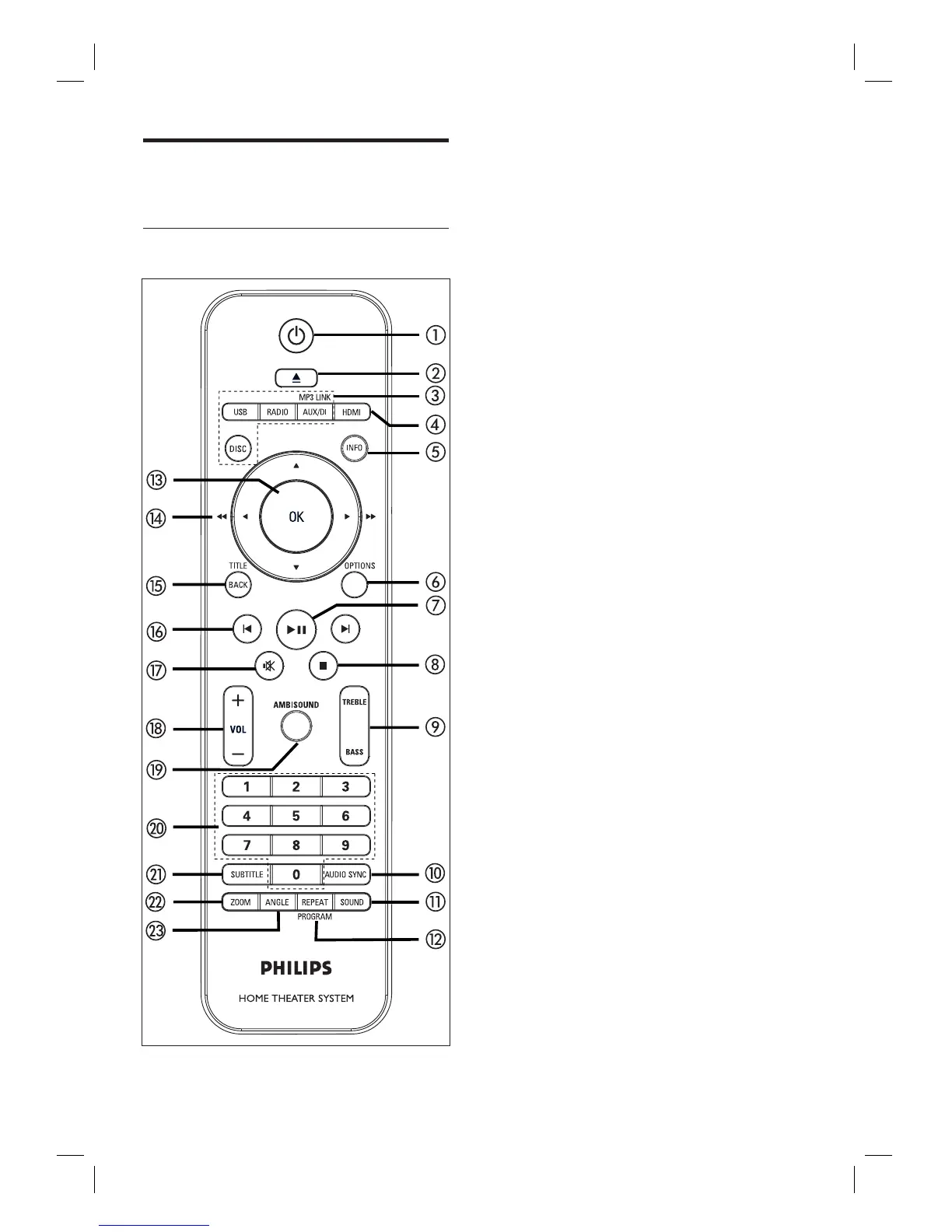
8 EN
Product overview
Remote control
a 2
Turn on this unit or turn off to standby
mode.
Press and hold to turn off this unit and
all the HDMI CEC compliant TV/
devices (for EasyLink control only).
b Z (Open/Close)
Open or close the disc compartment.
c Source buttons
DISC: switch to DISC mode. While in
disc mode, access or exit disc menu.
USB: switch to USB mode.
RADIO: switch to FM band.
AUX/DI /MP3 LINK: switch to AUX
SCART, AUX1 INPUT, AUX2 INPUT,
AUX3 INPUT, DIGITAL INPUT or
MP3 LINK that corresponds to the
socket you used to connect the
external device.
d HDMI
Select a video resolution setting for
HDMI output.
e INFO
Display the current status or disc
information.
Display photo fi les in 12 thumbnails
view.
f OPTIONS
Access or exit Options menu (this
menu provides various setting options).
g u (Play/Pause)
Start or pause disc play.
RADIO: start auto radio installation
(only available for fi rst time setup).
•
•
•
•
•
•
•
•
•
•
•
•
•













 To Next Page