English
EN 41
Adjust settings
[ TV Type ]
Change this setting only if the video does
not appear correctly. By default, this
setting matches the most common setting
for TVs in your country.
[ PAL ] – for PAL-system TV.
[ NTSC ] – for NTSC-system TV.
[ Multi ] – for TV that is compatible
with both PAL and NTSC.
[ TV Display ]
Select the screen format according to how
you want the picture to appear on your
TV.
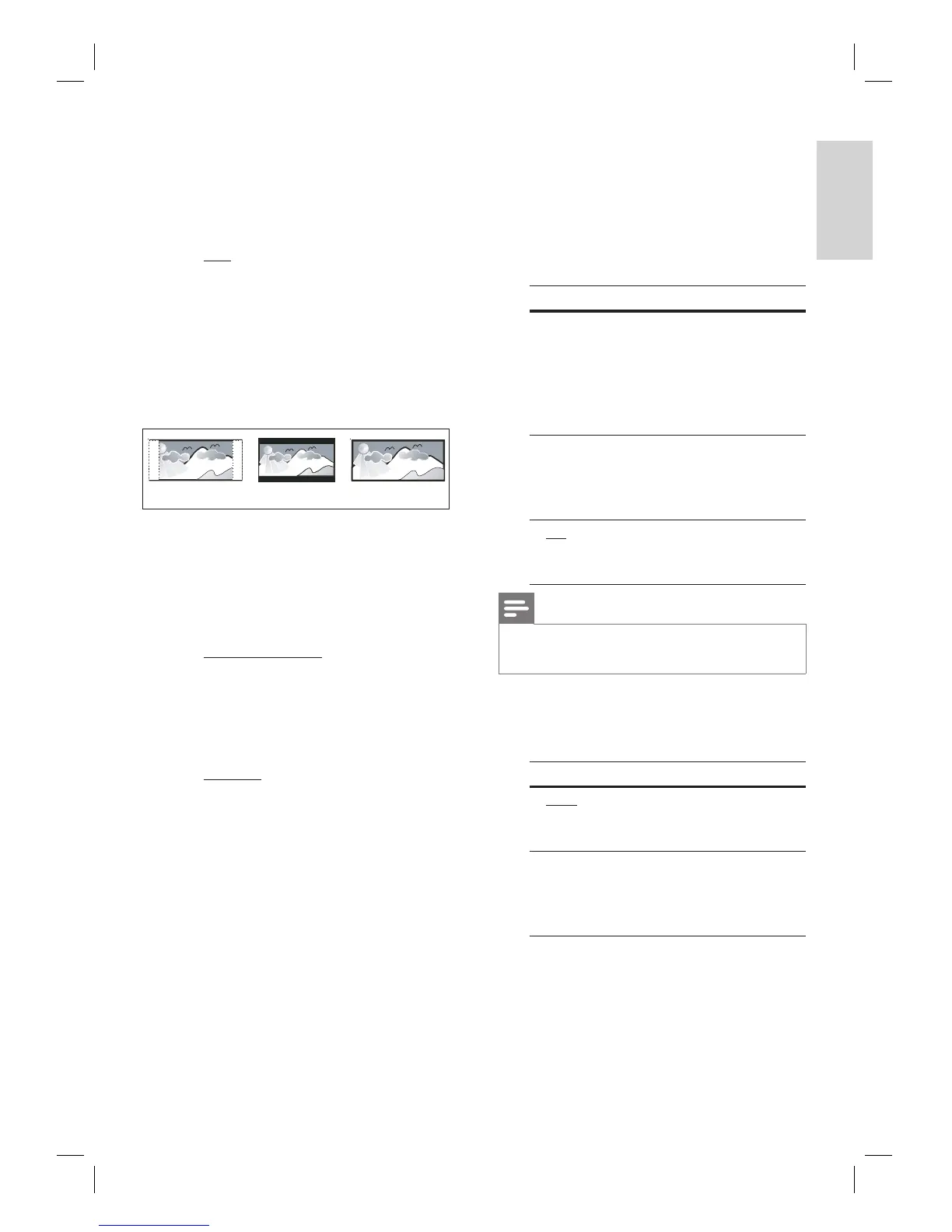
4:3 Letter Box (LB)
4:3 Pan Scan (PS)
16:9 (Wide Screen)
[ 4:3 Pan Scan ] – for standard TV, a
full-height screen display with the sides
trimmed.
[ 4:3 Letter Box ] – for standard TV, a
‘wide-screen’ display with black bars on
the top and bottom.
[ 16:9 Wide Screen ] – for wide-screen
TV (frame ratio 16:9).
[ Picture Settings ]
Select a predefi ned set of picture colour
settings or customise your personal setting.
[ Standard ] – original colour setting.
[ Bright ] – vibrant colour setting.
[ Soft ] – warm colour setting.
[ Personal ] – customise the colour
setting. Set the level of brightness,
contrast, tint and colour saturation in
the menu, then press OK.
•
•
•
•
•
•
•
•
•
•
[ HDMI Setup ]
When you connect this unit and TV with
HDMI cable, select the best HDMI setup
that your TV can support.
[ Wide Screen Format ] – defi ne the
wide screen format for disc play.
Options Descriptions
[ Superwide ] Centre position of the
screen is stretched less
than the side. This
setting is only applicable
if the video resolution is
set to 720p or 1080i/p.
[ 4:3 Pillar
Box ]
No stretching of the
picture. Black bars are
displayed on both sides
of the screen.
[ Off ] Picture will be displayed
according to the format
of the disc.
Note
This setting is only available if you have set the [ TV
Display ] setting to [ 16:9 Wide Screen ].
•
[ HDMI Video ] – select a video
resolution that is compatible with your
TV display capability.
Options Descriptions
[ Auto ] It detects and selects the
best supported video
resolution automatically.
[ 480p, 576p,
720p, 1080i,
1080p ]
Select a video resolution
that best supported by
your TV. See your TVs
manual for details.
•
•













 To Next Page