3-1
Various
other Tests
Activated with
ACTION
TEST
SEEPROM FORMAT
TEST
Load default data. Display shows "NEW" for 1 second.
Caution!
All presets from the customer will be lost!!
Disconnect
mains cord
LEAVE SERVICE
TEST PROGRAM
SOURCE / VOLUME
Knob
ROTARY
ENCODER TEST
Display shows value for 2 seconds.
Values increases or decreases in steps of 1 until
0 (Min.) or 40 (Max.) is reached.
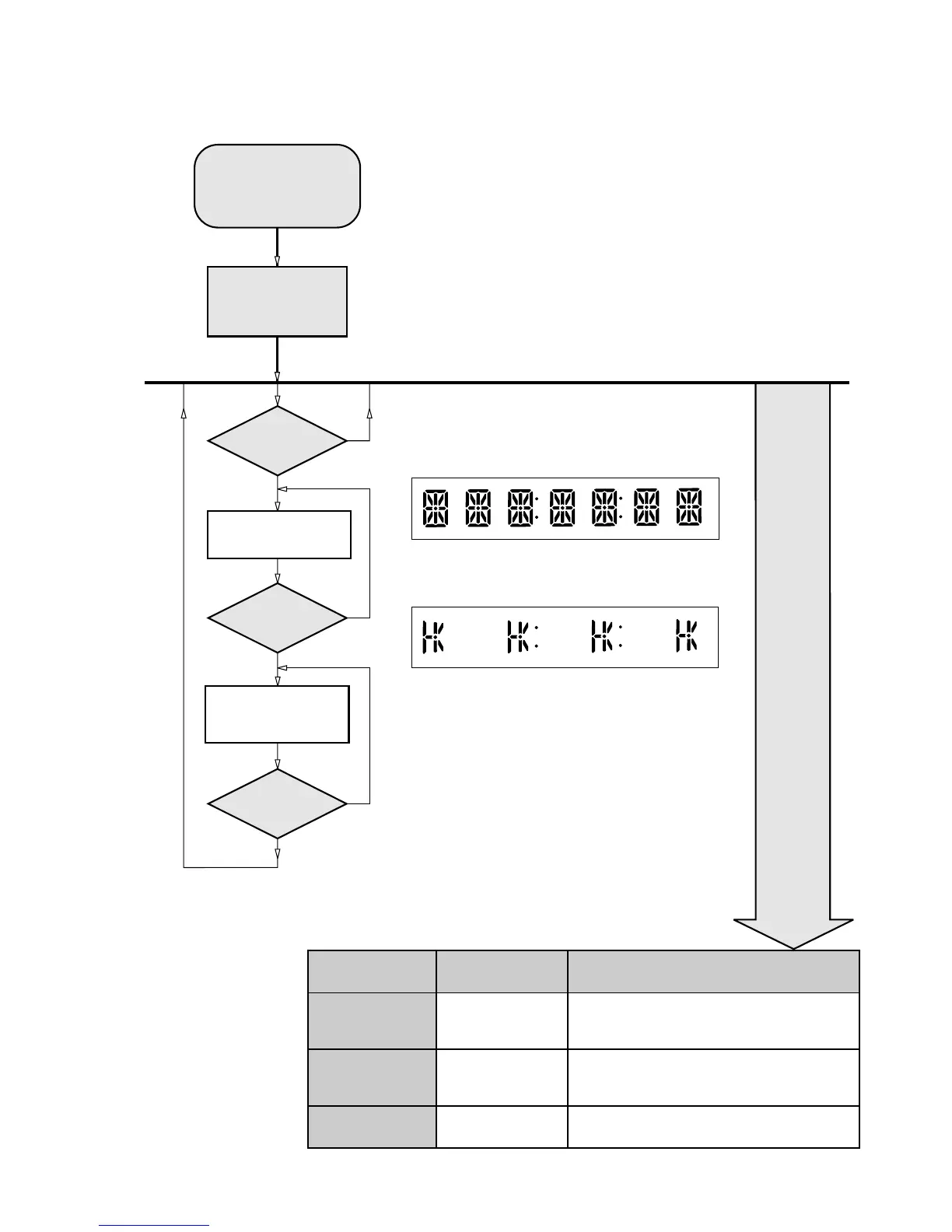
Figure 2
Figure 1
Y
N
Y
N
N
BII
Button pressed?
BII
Button pressed?
DISPLAY
TEST
Display shows Figure 1
Display shows Figure 2
Y
9
Button pressed?
To start service test program
hold S & SOURCE
buttons depressed and
press the STANDBY button*
Display shows the
ROM version
"S-Vyy"
S refers to Service Mode
V refers to Version
yy refers to Software version number of the uProcessor
(counting up from 01 to 99)
SERVICE TEST PROGRAM
LX3600D Service Test Program dd wk0326
MAIN MENU
* Mains power to set must be on
Hold till the Display is shown - ignore last setting info on the display



 To Next Page