EasyManua.ls Logo

Philips MCW770 - Adding music files to the Philips Media Manager (PMM)

Philips MCW770
64 pages
Print Icon
To Next Page IconTo Next Page

To Previous Page IconTo Previous Page
Loading...
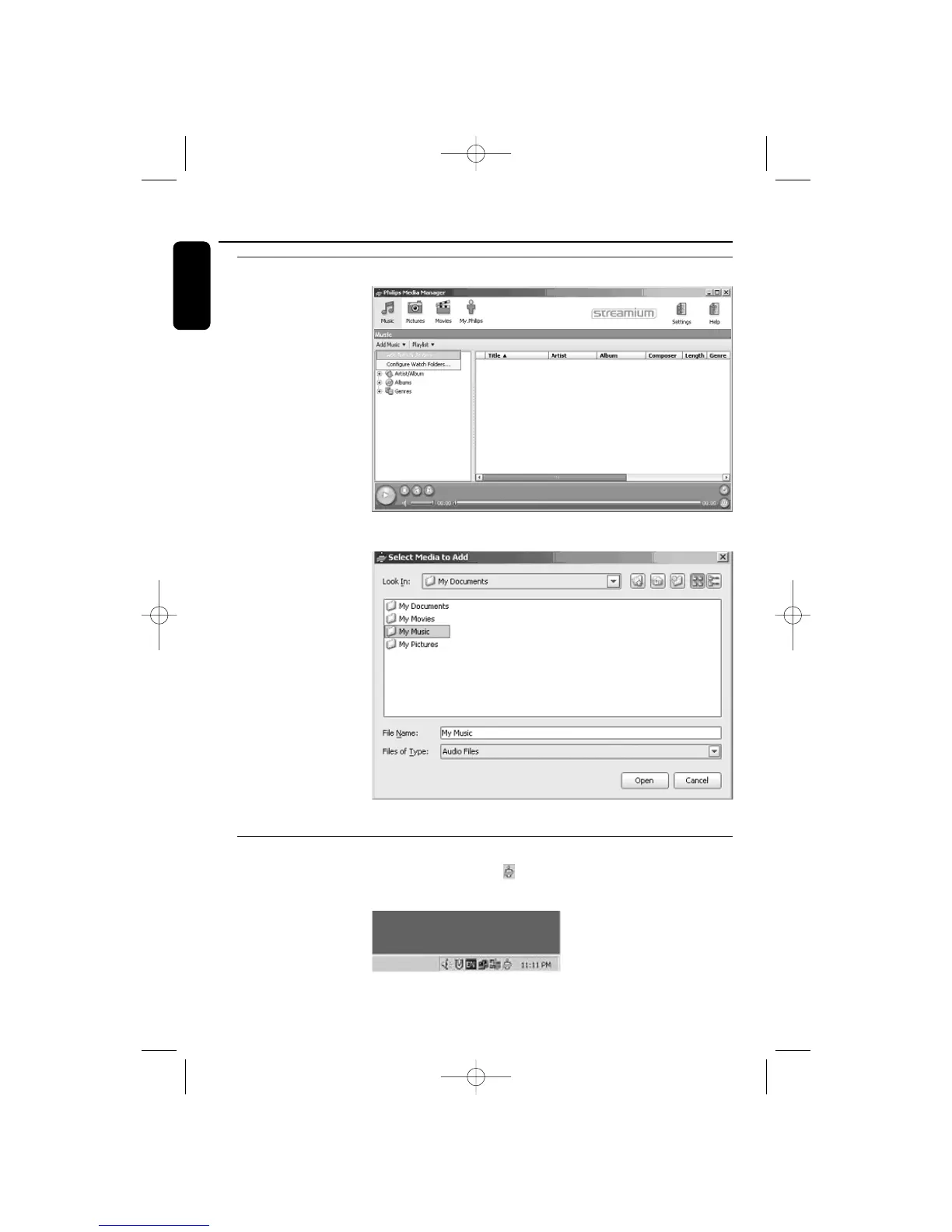
Adding music files to the Philips Media Manager (PMM)
1 Select the media
category Music. Click on
Add Music and then
select ‘Add Files or
Folders...
2 Select a folder or one
or more music files and
click the Open’button
to add the selected
folder or files to the
Media Manager window.
From now on the music
files you added may be
accessed from the
MCW770.
Opening and closing the Philips Media Manager window
You can close the Media Manager window, but the icon will remain active in the task bar of
Windows.The MC W770 will be able to access the music files on your computer only if this
icon is visible. Double-
clicking the icon opens
the Media Manager
window.
22
English
Wireless PC link PMM
MC W770/22.1 eng 7/23/04 16:07 Page 22

Table of Contents

Other manuals for Philips MCW770

Related product manuals