29
English
Integration of MC W770 into an existing (home) network
You can also install the MC W770 in any other, perhaps existing network, which is compliant to
the Wi-Fi or IEEE802.11b,g rules. Please use this kind of installation only if you are
experienced in handling wireless networks and experienced in setting up these
networks! In general there are 2 types of network modes: ad-hoc mode (used for direct
connections to PC’s) and infrastructure mode (used when you have accesspoint(s) in your
network). Both modes are supported.
Before starting this installation process:
– There should be a PC in the network having the dedicated Philips Media Manager Software
installed.Therefore install the Philips Media Manager software from the installation CD only.
– The wireless USB adapter has to be already installed and connected on the PC you use for
installation.
–You should have the
wireless settings for
your network like
SSID and WEP keys
available.
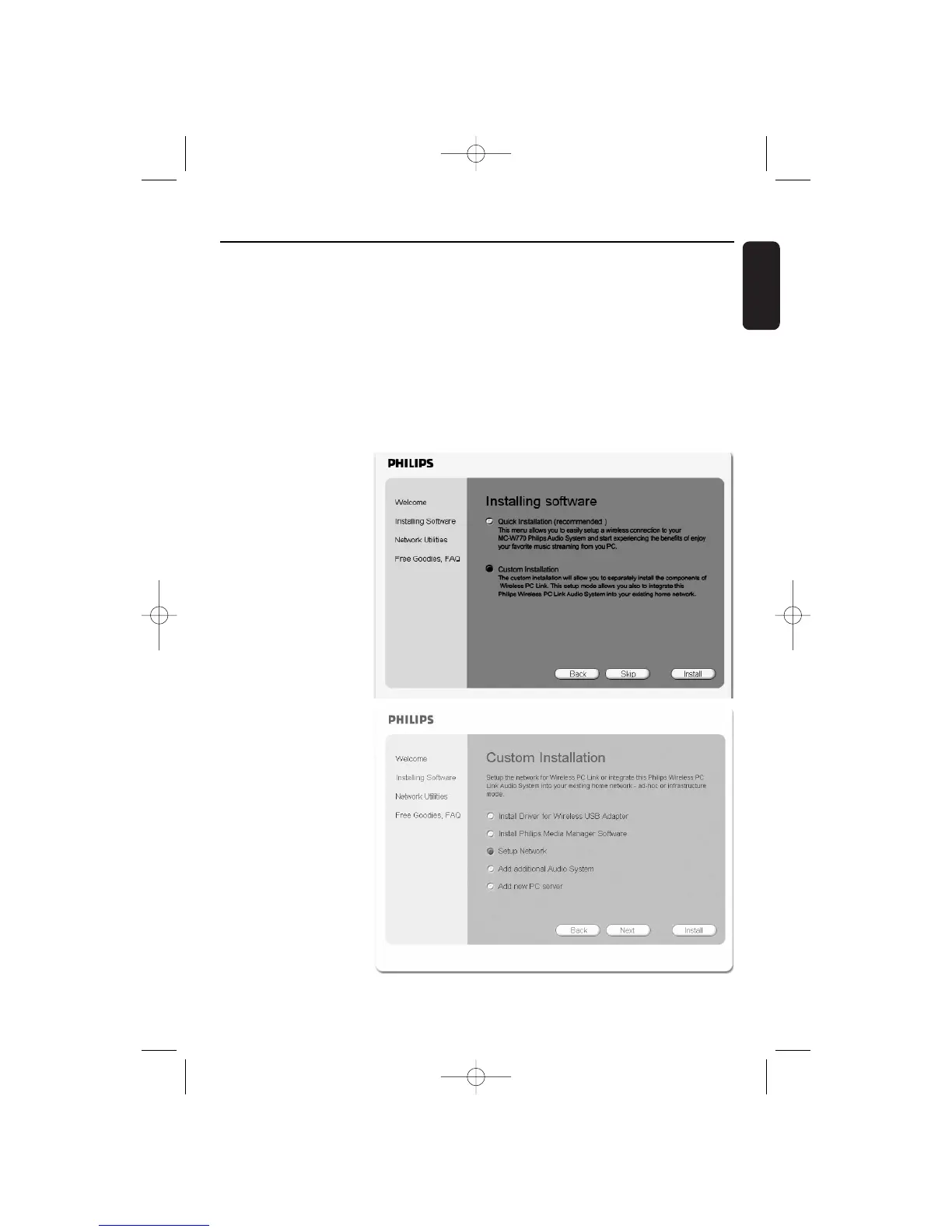
1 Insert the installation
disc.The installation
guide will appear
automatically. If it does
not, start the installation
manually by running
setup_.exe from the
installation CD. Follow
the installation process
until the following
window appears:
Select Custom
Installation and click on
Install.
2 ➜ The following window
appears.
Select Setup Network
and click again on Install.
Custom Installation Wireless PC link


 To Next Page