EasyManua.ls Logo

Philips MCW770 - Page 40

Philips MCW770
64 pages
Print Icon
To Next Page IconTo Next Page

To Previous Page IconTo Previous Page
Loading...
40
English
10 Press PC LINK A on your MC W770 for at least 5 seconds until INSTALLING is scrolled on
the set.
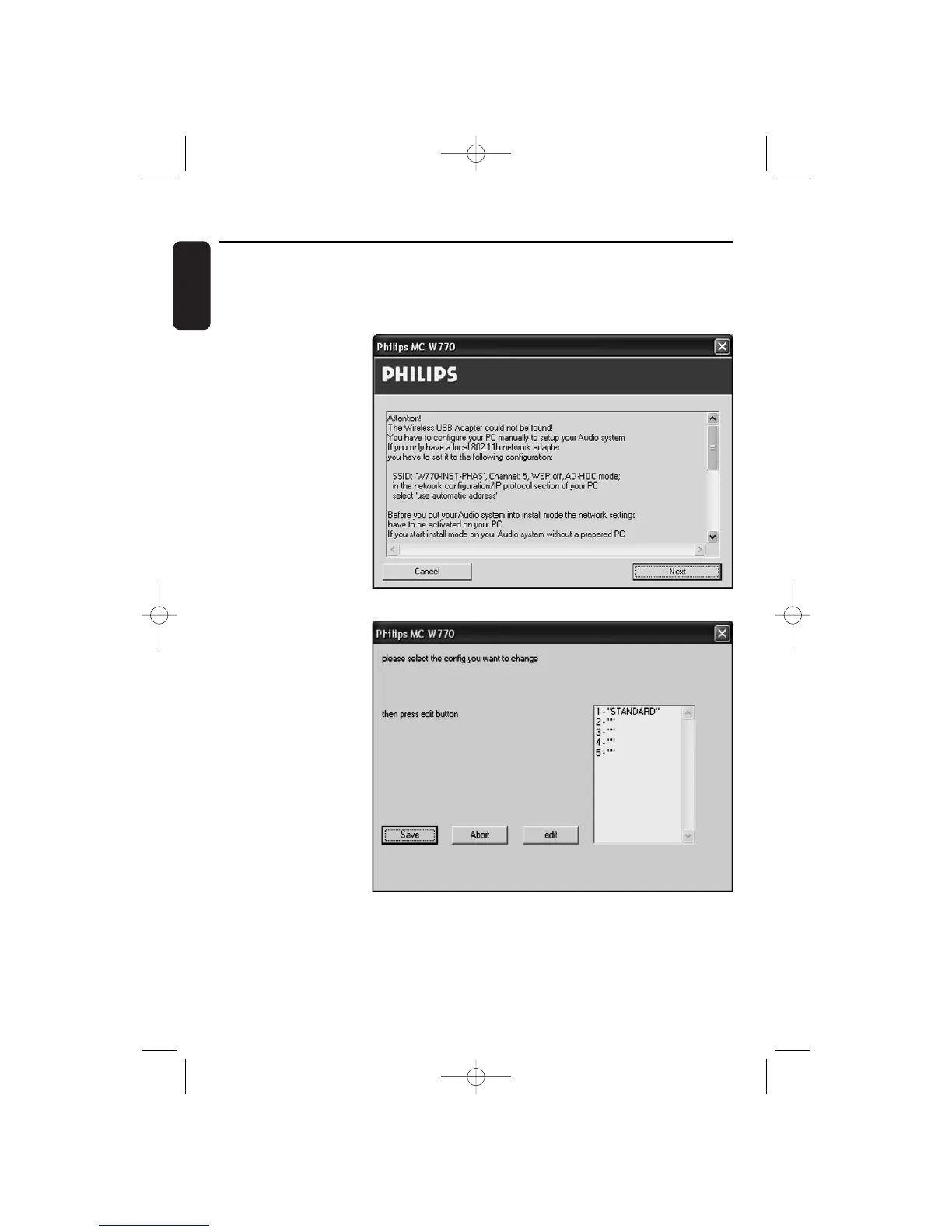
11 Press HOME on your MC W770 for at least 2 seconds until EXPERT INSTALL is scrolled on
the set.
12 Click on Next in the
network setup
programme on your PC.
13 The network setup
programme now
searches for the
MC W770 and reads
out the current
network
configurations from
your set.The
following window will
appear.
Select a network
configuration you want
to change, in the best
case an empty one (“”).
You should not change
STANDARD. Click on
edit.
Wireless PC link
MC W770/22.1 eng 7/23/04 16:07 Page 40

Table of Contents

Other manuals for Philips MCW770

Related product manuals