Connections
Step 3: ConnectingTV
,®®®,
IMPORTANT!
- You only need to make one video
connection from the following options,
depending on the capabilities of yourTV
system.
- S-Video or ComponentVideo
connection provides higher picture
quality. These options must be available
on your TV.
- Connect the DVD system directly to
theTV.
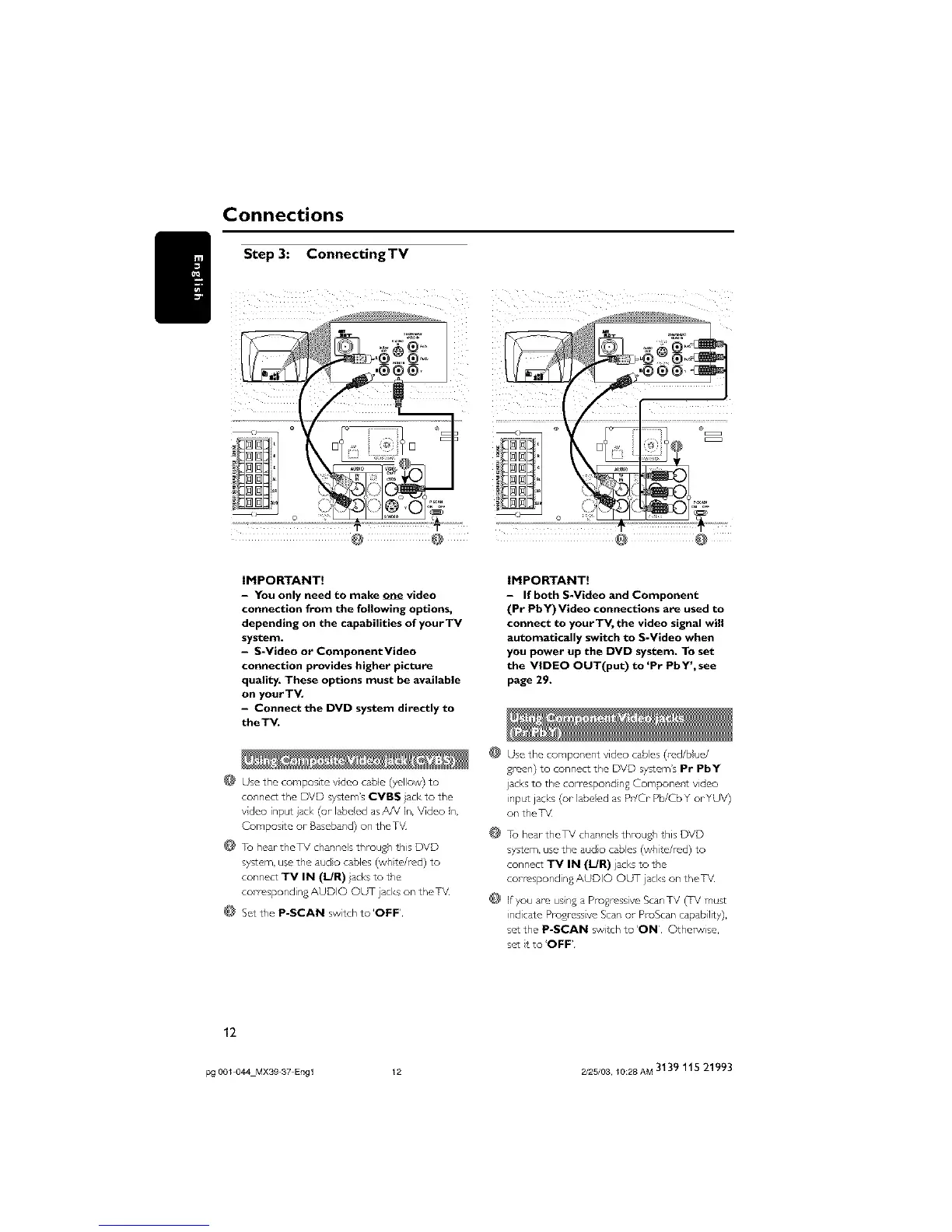
@ Use the composite video cable (yellow) to
connect the DVD system'sCVBS acl<to the
vdco input jacl<(or labeled asAN In, Video In,
Composite or-Baseband)on theTV
@ Tu heartheTV channelsthrough this DVD
system,usethe audo cables(wh te/red) to
connect iV IN (I/R) lacksto the
corresponding AUDIO OUT ]acl<son the TV
@ Setthe P-SCAN switch to'OFF'
IMPORTANT!
- If both S-Video and Component
(Pr PbY)Video connections are used to
connect to yourTV, the video signal will
automatically switch to S-Video when
you power up the DVD system. To set
the VIDEO OUT(put) to 'Pr PbY', see
page 29.
@
@
@
Use the component video cabes (red/blue/
green) to connect the DVD system's Pr PbY
jacks to the correspond ng Component video
inpc¢ jacks (or labeled as Pr/Cr Pb/Cb Y orYUV)
on the TV
To hear theTV channels through this DVD
system, use the audo cables (wh re/red) to
connect TV IN (I/R) acks to the
corresponding AUDIO OUT acl<s on the TV
If you are using a Pro%essive ScanTV (TV must
ind care Progressive Scan or ProScan capab lity),
setthe P-SCAN switch to'ON' Othel_/ise,
sat t to'OFF'
12
pg 001 044 Mx3g 37 Eng 1 12 2/25/03, 10:28 AM 3139 115 21993



 To Next Page