Connections
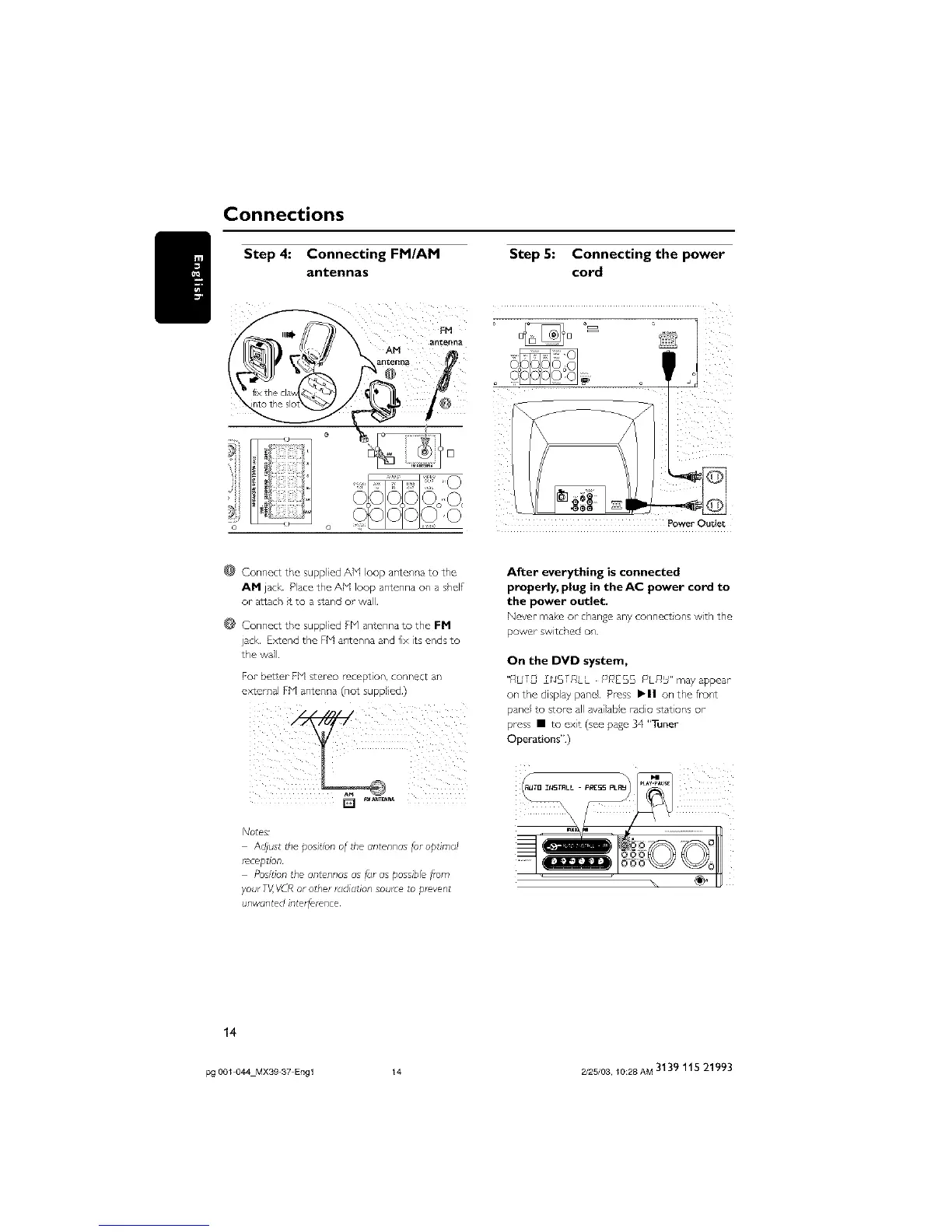
Step 4: Connecting FM/AM
antennas
Step 5: Connecting the power
cord
D
Power- Outlet
@ Connect the supp led AM loop antenna to the
AN jack Pace the Aid loop antenna on a shel
or attach t to a stand or wall
Connect the supplied Fh/ antenna to the FM
jack. E>_end the FI4 antenna and fix its ends to
the wall
For betzer Fid stereo reception, connect an
external Fid antenna (not supp Jc_J)
Adjust the posit_on of the antennas for optimal
r_ception
Posison the antennas as far as possible f,um
your TV,VCR or otl,er radiation source to p_event
unwanted interfelence
After everything is connected
properly, plug in theAC power cord to
the power outlet.
Never-make or changeany connect ons wth the
power switched on
On the DVD system,
"}lbfl, X_,%f_/LL FJkJES5 FJL£_S" may appear
on the display panel¸ Press ,11 on the from
panel to store all available radio stations or
press • to exit (see pade 34 "Tuner
Operations")
\
14
pg 001 044 MX39 37 Engl 14 2/25/03, 10:28 AM 3139 115 21993



 To Next Page