PHILIPS
12no 339 /IL_ 22042
Pallted il (hina
Use this simple and quick way to
watch your favorite DVD movie
and enjoy your Home Cinema
experience!
MX3900D .A4X3950D
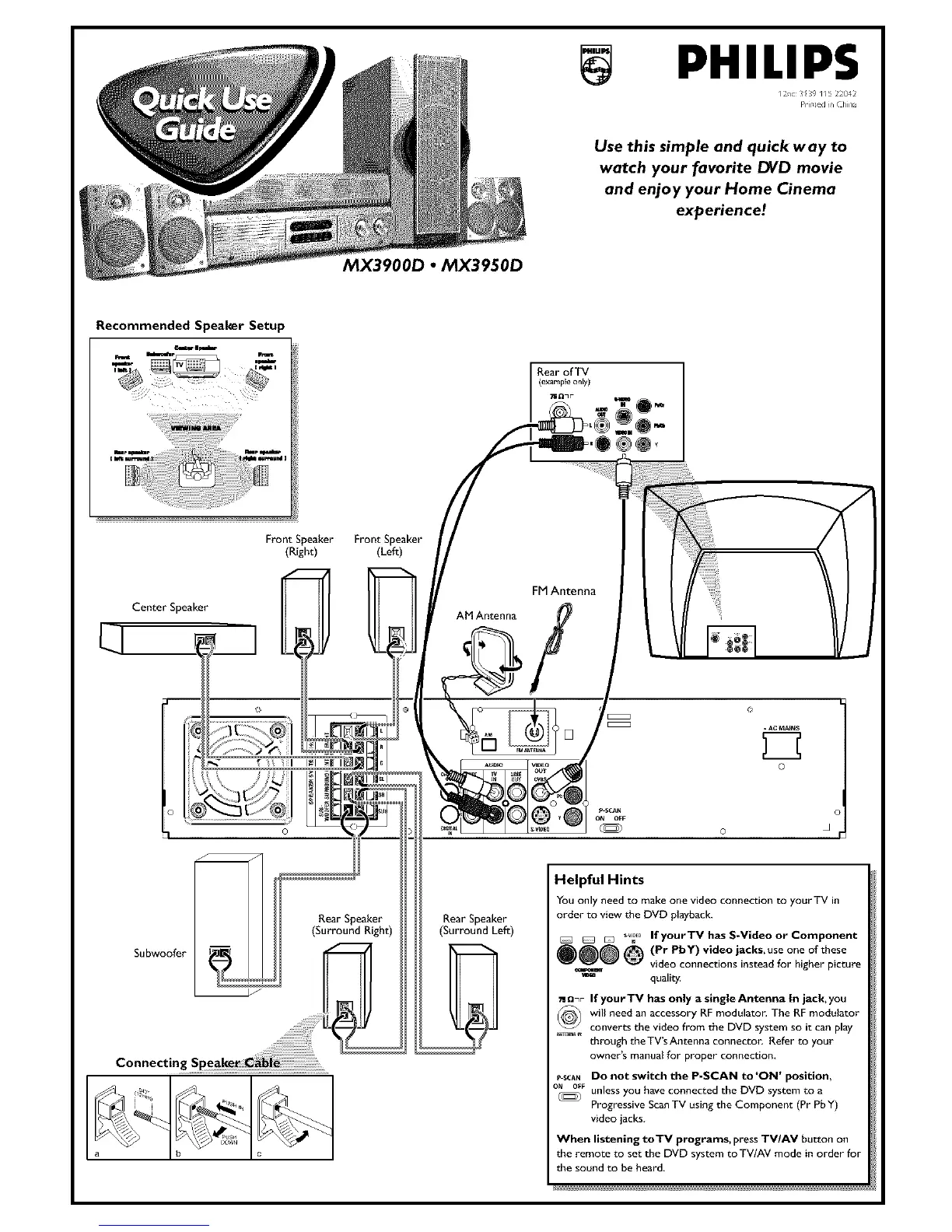
FrontSpeaker FrontSpeaker
(Right) (Le_)
CenterSpeaker
o
1 o
Subwoofer
Rear Speaker
(Surround Right)
FM Antenna
AM Antenna /
Rear Speaker
(Surround Left)
Helpful Hints
You only need to make one video connection to your TV ill
order to view the DVD playback.
__,_o If your TV has S-Video or Component
_)@@ @ (Pr PbY)video jacks, use one of these
video connections instead for higher picture
qualit_
o.F If you rTV has only a single Antenna In jack, you
(_) will need an accessory RFmodulator. The RF modulator
_ converts the videofrom the DVD system so it can play
through theTV'sAntenna connecton Refer to your
owner's manual for proper connection,
p SCAN DO not switch the P-SCAN to ON position,
ON_F unless you have connected the DVD system to a
Progressive Scan TV using the Component (Pr Pb Y)
video jacks.
When listening toTV programs, press TV/AV button on
the remote to set the DVD system toTV/AV mode in order for
the sound to be heard,



 To Next Page