User Guide
4
The Device
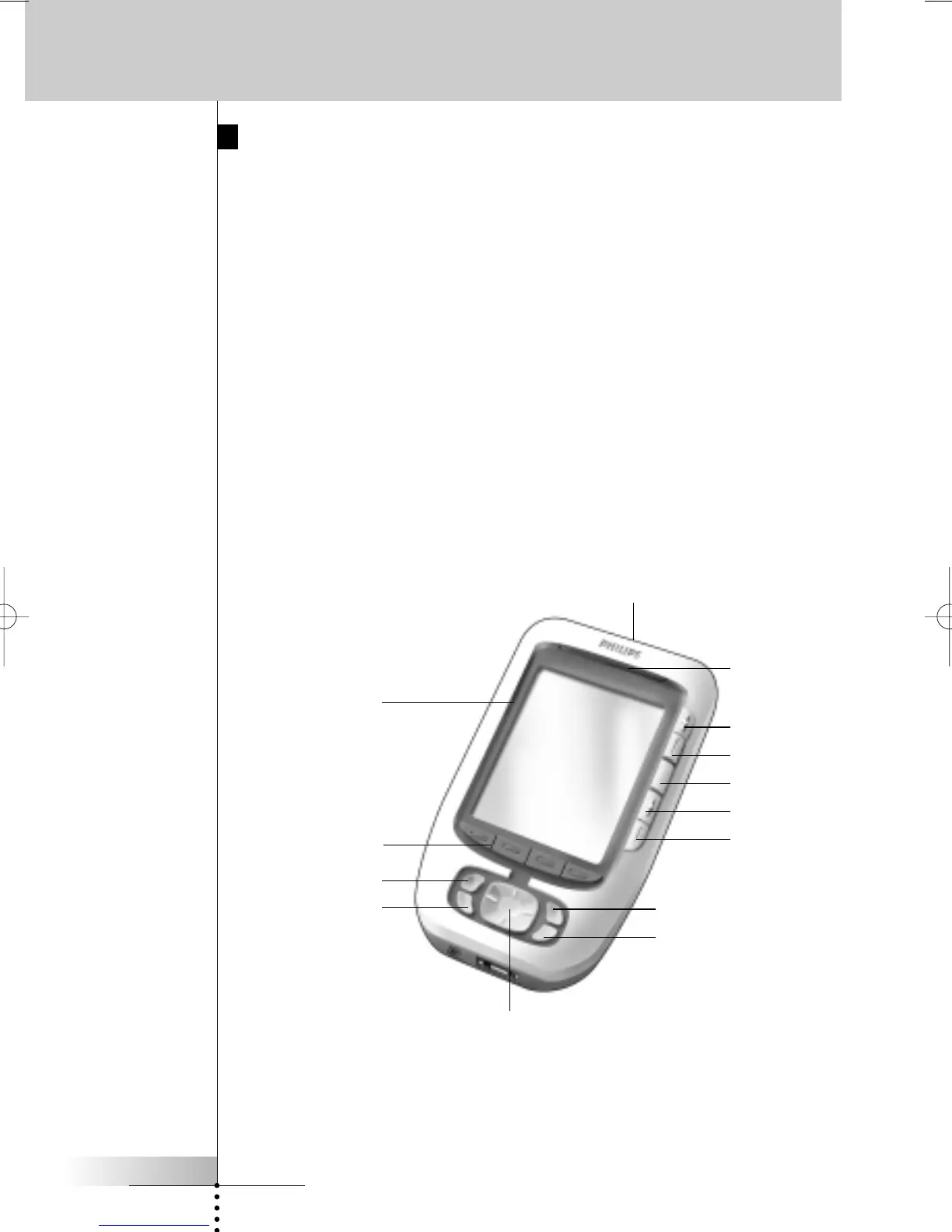
Pronto has several hard buttons. Some are freely programmable, some have a
predefined function:
■ The buttons on the left side of Pronto and the buttons at the right side of the
screen have predefined functions.
■ The utter left button below the touch screen has a predefined function.
The two middle buttons below the touch screen and the utter right button are
freely programmable.
You can reprogram the function of these buttons and change the label on the
touch screen.
■ The cursor and the OK and Home buttons on the right side of the cursor are
programmed to operate devices, for instance for navigating through the on
screen menu of your TV.
All these buttons are freely programmable. However, these buttons each have
a predefined function. If you learn one of these buttons or assign a macro to it,
its predefined function for that database will be permanently lost.
Taking a First Look
Learning eye
LCD touch screen
Buttons
Free programmable
Toggle button
Cursor
Volume up
Volume down
Mute
Channel up
Channel down
Light sensor
OK
Home









 To Next Page