17
English
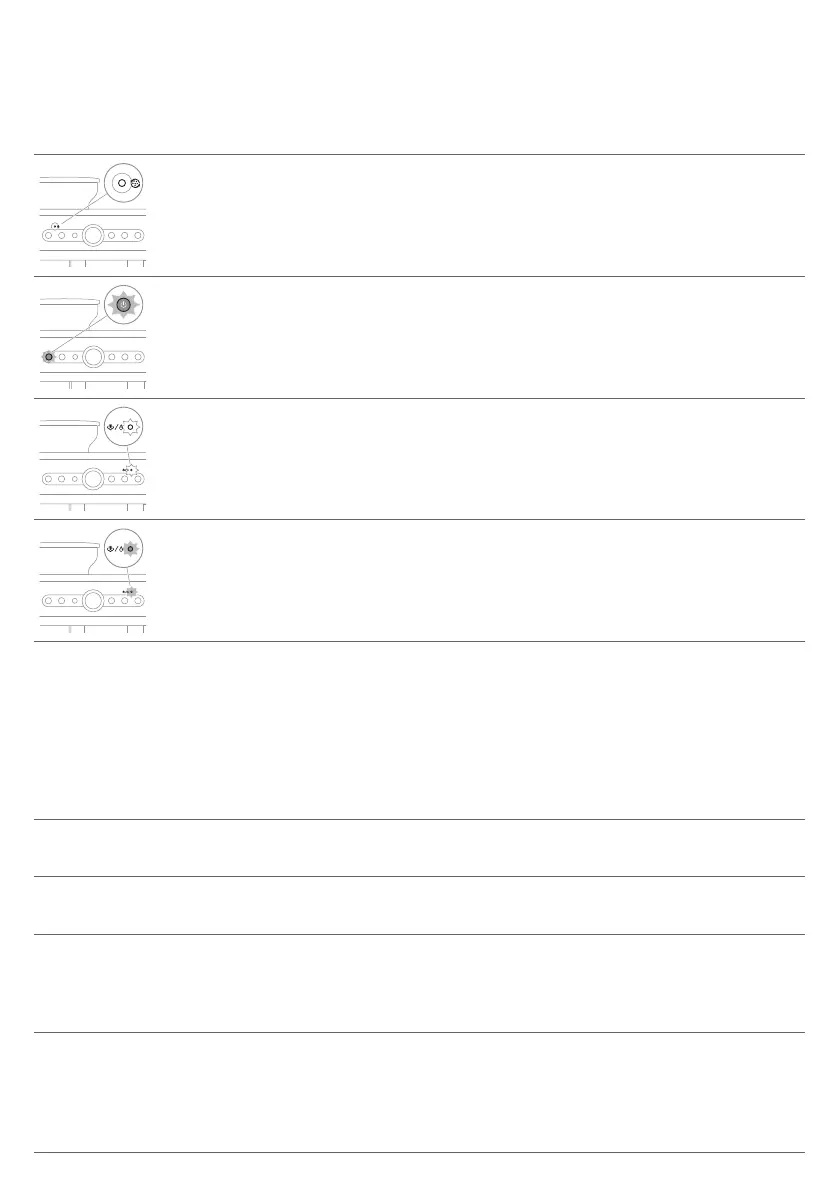
Warning icons
Warning
icon
Solution
The descaling/cleaning indicator is on: Descale the coffee machine (see
'Descaling').
The On/Off button indicator flashes: The coffee machine is heating up.
The steam/hot water indicator flashes white: The coffee machine is heating up to
use the hot water/steam function.
The steam/hot water indicator flashes red: The coffee machine is indicating a lack
of water. The cause may be 1. lack of water in the water tank; or 2. excessive
brewing pressure.
Troubleshooting
This chapter summarizes the most common problems you could encounter with the coffee
machine. For any problem that cannot be solved, please contact your local customer service center.
The contact information is provided on the warranty card.
Problem Cause Solution
The coffee machine
does not start.
The coffee machine is not
connected to a power outlet.
Plug in the coffee machine
The coffee machine
appears to be leaking.
The drip tray is overflowing,
which appears to be a leak.
Empty the drip tray.
The water tank is not in the
correct position.
Re-insert the water tank and push it
down into the coffee machine (see '1.
Installing the bean hopper and filling
the water tank').
The water tank is not fully
inserted, allowing air to be
drawn into the coffee machine.
Ensure the water tank is in the correct
position by removing it, re-inserting it
and pushing it down firmly (see '1.
Installing the bean hopper and filling
the water tank').








 To Next Page