6 Philips · Screeneo U4
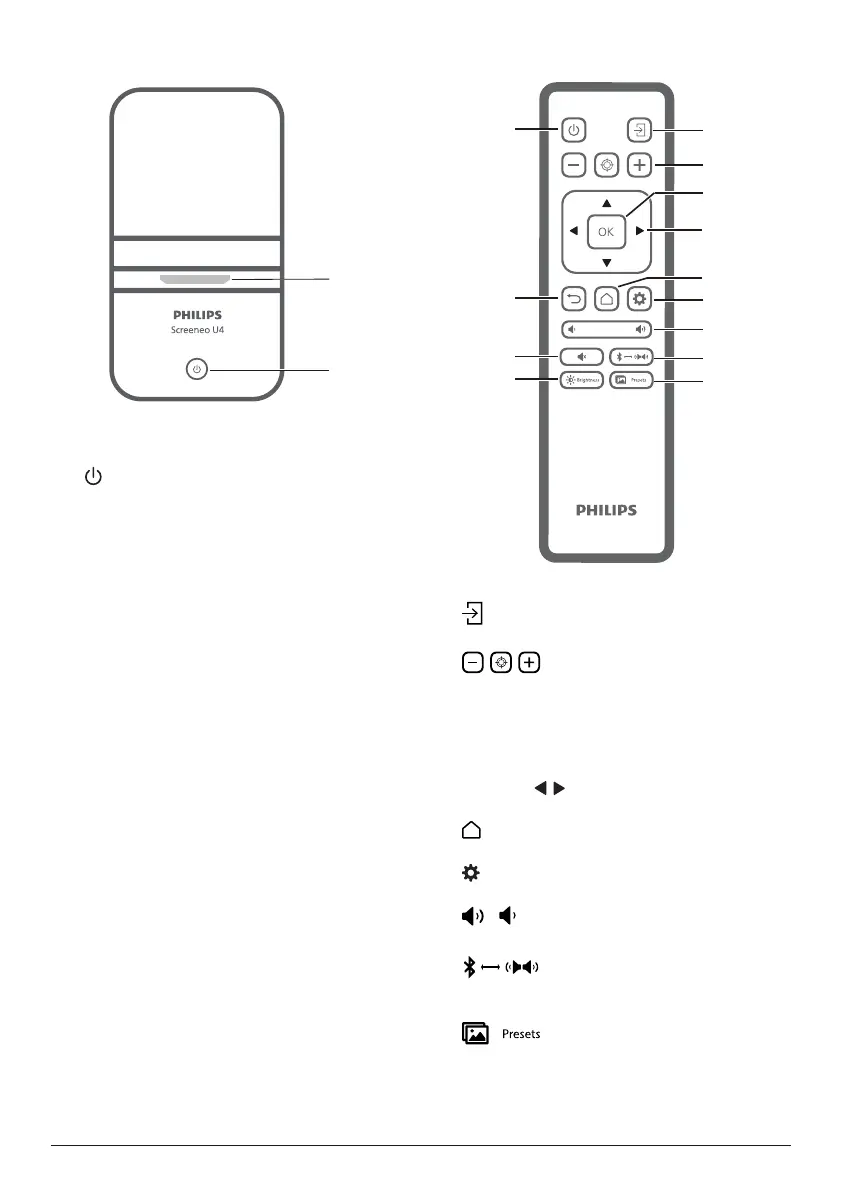
Top view
a
b
a
Projection lens
b
• Switch the projector on or to standby
mode.
• When the projector is on, the LED lights
up in white.
• When the projector is in standby mode,
the LED lights up in red.
• When the projector is in Bluetooth
speaker mode, the LED lights up in
blue.
Remote control
a
b
c
d
e
g
f
h
i
j
k
l
m
a
Switch to a different input source.
b
Adjust the focus automatically or manually.
c
OK
Confirm a selection on the screen.
d
Navigation buttons (Up, Down, Left, Right)
• Navigate items on the screen.
• Press / to change the value for the
current setting
.
e
Access the home screen.
f
Access the projector's settings menu.
g
/
Increase or decrease the volume.
h
Switch between Bluetooth and internal
speakers
.
i
Toggle between different picture presets
.















 To Next Page