EasyManua.ls Logo

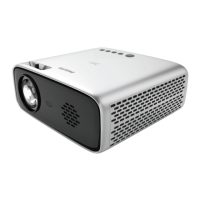
Philips NeoPix Easy+ - User Manual

Philips NeoPix Easy+
22 pages
Print Icon
To Next Page IconTo Next Page
Loading...
User Manual
Register your product and get support at
www.philips.com/support
Mini projector
NeoPix Easy+

Other manuals for Philips NeoPix Easy+

Questions and Answers

Summary

1 General safety information

Repairs

Instructs users not to repair the product themselves and to use authorized service centers.

2 Overview

Power supply

Remote control

Access home menu

3 Initial operation

Placing projector

Guides on how to position the projector for different projection scenarios.

Connecting power supply

Preparing the remote control

Power on and setup

4 Connect to playback devices

Connecting to devices through HDMI

Guides on connecting devices like Blu-ray players or gaming consoles via HDMI.

Connecting to a computer through VGA

Explains how to connect a computer using a VGA cable and audio connection.

5 Wireless projection with Android devices

6 Wireless projection with iOS devices

7 Connect to wireless speaker

8 Media playback

Movie playback

Details how to play movie files from USB or Micro SD cards.

Music playback

Explains how to play music files from USB or Micro SD cards.

9 Change settings

10 Service

Update software

Explains how to update the projector's software via Internet or USB.

Troubleshooting

Provides initial steps for troubleshooting common projector issues.

Summary

1 General safety information

Repairs

Instructs users not to repair the product themselves and to use authorized service centers.

2 Overview

Power supply

Remote control

Access home menu

3 Initial operation

Placing projector

Guides on how to position the projector for different projection scenarios.

Connecting power supply

Preparing the remote control

Power on and setup

4 Connect to playback devices

Connecting to devices through HDMI

Guides on connecting devices like Blu-ray players or gaming consoles via HDMI.

Connecting to a computer through VGA

Explains how to connect a computer using a VGA cable and audio connection.

5 Wireless projection with Android devices

6 Wireless projection with iOS devices

7 Connect to wireless speaker

8 Media playback

Movie playback

Details how to play movie files from USB or Micro SD cards.

Music playback

Explains how to play music files from USB or Micro SD cards.

9 Change settings

10 Service

Update software

Explains how to update the projector's software via Internet or USB.

Troubleshooting

Provides initial steps for troubleshooting common projector issues.

Philips NeoPix Easy+ Specifications

General IconGeneral
Brightness2600 lumens
Contrast Ratio3000:1
Built-in SpeakerYes (3W)
Keystone CorrectionManual
TechnologyLCD
Light SourceLED
LED Lifetime30, 000 hours
Throw Ratio1.4:1
Aspect Ratio16:9
Focus AdjustmentManual
Integrated Media PlayerYes
Wireless Screen MirroringNo
Power SupplyAC 100-240V, 50/60Hz
ConnectivityHDMI, USB
Weight860g
Resolution800 x 480 pixels
Dimensions207 x 150 x 84 mm

Related product manuals