EasyManua.ls Logo

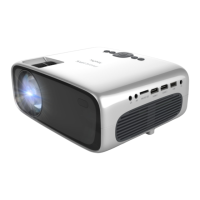
Philips NeoPix Ultra One - User Manual

Philips NeoPix Ultra One
2 pages
Print Icon
To Next Page IconTo Next Page
Loading...
VGA
MICRO SDAV HDMI
TM
1 HDMI
TM
2 USB DC
NeoPix
2 sec
NeoPix
NeoPix
OK
FCC ID:2ASRT-NPX641
This device complies with part 15
of the FCC Rules. Operation is
subject to the following two
conditions: (1) This device may
not cause harmful interference,
and (2) this device must accept
any interference received,
including interference that may
cause undesired operation.
MICRO SDAV HDMI
TM
1 HDMI
TM
2 USB DC
microSD
5C
41F
35C
95F
Home projector
NeoPix Ultra One
Quick Start
Guide
Quick Start
Guide
Quick Start
Guide
Quick Start
Guide
NeoPix
NeoPix
Quick
Start Guide
Download the full user manual at:
www.philips.com/support and register
your product for further support
Screeneo Innovation SA
Route de Lully 5C
1131 - Tolochenaz - Switzerland
www.philips.com
philips.projector.eu@screeneo.com
EUROPEAN Service Center:
Euro Repair Center
Europa-Allee-77
54343 Föhren
Germany
NORTH AMERICA Service Center:
Cooper General Global Services, Inc.
Attn: Screeneo/Philips
920 Minters Chapel Road, Suite 600
Grapevine, TX 76051
Philips and the Philips Shield Emblem are
registered trademarks of Koninklijke Philips
N.V. and are used under license. Screeneo
Innovation SA is the warrantor in relation to the
product with which this booklet was packaged.
2022 © Screeneo Innovation SA
All right reserved
4
1
2
Power
3
OnRemove lens cover
6
5
Focus
Keystone
Multimedia Interface, HDMI trade dress and
the HDMI Logos are trademarks or registered
trademarks of HDMI Licensing
Administrator, Inc.
Question and Answer IconNeed help?

Do you have a question about the Philips NeoPix Ultra One and is the answer not in the manual?

Summary

Initial Setup and Operation

Focus Adjustment

Adjusts the projector's focus for a clear image. Located on the front.

Lens Cover Removal

Instructions on how to safely remove the projector's lens cover.

Powering the Projector

Guides on connecting and turning on the projector.

Keystone Correction

Adjusts the image to correct trapezoidal distortion when projected at an angle.

Safety and Environmental Precautions

Laser Beam Warning

Avoid direct eye exposure to the laser light source.

UV Radiation Hazard

Do not expose the projector to direct sunlight or UV sources.

Electrical Shock Risk

Ensure proper grounding and avoid use in wet environments.

Hearing Protection

Extended exposure to loud sounds may affect hearing.

Temperature Considerations

Operate the projector within the specified temperature range.

Physical Handling

Handle the projector with care to prevent damage from drops.

Projector Controls and Connectivity

Adjustment Knob

Physical knob for adjusting projector settings or focus.

Navigation Keys

Buttons for navigating menus and confirming selections.

Remote Control Overview

Diagram and explanation of projector remote control buttons.

Connecting Devices via HDMI

Instructions for connecting phones and tablets using HDMI adapters.

Summary

Initial Setup and Operation

Focus Adjustment

Adjusts the projector's focus for a clear image. Located on the front.

Lens Cover Removal

Instructions on how to safely remove the projector's lens cover.

Powering the Projector

Guides on connecting and turning on the projector.

Keystone Correction

Adjusts the image to correct trapezoidal distortion when projected at an angle.

Safety and Environmental Precautions

Laser Beam Warning

Avoid direct eye exposure to the laser light source.

UV Radiation Hazard

Do not expose the projector to direct sunlight or UV sources.

Electrical Shock Risk

Ensure proper grounding and avoid use in wet environments.

Hearing Protection

Extended exposure to loud sounds may affect hearing.

Temperature Considerations

Operate the projector within the specified temperature range.

Physical Handling

Handle the projector with care to prevent damage from drops.

Projector Controls and Connectivity

Adjustment Knob

Physical knob for adjusting projector settings or focus.

Navigation Keys

Buttons for navigating menus and confirming selections.

Remote Control Overview

Diagram and explanation of projector remote control buttons.

Connecting Devices via HDMI

Instructions for connecting phones and tablets using HDMI adapters.

Philips NeoPix Ultra One Specifications

General IconGeneral
Projection TechnologyDLP
Contrast Ratio3000:1
Aspect ratio16:9
Focus adjustmentManual
Wi-FiYes
BluetoothYes
Light sourceLED
Projection image sizeup to 120 inches
Keystone CorrectionVertical ±40°
Wireless screen mirroringYes
ConnectionsHDMI, USB, 3.5mm audio out
LED lifetimeup to 30, 000 hours
Resolution1920 x 1080 pixels
Resolution support1920 x 1080p

Related product manuals