EasyManua.ls Logo

Philips NeoPix Ultra 2+ - User Manual

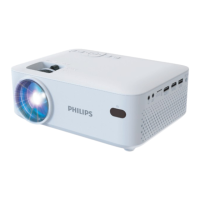
Philips NeoPix Ultra 2+
25 pages
Print Icon
To Next Page IconTo Next Page
Loading...
User Manual
Register your product and get support at
www.philips.com/support
NeoPix Ultra 2
+
Home projector

Other manuals for Philips NeoPix Ultra 2+

Questions and Answers

Summary

Introduction

About this user manual

Explains the purpose and content of the user manual.

Symbols used

Explains symbols used in the manual for tips and warnings.

Customer service centre

Provides contact information for support and online resources.

General safety information

Setting up the product

Instructions for safe placement and operation of the projector.

Repairs

Guidance on product repair and warranty voiding.

Power supply

Safety precautions

Important safety notes regarding power usage and cleaning.

Overview

Top view

Identifies and describes the controls on the top of the projector.

Front view

Identifies and describes the front components of the projector.

Side view

Identifies and describes the side ports and connections of the projector.

Rear view

Identifies and describes the rear ports and connections of the projector.

Remote controls

Android TV remote control

Details the buttons and functions of the Android TV remote.

Projector remote control

Functions and buttons

Explains the functions and buttons of the projector's dedicated remote.

Initial setup

Place the projector

Instructions for positioning the projector for optimal use.

Connect the Android TV Dongle

Steps to connect the Android TV Dongle to the projector.

Connect to power supply

Guide on connecting the projector to a power source safely.

Prepare the remote controls

Instructions for inserting batteries into the remote controls.

Power on and set up the projector

Steps to turn on the projector and initial setup.

Screen size adjustment

How to adjust the projected image size.

Digital zooming

Using digital zoom to adjust screen size.

Screen height adjustment

Adjusting the screen height using the angle adjustment knob.

Image focus adjustment

Adjusting image sharpness using the focus knob.

Image shape adjustment

Adjusting image shape using the keystone adjustment knob.

Set up Android TV

Guide for initial setup of the Android TV interface.

Use Android TV

Navigate Android TV

Instructions on using the remote to navigate the Android TV interface.

Configure Android TV

How to access and change Android TV settings.

Use a wired keyboard;mouse

Connecting and using wired input devices with Android TV.

Use a Bluetooth device

Pairing and using Bluetooth devices with Android TV.

Cast content to Android TV

Instructions for casting media from mobile devices to the projector.

Connect to playback devices

Connect to devices through HDMI

Steps to connect devices via HDMI for video and audio output.

Connect to devices through AV

Steps to connect devices via AV for video and audio output.

Connect to a computer through VGA

How to connect a computer using a VGA cable.

Connect to external speakers or headphones

How to connect audio output devices for enhanced sound.

Play videos from storage devices

Accessing and Playing Media

Steps to access and play video files from USB or MicroSD.

Change settings

Change Android TV settings

How to access and modify various Android TV settings.

Change projector settings

How to adjust picture, sound, language, and other projector settings.

Maintenance

Cleaning

Instructions for safely cleaning the projector and its lens.

Update software

Guide for updating the projector's software via USB.

Troubleshooting

Power cycling

Steps to resolve issues by cycling power on the projector.

Appendixes

Technical data

Detailed specifications and technical information for the projector.

Package content

Lists all items included in the product package.

CE statement

Declaration of conformity with EU essential requirements.

FCC statement

FCC compliance information and labeling requirements.

Canada regulatory compliance

Regulatory compliance information for Canada.

Other notice

Information regarding environmental preservation, packaging, batteries, and trademarks.

Summary

Introduction

About this user manual

Explains the purpose and content of the user manual.

Symbols used

Explains symbols used in the manual for tips and warnings.

Customer service centre

Provides contact information for support and online resources.

General safety information

Setting up the product

Instructions for safe placement and operation of the projector.

Repairs

Guidance on product repair and warranty voiding.

Power supply

Safety precautions

Important safety notes regarding power usage and cleaning.

Overview

Top view

Identifies and describes the controls on the top of the projector.

Front view

Identifies and describes the front components of the projector.

Side view

Identifies and describes the side ports and connections of the projector.

Rear view

Identifies and describes the rear ports and connections of the projector.

Remote controls

Android TV remote control

Details the buttons and functions of the Android TV remote.

Projector remote control

Functions and buttons

Explains the functions and buttons of the projector's dedicated remote.

Initial setup

Place the projector

Instructions for positioning the projector for optimal use.

Connect the Android TV Dongle

Steps to connect the Android TV Dongle to the projector.

Connect to power supply

Guide on connecting the projector to a power source safely.

Prepare the remote controls

Instructions for inserting batteries into the remote controls.

Power on and set up the projector

Steps to turn on the projector and initial setup.

Screen size adjustment

How to adjust the projected image size.

Digital zooming

Using digital zoom to adjust screen size.

Screen height adjustment

Adjusting the screen height using the angle adjustment knob.

Image focus adjustment

Adjusting image sharpness using the focus knob.

Image shape adjustment

Adjusting image shape using the keystone adjustment knob.

Set up Android TV

Guide for initial setup of the Android TV interface.

Use Android TV

Navigate Android TV

Instructions on using the remote to navigate the Android TV interface.

Configure Android TV

How to access and change Android TV settings.

Use a wired keyboard;mouse

Connecting and using wired input devices with Android TV.

Use a Bluetooth device

Pairing and using Bluetooth devices with Android TV.

Cast content to Android TV

Instructions for casting media from mobile devices to the projector.

Connect to playback devices

Connect to devices through HDMI

Steps to connect devices via HDMI for video and audio output.

Connect to devices through AV

Steps to connect devices via AV for video and audio output.

Connect to a computer through VGA

How to connect a computer using a VGA cable.

Connect to external speakers or headphones

How to connect audio output devices for enhanced sound.

Play videos from storage devices

Accessing and Playing Media

Steps to access and play video files from USB or MicroSD.

Change settings

Change Android TV settings

How to access and modify various Android TV settings.

Change projector settings

How to adjust picture, sound, language, and other projector settings.

Maintenance

Cleaning

Instructions for safely cleaning the projector and its lens.

Update software

Guide for updating the projector's software via USB.

Troubleshooting

Power cycling

Steps to resolve issues by cycling power on the projector.

Appendixes

Technical data

Detailed specifications and technical information for the projector.

Package content

Lists all items included in the product package.

CE statement

Declaration of conformity with EU essential requirements.

FCC statement

FCC compliance information and labeling requirements.

Canada regulatory compliance

Regulatory compliance information for Canada.

Other notice

Information regarding environmental preservation, packaging, batteries, and trademarks.

Philips NeoPix Ultra 2+ Specifications

General IconGeneral
Display TechnologyLCD
Contrast Ratio3000:1
Wi-FiYes
BluetoothYes
Integrated Media PlayerYes
Internal Memory16GB
Resolution1920 x 1080
ConnectivityHDMI, USB, VGA
Built-in SpeakerYes
Keystone CorrectionManual

Related product manuals