EasyManua.ls Logo

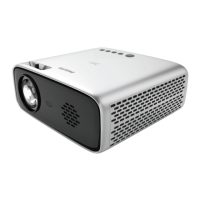
Philips NeoPix Easy+ - User Manual

Philips NeoPix Easy+
22 pages
Print Icon
To Next Page IconTo Next Page
Loading...
User Manual
Register your product and get support at
www.philips.com/support
Mini projector
NeoPix Easy+

Other manuals for Philips NeoPix Easy+

Questions and Answers

  • M
    Michael RobinsonSep 10, 2025
    Why can't my Philips Projector read the USB stick?
    • A
      anna75Sep 10, 2025
      If your Philips Projector cannot read the USB stick, it might be because the projector does not support the exFAT file system. Format the USB stick in FAT format, then try using it again.
  • S
    snowstephenSep 12, 2025
    Why is the sound or picture sometimes distorted when I view videos on my Philips Projector?
    • J
      Jill LeeSep 12, 2025
      If you are experiencing distorted sound or picture, or if the sound is not synchronized with the picture when viewing videos on your Philips Projector, it could be due to insufficient WiFi bandwidth. Disabling the connection to your home network temporarily may help.
  • C
    Cassie RussellSep 14, 2025
    Why is there no sound from the external connected device on my Philips Projector?
    • S
      Savannah ClineSep 14, 2025
      If you're not getting any sound from the external device connected to your Philips Projector, check the cables connected to the external device. Ensure that the sound is activated on the external device and that you are using the original cables from the device manufacturer, as only these may function correctly.
  • S
    Sarah ThomasSep 16, 2025
    Why is the temperature of the Philips NeoPix Easy+ Projector’s surface warm?
    • A
      Allison SanfordSep 16, 2025
      It is normal for the surface of your Philips Projector to feel warm during operation, as the projector is designed to generate moderate heat.

Summary

1 General safety information

Repairs

Instructs users not to repair the product themselves and to use authorized service centers.

2 Overview

Power supply

Remote control

Access home menu

3 Initial operation

Placing projector

Guides on how to position the projector for different projection scenarios.

Connecting power supply

Preparing the remote control

Power on and setup

4 Connect to playback devices

Connecting to devices through HDMI

Guides on connecting devices like Blu-ray players or gaming consoles via HDMI.

Connecting to a computer through VGA

Explains how to connect a computer using a VGA cable and audio connection.

5 Wireless projection with Android devices

6 Wireless projection with iOS devices

7 Connect to wireless speaker

8 Media playback

Movie playback

Details how to play movie files from USB or Micro SD cards.

Music playback

Explains how to play music files from USB or Micro SD cards.

9 Change settings

10 Service

Update software

Explains how to update the projector's software via Internet or USB.

Troubleshooting

Provides initial steps for troubleshooting common projector issues.

Philips NeoPix Easy+ Specifications

General IconGeneral
Brightness2600 lumens
Contrast Ratio3000:1
Built-in SpeakerYes (3W)
Keystone CorrectionManual
TechnologyLCD
Light SourceLED
LED Lifetime30, 000 hours
Throw Ratio1.4:1
Aspect Ratio16:9
Focus AdjustmentManual
Integrated Media PlayerYes
Wireless Screen MirroringNo
Power SupplyAC 100-240V, 50/60Hz
ConnectivityHDMI, USB
Weight860g
Resolution800 x 480 pixels
Dimensions207 x 150 x 84 mm

Related product manuals