EN
12
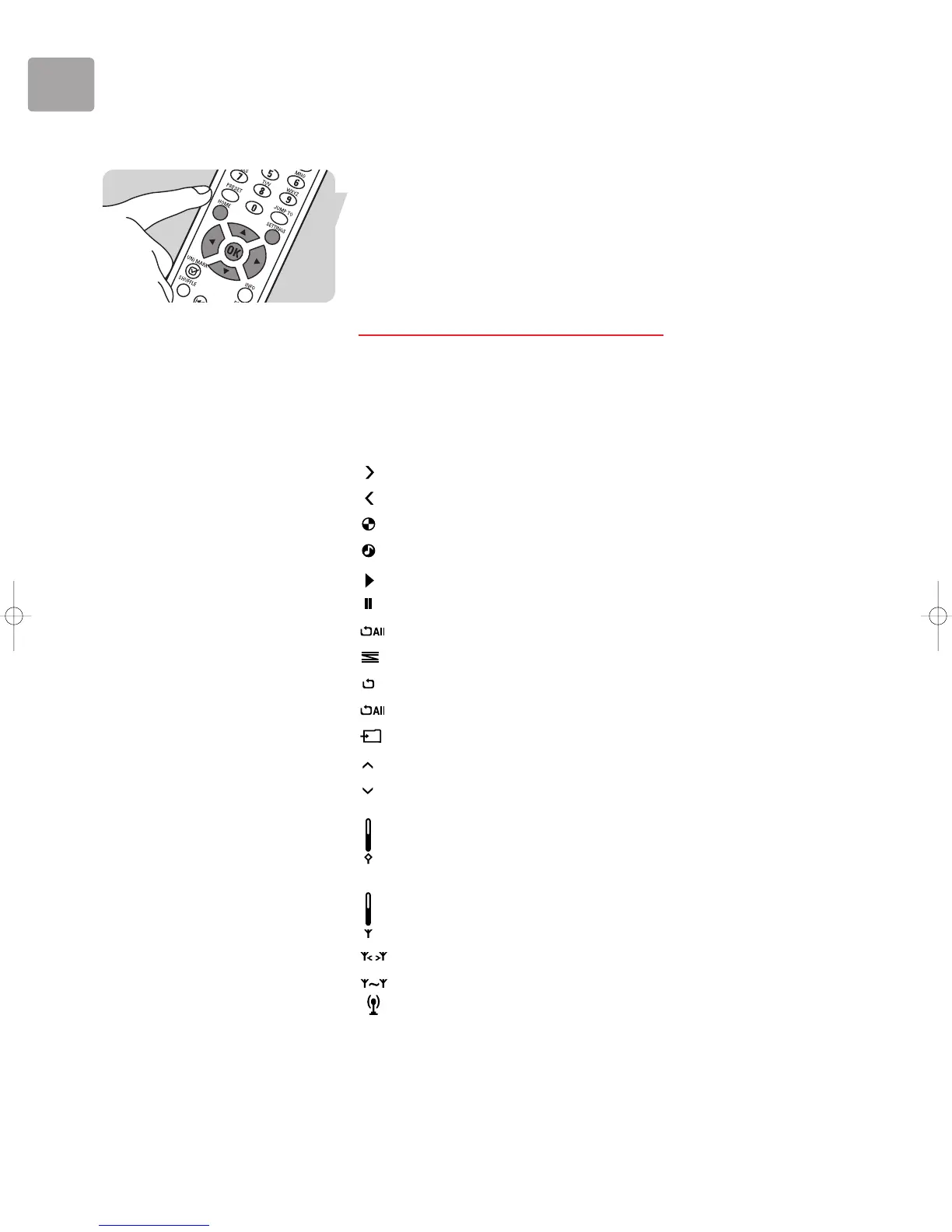
Navigating in the LCD screen menus
Press 2 to select a menu item (move right)
Press 3 to move up the menu
Press 4 to move down the menu
Press 1 to cancel a menu item (move left)
Press HOME (1) to activate the Philips SLA5520 menu
Press SETTINGS (X) to go to the Configuration menu
Press
PLAY LIST (17) to go to the Dynamic Playlist
Wireless Music Adapter LCD Screen Icons
The following table describes the icons that may be displayed on the Wireless Music
Adapter LCD screen.
Description
Move down the menu hierarchy.
Move up the menu hierarchy.
Processing (please wait).
Item may be played.
Now playing.
Now paused.
Now playing all items.
Shuffle mode enabled.
Repeat mode enabled.
Repeat All mode enabled.
Storing current item.
Lower case (edit mode).
Upper case (edit mode).
Buffer fill status.
Wireless signal strength.
Wireless network disconnected.
Peer-to-peer wireless network mode available.
Internet Radio available.


 To Next Page