15
English
EN
Wireless connection: Enter
encryption key manually
Tip
encryption key to your router ready.
1 Select [Yes]
up network connection (see 'First-time
setup').
2 Select > [Look for
network].
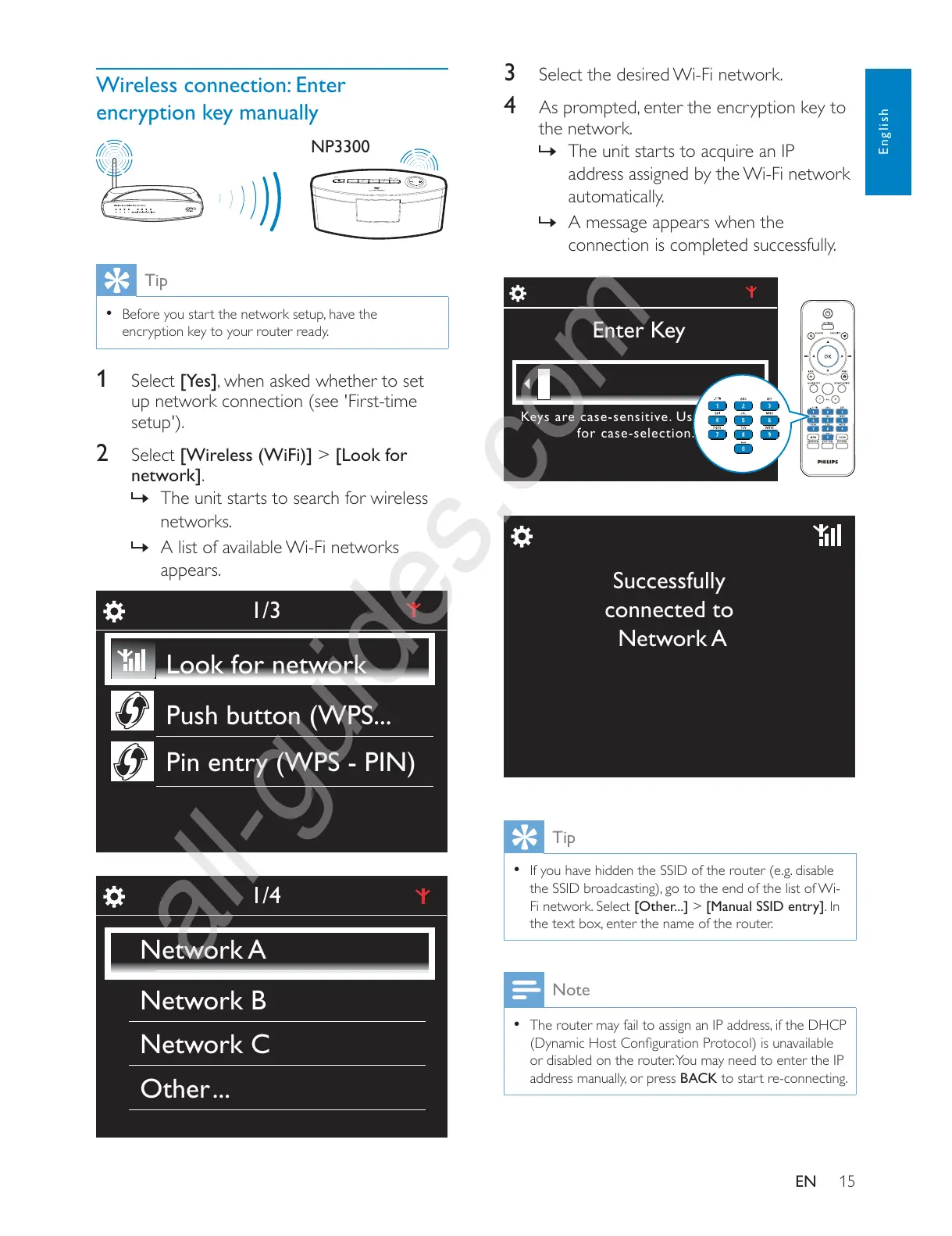
» The unit starts to search for wireless
networks.
» A list of available Wi-Fi networks
appears.
NP3300
1/3
Look for network
Push button (WPS...
Pin entry (WPS - PIN)
1/4
Network A
Network B
Network C
Other ...
3 Select the desired Wi-Fi network.
4
the network.
»
address assigned by the Wi-Fi network
automatically.
» A message appears when the
connection is completed successfully.
Tip
If you have hidden the SSID of the router (e.g. disable
Fi network. Select [Other...] > [Manual SSID entry]. In
Note
or disabled on the router. You may need to enter the IP
BACK to start re-connecting.
Enter Key
Keys are case-sensitive. Use key <a/A>
for case-selection.
Successfully
connected to
Network A











 To Next Page