17
English
EN
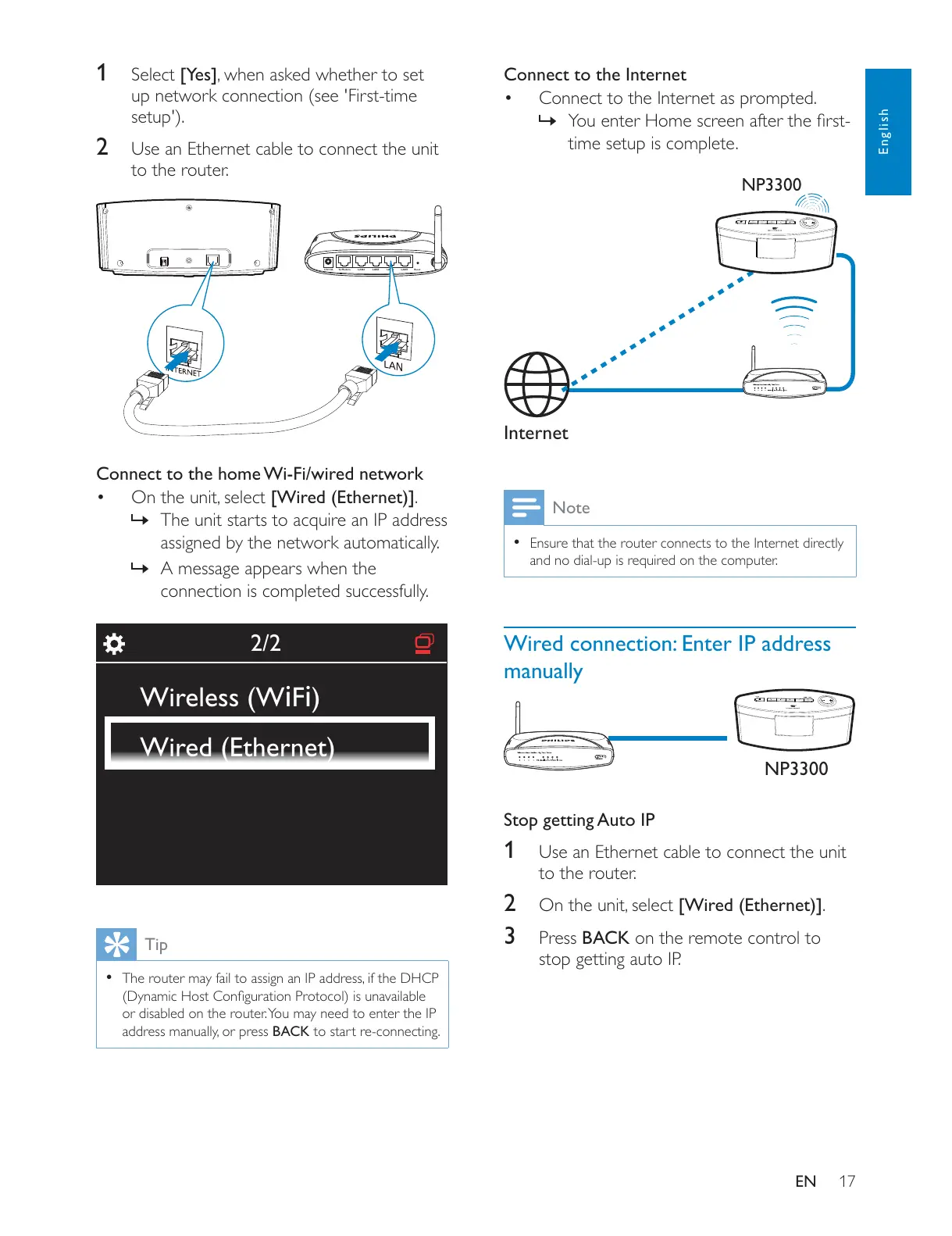
1 Select [Yes]
up network connection (see 'First-time
setup').
2 Use an Ethernet cable to connect the unit
to the router.
Connect to the home Wi-Fi/wired network
.
»
assigned by the network automatically.
» A message appears when the
connection is completed successfully.
Tip
or disabled on the router. You may need to enter the IP
BACK to start re-connecting.
LAN4To Modem12V=1A ResetLAN3 LAN2 LAN1
2/2
Wireless (WiFi)
Wired (Ethernet)
Connect to the Internet
Connect to the Internet as prompted.
»
time setup is complete.
Note
Ensure that the router connects to the Internet directly
Wired connection: Enter IP address
manually
Stop getting Auto IP
1 Use an Ethernet cable to connect the unit
to the router.
2 .
3 Press BACK on the remote control to
stop getting auto IP.
Internet
NP3300
NP3300











 To Next Page