Service Modes, Error Codes, and Fault Finding
EN 17TPM5.1E LA 5.
2011-Sep-02
• 3.7 HDMI video format input stream Per Supported
format. e.g. 576i 50 Hz, 576p 50 Hz, 720p 50 Hz,
1080i 50 Hz, 1080p 50 Hz
How to Exit CSM
Press “MENU” on the RC-transmitter.
5.1.2 Service Alignment Mode (SAM)
How to enter
To enter the factory mode, use the following method:
• Press the following key sequence on the remote control
transmitter: “062596” directly followed by the “INFO”
button.
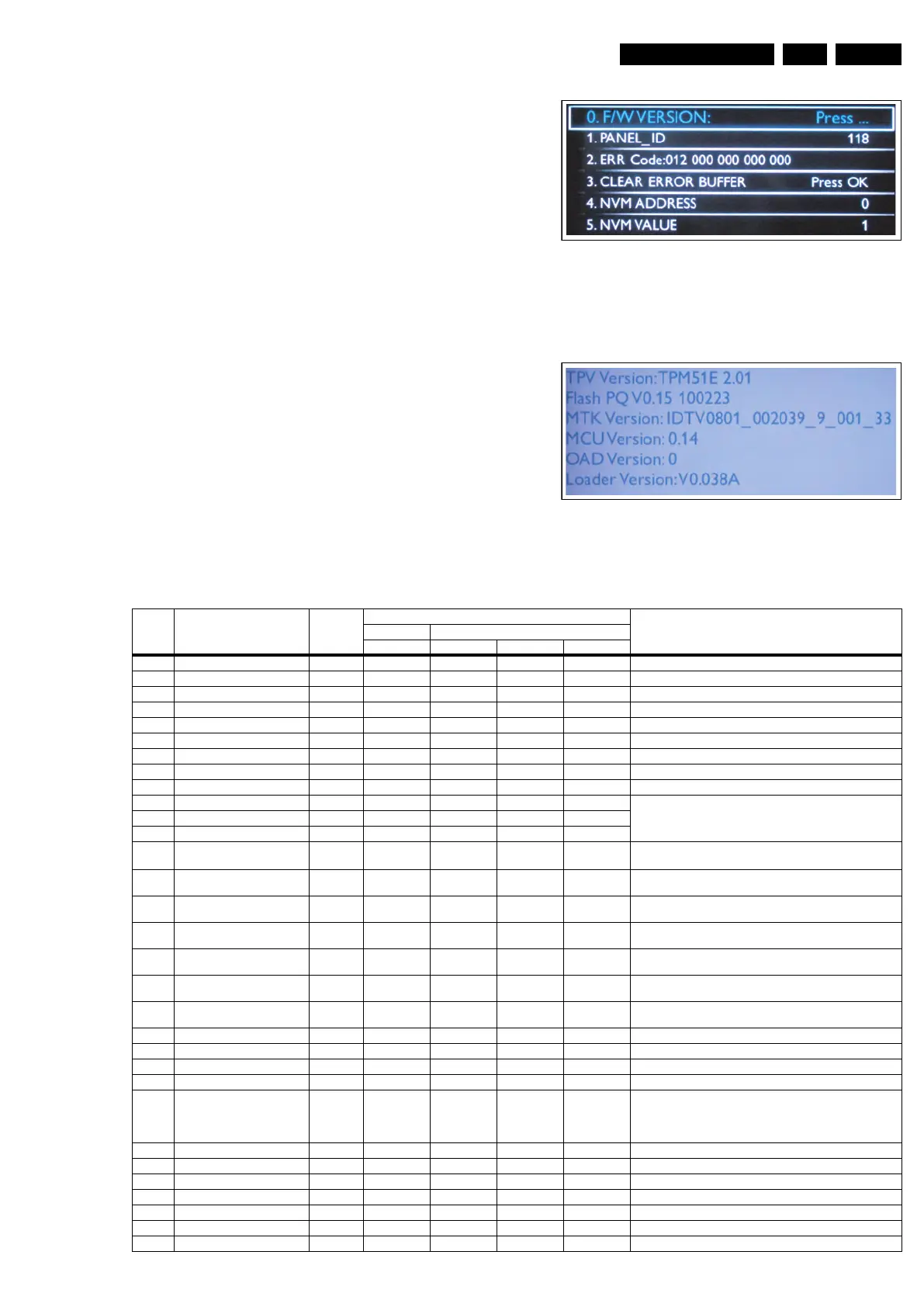
After entering the factory mode, the following screen is visible
on the top and right of the panel.
Figure 5-4 Example of SAM
Press “OK” to check the Version information of the software
when you select the “F/W Version”.
Figure 5-5 Software Version information in SAM
Table 5-1 Contents of SAM
18850_203_100202.eps
100506
1
8850_212_100506.eps
100512
Number Action Items Range Default Value Description
Smart Choice Dali
32" 32" 42" 47"
0 F/W Version
Press OK Press OK Press OK Press OK
Version description
1 Panel_ID 134 117 116 118 Display Code identify
2 Err Code:000 000 000 000 000 - - - - Show the latest 5 error code status
3 Clear Error Buffer Press OK Press OK Press OK Press OK Reset CSM ERROR Code to 0
4 NVM Address 0 0 0 0 The address in the NVM
5 NVM Value 1 1 1 1 The value in the NVM
6 NVM Store Press OK Press OK Press OK Press OK Store in the NVM
7 NVM Copy TV to USB Press OK Press OK Press OK Press OK Use this to copy the NVM data from the TV to the USB
8 NVM Read USB to TV Press OK Press OK Press OK Press OK Use this to copy the NVM data from the USB to the TV
9 CLR_Temp_R 0 - 255 128 127 127 128 Back-End Scaler R G B Gain NVM has for YPbPr four settings:
NORMAL, WARM, COOL, CUSTOMER. Other source use offset
with hardcoding.
10 CLR_Temp_G 0 - 255 127 121 123 128
11 CLR_Temp_B 0 - 255 109 121 119 116
12 Auto_Color Press OK Press OK Press OK Press OK
PC: any pattern has black and white YPbPr: SMPTE bar (colour
bar), any timing.
13 ADC_Gain_R 0 - 255 0 0 86 0 Analogue to Digital Converter Gain for Red, AutoColor affects this
and it value is depends on the input
14 ADC_Gain_G 0 - 255 0 0 86 0 Analogue to Digital Converter Gain for Green, AutoColor affects
this and it value is depends on the input
15 ADC_Gain_B 0 - 255 0 0 87 0 Analogue to Digital Converter Gain for Blue, AutoColor affects
this and it value is depends on the input
16 ADC_Offset_R 0 - 255 128 128 113 128
Analogue to Digital Converter Offset for Red, AutoColor affects
this and it value is depends on the input
17 ADC_Offset_G 0 - 255 128 128 109 128
Analogue to Digital Converter Offset for Green, AutoColor affects
this and it value is depends on the input
18 ADC_Offset_B 0 - 255 128 128 100 128
Analogue to Digital Converter Offset for Blue, AutoColor affects
this and it value is depends on the input
19 Virgin_Mode Off Off Off Off Reset the set to manufacturer's mode
20 Gamma_Table On On On On use gamma table or not
21 E-Fuse On On On On use efuse as default ADC value or not
22 Ageing Mode Off Off Off Off turn on ageing mode
23 Reset_PBS_PWD Press OK Press OK Press OK Press OK Clear EEP_OFFSET_BDS_PCODE_1_4,
EEP_OFFSET_BDS_PCODE_2_4,
EEP_OFFSET_BDS_PCODE_3_4,
EEP_OFFSET_BDS_PCODE_4_4
24 V-COM Press OK Press OK Press OK Press OK This starts V-COM
25 Video_PWM_Medium 0 - 255 128 128 128 128 PWM value at contrast 50%
26 Video_PWM_Minmum 0 - 255 240 200 200 200 Minimum PWM value
27 Video_PWM_Maximun 0 - 255 0 0 0 0 Maximum PWM value
28 Video_PWM_Ratio_Top 0 - 100 90 60 60 60 PWM value at Best Power
29 Video_PWM_Ratio_Bottom 0 - 100 5 20 20 20 PWM value at Best Picture
30 Video_PWM_Ratio_STD 0 - 100 95 78 78 78 PWM value at standard










 To Next Page