Automatic Channel Setup (cont’d) 13
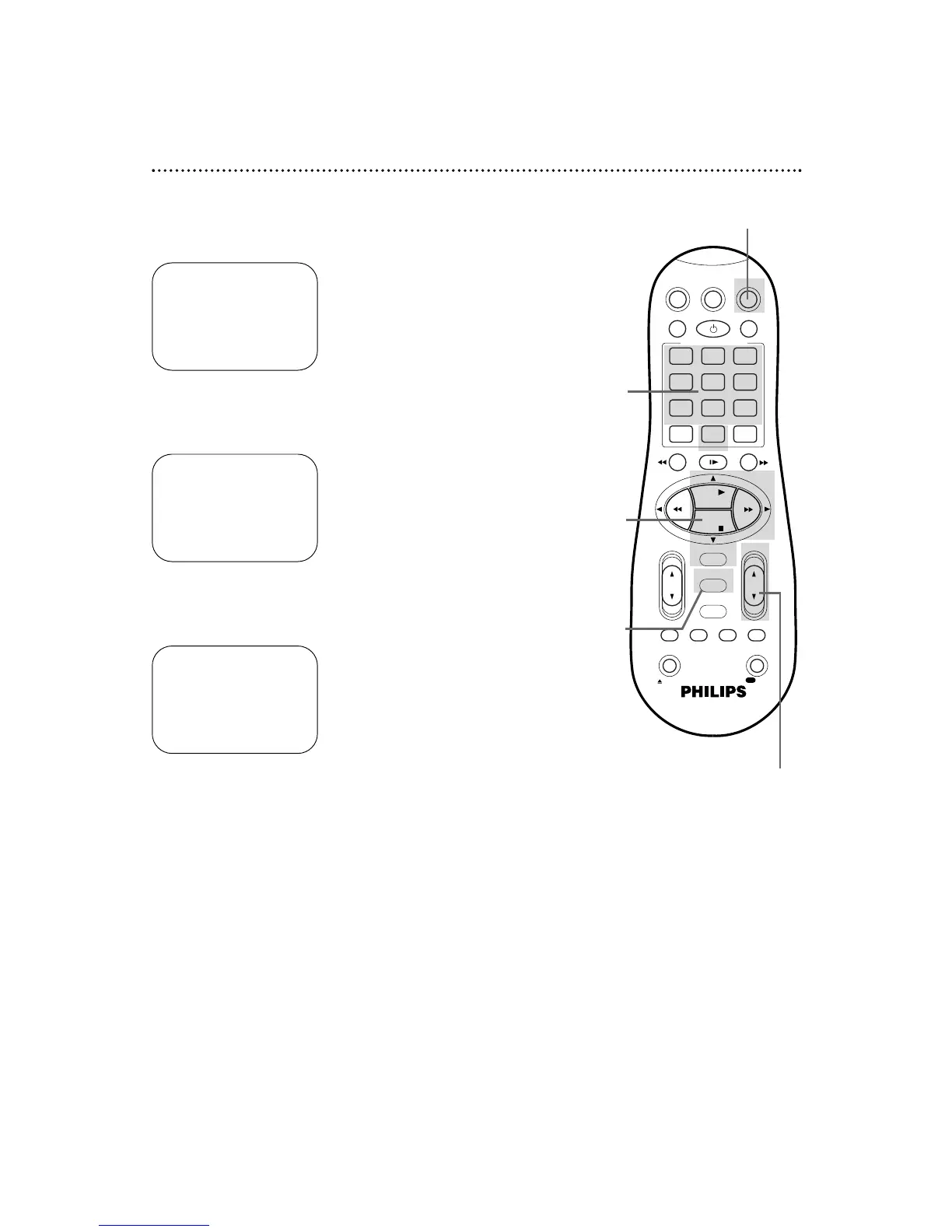
Adding/Deleting Channels
2
Press the PLAY 8 or STOP 9 button to select TUNER
SET UP, then press the OK/STATUS button.
3
Press the PLAY 8 or STOP 9 button to select
ADD/DELETE CH., then press the OK/STATUS button.
4
Use the Number buttons, the CH(annel) 8/9 button, or
the PLAY 8 or STOP 9 buttons to select the channel
you want to add or delete. An arrow will appear beside the
selected channel.
5
Press the FF - button so that DELETED or ADDED
appears beside the channel number.
6
Press the MENU button. Programming of the last channel you
added or deleted will appear on the screen.
1
Press the VCR button, then press the MENU button.
➔ CABLE/ANTENNA CABLE
AUTO CH. PROGRAMMING
ADD/DELETE CH.
SELECT: 89 CHANGE: -
END: MENU
124 DELETED
125 DELETED
01
– – – –
> DELETED
02 ADDED
03 ADDED
SELECT: 89 OR 0-9
CHANGE: - END: MENU
➔ VCR SET UP
TUNER SET UP
INITIAL SET UP
SELECT: 89 CONFIRM: OK
END: MENU
2-5
4
1,6
1
4


 To Next Page